Week 4 · Day 16 of 40 · Build AI

Voice and video AI

You ship: A browser voice assistant and a timestamped video analysis tool. Builds on: Day 6, Day 8.

By the end of the day you can

  • Implement speech-to-text and text-to-speech in TypeScript
  • Build a real-time voice AI assistant with interruption handling
  • Process and analyze video with AI vision models

Topics

Speech-to-Text (STT)

  • Whisper API (OpenAI): high accuracy, batch processing, supports 50+ languages
  • Deepgram: real-time streaming STT via WebSocket, custom vocabularies, speaker diarization
  • AssemblyAI: real-time streaming + async processing, summarization, entity detection
  • Choosing: Deepgram for real-time/streaming, Whisper for batch/accuracy, AssemblyAI for its wider feature set
  • Audio input: MediaRecorder API in browsers, audio format requirements, sample rates

Text-to-Speech (TTS)

  • ElevenLabs: high-quality voices, voice cloning, emotional range, streaming output
  • Cartesia: ultra-low latency (<100ms), designed for real-time conversations
  • PlayHT: good quality, competitive pricing, streaming
  • Choosing: Cartesia for real-time conversation (lowest latency), ElevenLabs for quality/cloning
  • Audio playback: Web Audio API, queuing audio chunks for smooth playback, handling gaps

Real-Time Voice Architecture

  • The pipeline: microphone → STT (streaming) → LLM → TTS (streaming) → speaker
  • WebSocket streaming: bidirectional audio streams between client and server
  • Voice Activity Detection (VAD): detecting when the user starts/stops speaking, silero-vad
  • Interruption handling: user speaks while AI is talking → stop TTS → flush buffer → listen → respond
  • Latency optimization: streaming at every stage, start TTS before LLM finishes, parallel processing
  • Turn-taking: managing who's "speaking" at any moment

Video Understanding

  • Frame extraction: ffmpeg for extracting frames at intervals, canvas-based extraction in browser
  • Scene analysis with a vision model (Claude or GPT): send frames as images, ask "what's happening in this scene?"
  • Video summarization: extract key frames → analyze each → synthesize into a timeline summary
  • Real-time video: periodic frame capture from webcam → analyze → respond (higher latency)
  • Multi-frame analysis: sending multiple frames to understand motion, changes, sequences

Video Generation (Overview)

  • Current providers: Runway, Luma, Kling - capabilities and limitations
  • API integration: text-to-video, image-to-video
  • Practical uses: product demos, content creation, prototyping visual ideas
  • State of the art: impressive but not yet reliable for production use in most cases

Build

Features shipped today

  • WorkBot: A voice intake line for support with interruption handling; recorded meetings and uploaded videos analysed and indexed into tickets

Part 1: Voice AI Assistant

Build a browser-based voice assistant:

  1. Microphone input via MediaRecorder
  2. Real-time STT via Deepgram WebSocket
  3. LLM processing via Anthropic SDK (streaming)
  4. TTS output via Cartesia or ElevenLabs (streaming)
  5. Interruption handling: user can cut in at any time
  6. Visual feedback: waveform visualization, speaking/listening indicators
  7. Falls back to text input/output

Part 2: Video Analysis Tool

Build a video analysis pipeline:

  1. Upload a video file
  2. Extract key frames (1 per second or scene-change detection)
  3. Send frames to a vision model for analysis
  4. Generate a timestamped summary: "0:00-0:15: Person enters room and sits at desk. 0:15-0:30: Opens laptop and begins typing..."
  5. Support follow-up questions about the video ("What was the person wearing?")

Walkthrough

Build a voice line that files the call, and read recordings frame by frame into tickets. Both stand on what is there: the intake workflow files the call, the request page holds the recording.

Part 1

The call as a state machine

A voice call is 4 states and 6 events. Model who is speaking as a pure reducer, testable without a microphone.

Study first

  • The pipeline the curriculum describes: microphone, speech-to-text, the model, text-to-speech, speaker. A production line streams at every stage and starts speaking before the model has finished; this build keeps replies short (300 characters at most) and speaks each whole.
  • Interruption and turn-taking: the caller may speak while the assistant does. The assistant must stop speaking and listen.

Build

  1. src/lib/voice-model.ts: Voice is { state, turns, interim } with states idle, listening, thinking, speaking; events start, stop, heard (text and whether it is final), reply, spoken.
  2. next(voice, event): a final transcript while listening appends a caller turn and moves to thinking; a reply appends a WorkBot turn and moves to speaking; spoken returns to listening.
  3. The interruption rule in one branch: heard while speaking moves to listening, with the words as the interim text. Everything heard while idle or thinking is ignored.
  4. Tests: a full turn, the interruption, and what is ignored.

Done when

  • pnpm test src/lib/voice-model passes 3 tests, and the interruption test ends in listening with interim set, from speaking.
Technical notes
  • The reducer holds no browser objects, so the component is the only place that touches the microphone, the recognizer and the synthesizer.
  • Ignoring words heard while thinking is a choice: the model is already answering what was said. A final transcript at that moment would otherwise start a second request in parallel.
  • interim is the caller's words so far, shown in italics; it is cleared when a final transcript arrives or the call stops.
Part 2

Ears and a voice behind 2 interfaces

The browser already has speech recognition and synthesis. Define a Listener and a Speaker of 2 methods each, so a hosted provider can replace either.

Study first

  • The Web Speech API: SpeechRecognition (prefixed webkit in Chrome) with continuous and interimResults, and speechSynthesis with SpeechSynthesisUtterance. Chrome ends a continuous recognition on its own after a while and fires end; restart it until the call stops.
  • Where the hosted services go: MediaRecorder captures the microphone as chunks; Deepgram takes them over a WebSocket and streams transcripts back, the Listener seat; Cartesia and ElevenLabs stream audio for the Speaker seat, with the Web Audio API queuing the chunks for playback.
  • Voice activity and interruption in a hosted line: a detector such as silero-vad, or the provider's endpointing, says when the caller starts and stops; on an interruption the queued audio is flushed. Here the recognizer's interim results are the activity signal and speechSynthesis.cancel() is the flush.
  • getUserMedia and an AnalyserNode: the microphone's samples, for a waveform.

Build

  1. src/components/voice-line.tsx: webSpeechListener() returns { start(on), stop() }; on gets the latest result's text and whether it is final, and recognition restarts on end until the call stops. webSpeechSpeaker() returns { speak(text), stop() }, resolving on the utterance's end or error.
  2. The component holds the reducer. Entering thinking posts the turns to /api/voice; entering speaking speaks the last line; leaving speaking early, because the caller cut in, runs the effect's cleanup, which cancels the speech.
  3. src/lib/voice.ts: voiceTurn(turns, model) asks the small model for the next line and whether it knows enough (say, done). When done, the caller's words go through Day 12's intake, and the line ends with the team and title the request was filed under.
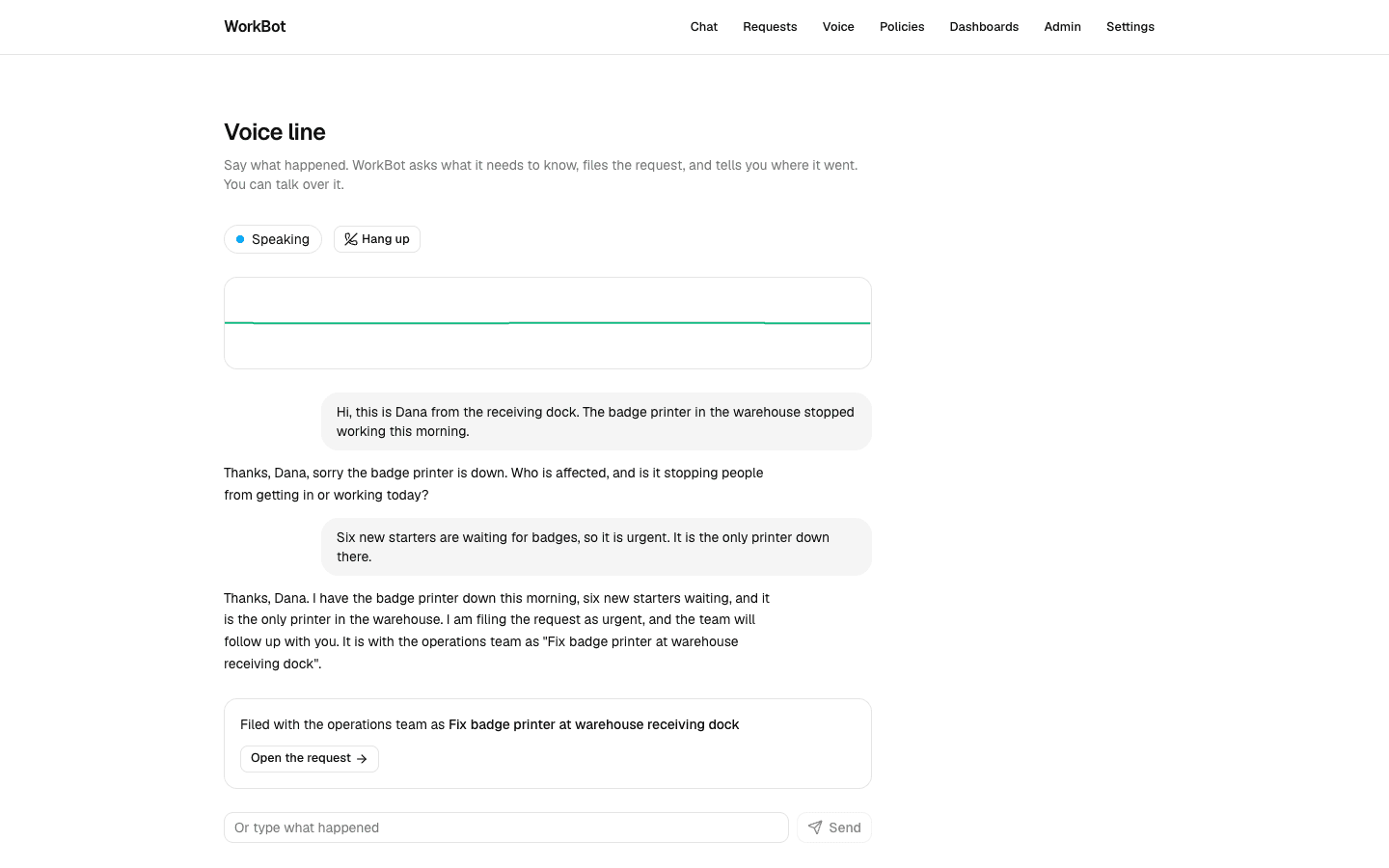
  4. POST /api/voice with { turns }; a status pill, a waveform, the transcript as bubbles, a card with a link to the filed request, and a text field that feeds the same reducer when there are no speech services.
  5. Tests: voiceTurn with a scripted model (a question, then a filing), the route, a render of the component, and a live test (pnpm test:live src/lib/voice.live.test.ts, with the Anthropic key in .env.local) that files a caller's report on the small model, chatModel("small"), Haiku here.

Done when

  • At /voice in Chrome, Start the call shows Listening and a moving waveform; say what happened and WorkBot asks a question; cut in while it speaks and it stops; after at most 2 questions the card shows the filed request and the call ends.
  • pnpm test:live src/lib/voice.live.test.ts passes: the caller's report is filed as an open request with priority high and a title that names the printer.
  • In another browser, or with the microphone refused, the same conversation works typed.
The voice line mid-call
A call on the small model: the caller's turns, WorkBot's questions, and the request filed with its team at the end.
Technical notes
  • The line ends itself after the filing line is spoken: another turn would run intake again and file a second request.
  • speechSynthesis.cancel() fires error on the cut-off utterance, which resolves speak; the effect's current flag stops that resolution from dispatching spoken into a state that has moved on.
  • Chrome does not always fire the utterance's end event: in 2 of 4 headless runs here the line stayed in Speaking. Day 17 begins by bounding the wait with a timer sized to the text.
  • The route's reply schema caps say at 300 characters, and the prompt forbids lists and markdown and allows at most 2 questions in a call.
  • Headless Chrome driven by Playwright on this machine has both services: synthesis fires start and end with no audible voice, and recognition starts without error, so the page runs for screenshots. What it could not do was hear a WAV file played as a fake microphone: the transcripts came back garbled.

Part 3

A recording, frame by frame

A vision model reads frames, not videos. ffmpeg turns a recording into 1 frame every 2 seconds, the model describes a batch of frames per call, and a second call writes the timeline.

Study first

  • ffmpeg's fps filter and image2pipe: frames as PNGs on standard output, no files on disk. Every PNG starts with the same 8-byte signature, so a stream of whole PNGs is cut into frames at each signature.
  • Several images in one model call: the Vercel AI SDK's file parts, each labelled by the text part before it.
  • The other ways to frames: select='gt(scene,0.3)' in place of fps for scene changes, --every 1 for 1 frame per second, a canvas drawImage from a <video> or a webcam in the browser. The pipeline after the frames is the same. Video generation (Runway, Luma, Kling) is an overview topic; nothing in WorkBot generates video.

Build

  1. src/lib/video.ts: extractFrames(file, { every, limit }) spawns ffmpeg with fps and a scale to at most 1024 pixels wide, and cuts its output at each PNG signature into { at, png }; duration(file) asks ffprobe.
  2. describeFrames(frames, model, { batch }): 8 frames per call, each after a text part with its time, returning { at, text } per frame through Output.object.
  3. summarize(scenes, model): one line per span of time, consecutive frames that show the same thing merged. askRecording(scenes, question, model): an answer from the frame notes, with the time.
  4. pnpm video <file> [--every n] [--ask "<question>"].
  5. Tests: frames out of a 5-second test pattern ffmpeg generates in the test; a 1600-pixel-wide recording scaled to 1024; descriptions batched 3 at a time in the test (8 in production), with 3 file parts in the first call; the timeline and an answer from scripted text. A live test (pnpm test:live src/lib/video.live.test.ts; needs Chrome, ffmpeg and the key) draws 3 labelled scenes with Chrome, stitches them with ffmpeg, and checks the small model reads each label, writes a timeline from 0:00, and answers which scene said what.

Done when

  • pnpm video walk.mp4 --ask "What did the second scene say?" prints the frame count, a timeline with time spans, and an answer naming the scene and its time.
Technical notes
  • fps=1/2 gives the first frame at 0 seconds and one every 2 seconds after; -frames:v caps a long recording at 90 frames, which is 12 model calls at 8 per batch. The scale bounds what a frame costs in memory and in the request, whatever the recording's resolution; a test checks a 1600-pixel-wide recording comes out at 1024.
  • The frame notes, not the frames, answer questions: 1 text call instead of another pass over the images.
  • This ffmpeg build has no drawtext, so the live test draws its labels in Chrome and uses ffmpeg only to stitch; -framerate 1/3 shows each image for 3 seconds.
  • There is no transcript: the audio track needs a hosted speech-to-text provider, which this build does not have. The recording's words are out of scope until one is configured.

Part 4

Filed on the ticket

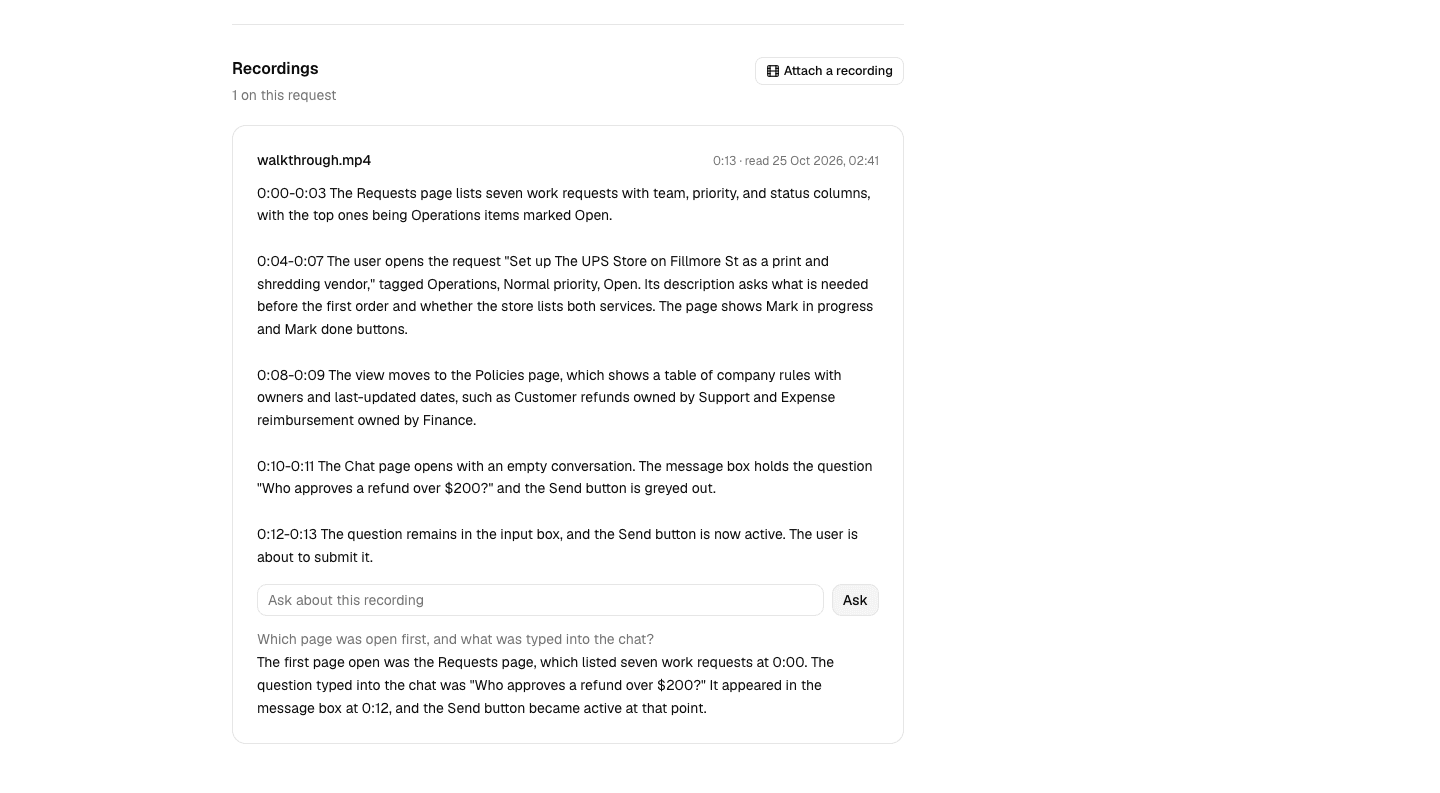
A recording attached to a request becomes a timeline on its page, with a question box; the frame notes stay in the database for the questions.

Study first

  • Uploads through a Server Action: the file arrives in FormData; the default body limit is 1 MB and serverActions.bodySizeLimit raises it.
  • useActionState for a form whose result is shown in place, and useFormStatus for a button that shows the submission is running; it reports on the form it is rendered inside.

Build

  1. A recordings table: request, name, seconds, scenes as jsonb, summary, time; src/lib/recordings.ts with saveRecording, listRecordings, getRecording.
  2. attachRecording(id, formData) in the request actions: the file to a temporary directory, frames, descriptions, duration, the timeline, the row, a recording_attached event with the request id and the seconds, refresh(); the directory removed in a finally.
  3. askAboutRecording(recordingId, state, formData): the question answered from the stored scenes, returned as { question, answer } for useActionState.
  4. src/components/pending-button.tsx, shared by Day 15's Investigate button and the upload: a spinner and a busy label while the form runs. recording-upload.tsx is a hidden file input and that button; choosing a file submits the form. recording-question.tsx is the question box.
  5. The request page: a Recordings section listing each recording with its length, when it was read, its timeline and the question box. bodySizeLimit: "50mb" in next.config.ts.

Done when

  • On a request's page, Attach a recording with a short video shows "Reading the recording…" until the timeline appears, with the length in m:ss; a question under it gets an answer with a time.
A recording read into a ticket
A screen recording of WorkBot attached to a request: the timeline the small model wrote from its frames, and a question answered from them.
Technical notes
  • The scenes column is bound as the array itself, as the reports table's findings are: postgres.js and PGlite both serialize a value bound to a jsonb column, and a string would be encoded twice.
  • A recording of 2 minutes is 60 frames and 8 model calls on the small model; the action waits for all of them, under the page's maxDuration of 300 seconds.
  • ffmpeg reads the file from the temporary path, which is then removed; only the frame notes and the timeline are stored.
  • requestSubmit() from the file input's change event submits the form through its action, so the pending state and the refresh work as for any form.

Resources