Week 3 · Day 15 of 40 · Build AI

The research analyst: orchestration, retrieval and the browser

You ship: The AI research analyst, with error recovery, logging, cost tracking and tests, filing its report on the ticket. Builds on: Day 12, Day 13, Day 14.

What you'll build today

Week 3 has given you each piece on its own. Day 11 built an agent loop and an investigation agent, and Day 12 an orchestrator that hands work to other agents. Day 13 added agentic retrieval over the knowledge base, and Day 14 a browser agent. The investigation agent still does everything itself, though, and its report exists only in the terminal.

Today you put the pieces together into a research analyst. The analyst delegates to 2 specialists, one that explores the knowledge base and one that reads the web, and all 3 agents share one list of findings. You learn how to treat an agent as a tool and how to recover when a browser run fails. You also learn to log and price each agent separately, so that anyone can read a run and split its bill.

By the end of the day, anyone looking at a request in WorkBot can press Investigate and get a sourced report on the ticket, with its findings and its cost.

By the end of the day you can

  • Combine agents, agentic retrieval-augmented generation (RAG) and the browser into one system
  • Build a production-quality multi-agent application with proper error handling and logging

Build

Features shipped today

  • WorkBot: The investigation agent over the knowledge base plus the web, with citations and tests, writing a report into the ticket

Build an agent system that combines everything from Week 3:

Core capabilities

  1. Multi-agent orchestration (Day 12): an orchestrator agent delegates to specialists
  2. Agentic retrieval (Day 13): one specialist agent searches and explores a document corpus
  3. Browser automation (Day 14): another specialist agent browses websites and extracts information
  4. Tool use: each specialist has its own tools, plus tools they share

Example scenario: Build an "AI research analyst". Given a question, it:

  • Searches internal documents with agentic RAG for what the company already knows
  • Browses the web for current information
  • Cross-references the findings
  • Produces a structured report with sources from both internal and external data

Requirements

  • Multi-agent orchestration with proper handoffs and shared context
  • Error recovery: when the browser agent fails, retry, then fall back to the page's text or a web search API
  • Structured logging: log every agent decision, tool call and result with a timestamp
  • Cost tracking: track token usage per agent, and the total cost per query
  • Tests: at least 3 test cases that verify end-to-end behavior

Walkthrough

Part 1

Specialists as tools

The analyst is the orchestrator, and it delegates by calling each specialist as a tool. A specialist is a tool whose run is its own agent loop, so the analyst calls it like any other tool. The 3 agents share one context, a list of findings, which all 3 write to and which each specialist is handed when it starts.

Study first

  • Look again at the agent loop from Day 11, runAgent. It takes a system prompt, a tool list, a done tool that ends the task, and limits, and a specialist reuses it with its own prompt and tools.
  • Note that each agent keeps its own messages, and only the findings list is shared.

Build

  1. In src/lib/investigate.ts, define 3 agents, analyst, knowledge and web, each with its own system prompt. The analyst asks the knowledge base first, and it asks the web only for what the documents do not cover or when the question names a site. It ends with write_report.
  2. Make save_finding the shared tool, which appends a finding's text and source to the one list.
  3. Write a specialist(agent, name, description, system, tools) helper that returns a tool. Its run calls runAgent on the small model with the specialist's tools plus save_finding, and the task is the question plus "Known so far" with the findings to date. The tool returns the specialist's answer in text.
  4. Give each specialist limits of 8 steps, $0.20 and 90 seconds. The analyst keeps the loop's defaults of 15 steps and $0.50, with 300 seconds.
  5. Build ask_knowledge_base with the Day 13 tools (find, ls, cat, grep), and ask_web with read_url, browse_site and, when a search key is set, web_search.
  6. Write investigate(question, { analyst, specialist }, { on, limits, browser }), where the second argument holds the 2 models. It returns the report, the findings, the log, the cost by agent and the total.

Done when

  • A test runs a scripted analyst that calls ask_knowledge_base and then write_report, and a scripted specialist that calls find, saves a finding and answers. The report cites the finding's source.
  • The log is in this order: the analyst's thought, the specialist's 2 calls and its answer, the specialist's finish, the analyst's 2 calls, and the analyst's finish.
Technical notes
  • A specialist that stops on a limit returns a sentence that says so, and the findings it saved stay in the list.
  • The analyst and the specialists run on different models, chatModel() and chatModel("small"), because the large model decides and writes while the small one reads. In the terminal, both models come from the session's provider.
  • A specialist runs inside the analyst's tool call, so the analyst's time limit bounds it too. A specialist that outlives the deadline fails as a tool, and the analyst continues with the tool error as the result.
  • Day 12's orchestrator on the Claude Agent SDK has the same shape, but the SDK runs its loops. On Day 15 the loops are your repository's own, so a test can script every agent.
Part 2

The web specialist's fallback

A browser run can fail because Chrome does not start, a page hangs or the agent gives up, and the analyst should still get an answer. So the specialist's browse_site tool tries once more and then reads the page as text. With a search key, the specialist can also search for another page, so the run goes on.

Study first

  • Look again at the browser agent from Day 14, browse(goal, start, model, browser), and its outcomes done, gave_up and steps.
  • Retry only what can succeed on a second try, such as a browser that failed to start or a page that timed out. A page the agent cannot work will not improve with a retry, because it needs another route to the content.

Build

  1. Write browse_site({ url, task }), which opens a browser at the address, runs browse with at most 8 steps, and closes the browser in a finally.
  2. Retry once on a thrown error. After that, return a failed outcome with the message instead of throwing.
  3. Make browse report each model call's tokens through an on.spend event, and return the total. The tool prices the tokens with costOf, which the next part adds to providers.ts. It adds them to the web agent's cost call by call, so an attempt that fails midway is on the bill too.
  4. On done, return the result. On any other outcome, return the outcome and the page's text through readPage, and name the fallback in the tool result so the specialist knows what it is reading.
  5. Write 2 tests with a fake browser and a scripted model. In the first, the agent gives up and the page's text comes back in its place. In the second, a browser that throws midway is launched again, and both attempts are on the bill.

Done when

  • In the first test, the tool result starts with "The browser could not finish (gave_up: …). The page's text instead:", and the fake browser saw exactly a goto and a close.
  • In the second test, the browser factory was called twice and the result is the agent's. The web agent's cost is 4 model calls, the specialist's 2 and 1 per browser attempt.
Technical notes
  • In once().catch(once).catch(failed), the second catch turns an error on the retry into a value, so one if decides between the result and the fallback.
  • The fallback reads the page through the same readPage as the assistant's tools, so it reads public addresses only and caps the text at 6,000 characters.
  • With a search key, the specialist also has web_search, and its prompt says to use it to find another page when one could not be read. This is the curriculum's fallback to a search API, one step after the text fallback.
  • The analyst's own limits still apply. A slow browser run counts against the 300 seconds, and the tool-call deadline from Day 11 fails the call.

Part 3

Logging and cost per agent

With 3 agents in one run, you need to see which agent did what and what each one cost. So you log each thought, tool call and result with its agent and time, and you price each agent's spend on its own. The terminal prints the log as it happens, and the tests assert on it.

Study first

  • Learn what makes logging structured. An entry is a typed record, not a formatted string, and you format it once, at the edge, so the same entries serve the terminal, a test and a database.
  • Learn how cost per agent adds up. Each runAgent returns dollars from the model's published price, which you sum by agent and then in all.

Build

  1. Define Entry as { at, agent } plus one of 3 kinds. A thought has its text, a tool has the name, input, result and failed, and a done has the outcome, the steps and the dollars.
  2. Write events(agent), which adapts the agent loop's callbacks to entries, and record, which appends an entry to the log and calls on.log.
  3. Build cost: Record<Agent, number> from each run's dollars, and add costOf(modelId, usage) to providers.ts to price the browser agent's tokens.
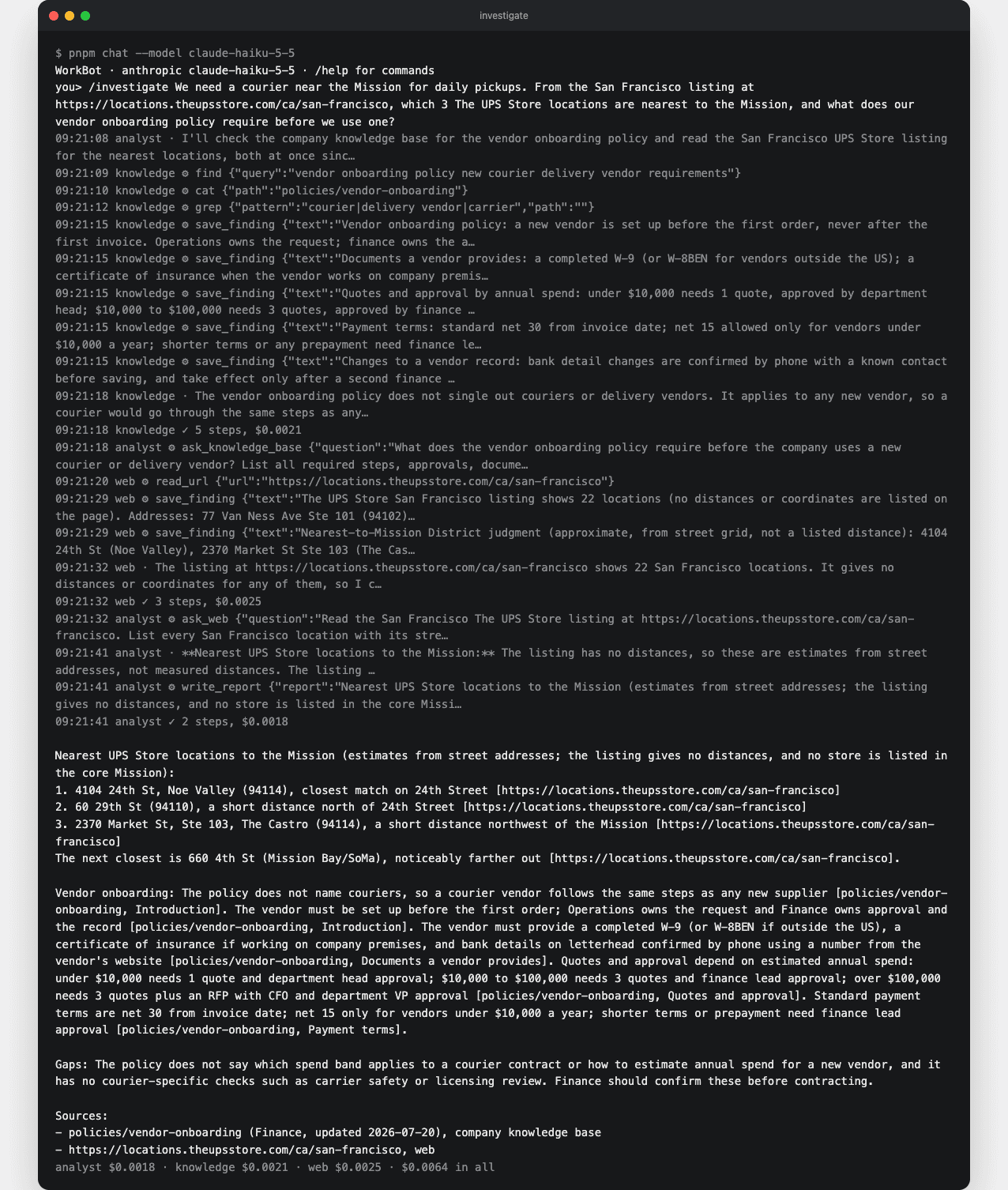
  4. Make /investigate in pnpm chat print each entry on one line. A line shows the clock and the agent, then · for a thought, ⚙ for a tool call or ✓ for a finish. The output ends with the cost by agent and in all.
  5. Make pnpm compare:retrieval, from Day 13, run the analyst for the agentic column and print dollars for both columns.

Done when

  • /investigate on a question that needs the web shows lines from all 3 agents, with timestamps. Each agent gets a ✓ line with its steps and dollars, and a final line shows the 3 costs and the total.
  • pnpm test runs 4 end-to-end tests of the analyst with scripted models. They cover delegation with sources, the text fallback, the retry with its bill, and a run cut off by its limits.
  • pnpm compare:retrieval ends each row with 2 dollar figures.
An investigation in the terminal
In a real run on the small model, each line from the analyst, the knowledge specialist and the web specialist carries its time and agent. The cost is split at the end.
Technical notes
  • The log is in the order things happened, which is not the order the analyst sees them. The specialist's entries come before the analyst's tool entry for the call that ran it, because the loop records a call only after its result is in.
  • A specialist's final text is logged as a thought, the loop's name for the model's words between tool calls, and its done entry follows.
  • Dollars come from the price table in providers.ts. A model with no published price costs 0 in the log, as in the session's /cost.

Part 4

File the report on the ticket

A report in the terminal helps only the person who ran it. WorkBot saves the report on the request instead, so whoever picks up the ticket finds it there.

Study first

  • Learn how a Server Action can run for minutes. maxDuration on the page sets the time limit for the actions it uses, and a pending state on the button tells the person the run is on.
  • Read React's page on useFormStatus, which lets a Client Component inside a form read whether its submission is pending.

Build

  1. Add a reports table with id, request_id, report, findings as jsonb, dollars as double precision and created_at. request_id is a foreign key, deleted with the request, and the table is one idempotent statement appended to the schema.
  2. Write src/lib/reports.ts with saveReport and latestReport, and test that the latest report is the one returned, with its findings parsed.
  3. Write investigateRequest(id) in src/app/requests/actions.ts. It uses the request's title and body as the question, runs investigate with chatModel() and chatModel("small"), and calls saveReport. Then it sends an analytics event with the dollars and calls refresh(), from Day 4.
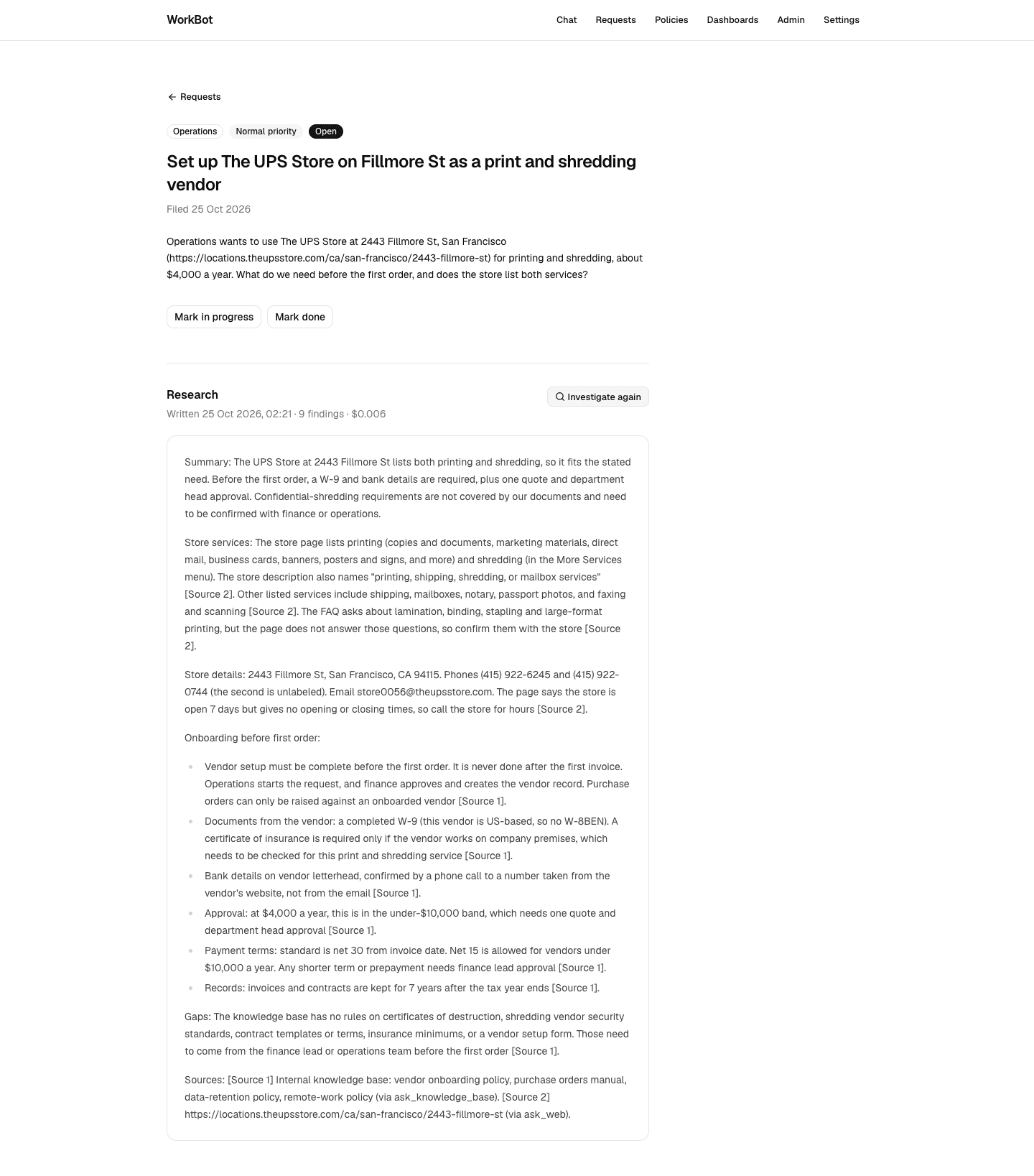
  4. On the request page, add export const maxDuration = 300 and a Research section. The section shows the latest report's date, findings count and cost, the report as Markdown, and an Investigate button.
  5. Write src/components/investigate-button.tsx, a Client Component on useFormStatus that disables itself and shows a spinner and "Investigating…" while the action runs. Put a render test beside it.

Done when

  • On a request's page, Investigate disables the button until the report appears, with its sources, the findings count and the cost.
  • Investigate again replaces it with a new report.
A report filed on a request
The analyst's report on a request was written by a real run. The sources are in brackets, and the heading shows the findings count and the cost.
Technical notes
  • latestReport awaits io() before its query, like the other readers on the page since Day 3. The report is then never captured in the static shell, the HTML prerendered at build.
  • The findings column is jsonb. Both database drivers from Day 5, postgres.js and PGlite, return it parsed, so the page reads report.findings.length without a parse step.
  • A server action runs on the machine that serves the page, so the browser agent needs Chrome there. Without it, browse_site fails twice and the page's text stands in, and the report still gets written.
  • The server action's cost goes to the analytics event, not to a person, because request_investigated carries the request id and the dollars.

Resources

  • All resources from Days 11-14