Week 2 · Day 6 of 40 · Build AI

Anatomy of an AI app

You ship: WorkBot's conversation core: a streaming CLI chatbot on either provider, with model switching and cost tracking.

By the end of the day you can

  • Use the Anthropic TypeScript SDK to make API calls with full control over parameters
  • Understand and tune all the knobs: model, temperature, top-p, max_tokens, stop sequences
  • Implement streaming and non-streaming responses
  • Apply core prompt engineering techniques

Topics

Anthropic TypeScript SDK

  • Installation: pnpm add @anthropic-ai/sdk
  • Authentication: API keys, environment variables, key rotation
  • Message API: creating messages, conversation structure (system, user, assistant roles)
  • Model selection: Claude Opus (complex reasoning), Sonnet (balanced), Haiku (fast/cheap) - when to use each
  • Message anatomy: role, content blocks (text, image, tool_use, tool_result)

The Same Call on OpenAI

  • OpenAI TypeScript SDK: pnpm add openai; the Responses API (client.responses.create) is the current interface, Chat Completions the older one
  • Message anatomy: instructions for the system prompt, input as text or a list of items, output items for text and tool calls
  • Model tiers: large, standard and small models on both providers; choose by task
  • The knobs by other names: temperature, top_p, max_output_tokens
  • Streaming: stream: true, with response.output_text.delta events; the same SSE underneath
  • Errors: 429 and overloaded responses handled the same way on both

The Knobs

  • temperature (0-1): controls randomness. 0 = deterministic, 1 = creative. Use 0 for extraction/classification, 0.7+ for creative tasks
  • top_p (0-1): nucleus sampling. Alternative to temperature. Generally use one or the other
  • max_tokens: maximum response length. Set from the expected output
  • stop_sequences: strings that halt generation. Useful for structured output, preventing runaway responses
  • system prompt: persistent instructions that shape all responses. Architecture of a good system prompt
  • Model-specific behaviors: how the same prompt performs differently across Opus/Sonnet/Haiku

Streaming vs Non-Streaming

  • Non-streaming: client.messages.create() - wait for full response. Simple, good for background processing
  • Streaming: client.messages.stream() - get tokens as they're generated. Essential for chat UIs
  • SSE (Server-Sent Events): the protocol behind streaming
  • ReadableStream: browser/Node.js stream API for processing chunks
  • Handling stream events: message_start, content_block_delta, message_stop
  • When to use each: streaming for user-facing, non-streaming for batch/background

Prompt Engineering

  • System prompts: setting behavior, persona, constraints, output format
  • Few-shot prompting: providing examples of desired input/output pairs
  • Chain-of-thought: asking the model to reason step by step before answering
  • Structured output: getting JSON, XML, or other formats reliably
  • Prompt patterns: role assignment, task decomposition, constraint specification

Error Handling and Cost

  • Rate limits (429): exponential backoff, retry strategies
  • Overloaded (529): server-side throttling, queue and retry
  • Token counting: estimating input/output tokens, using usage field in response
  • Cost calculation: tokens x price per model. Building cost awareness from day one

Build

Features shipped today

  • WorkBot: The conversation core: a CLI chatbot with WorkBot's system prompt (an operations persona, safety rules, source policy), provider and model flags, and a cost command; kept as the admin assistant

Build a CLI chatbot with the following features:

  • Configurable provider (Anthropic or OpenAI) and model via command-line flags
  • Configurable temperature via flag
  • Streaming output to terminal with proper chunk handling
  • Conversation history maintained across turns
  • /cost command that shows total tokens used and estimated cost for the session
  • /model command to switch provider or model mid-conversation
  • /system command to update the system prompt
  • Graceful error handling with retries on rate limits

Walkthrough

Build WorkBot's conversation loop as a terminal chatbot: one provider interface over the Anthropic and OpenAI SDKs, WorkBot's system prompt, streaming replies, a conversation that survives a model switch, and a cost command.

Part 1

One interface over two SDKs

The SDKs sit behind one type from the first call.

Study first

  • Anthropic's Messages API: system, messages, max_tokens, streaming with client.messages.stream and the final message's usage.
  • OpenAI's Responses API: instructions, input, max_output_tokens, streaming events, and usage on the completed response.
  • The sampling controls: reasoning effort on models that reason (output_config.effort for Claude, reasoning.effort for OpenAI) and temperature, 0 to 1, on models that still accept it. The current Claude models reject temperature.

Build

  1. ANTHROPIC_API_KEY in .env.local, from the Anthropic console, and OPENAI_API_KEY if you have one.
  2. src/lib/providers.ts: a Provider with a name, a list of Models (id and published price per million tokens, first one the default) and stream(completion, onText), which resolves with the tokens used. One factory per SDK, with maxRetries: 3 on the client.
  3. Tests that feed each SDK an event stream written from the SDK's event types, through a fake fetch: text deltas arrive in order, usage comes from the final event, and the request body carries the right fields.

Done when

  • pnpm test passes for both providers, and a Haiku call through anthropic().stream prints a reply.
Technical notes
  • Prices live on the model list and nowhere else; a model without a published price has none, and the cost report names it instead of guessing.
  • Both SDKs retry 429 and 5xx answers with backoff, Anthropic's 529 overloaded among them; after the third retry the error surfaces.
  • The OpenAI stream has 3 terminal events: response.completed, response.incomplete (the reply was cut; usage is still reported) and response.failed (thrown as an error with the API's message).
  • Clients are built on first use, so switching to a provider without a key fails at the request, where the error can be shown, not at the switch.
Part 2

The system prompt

WorkBot's persona, source policy, safety rules and style, in prose a person can review.

Study first

  • The prompt engineering overview for Claude: what belongs in the system prompt.

Build

  1. src/lib/system-prompt.ts: who WorkBot is and whom it serves; sources (answer policy questions from company documents and name them, or say so and name the team to ask); safety (no unsourced limits or deadlines, no personal details across employees, no approvals or commitments, point incidents and HR matters to the responsible team); style.
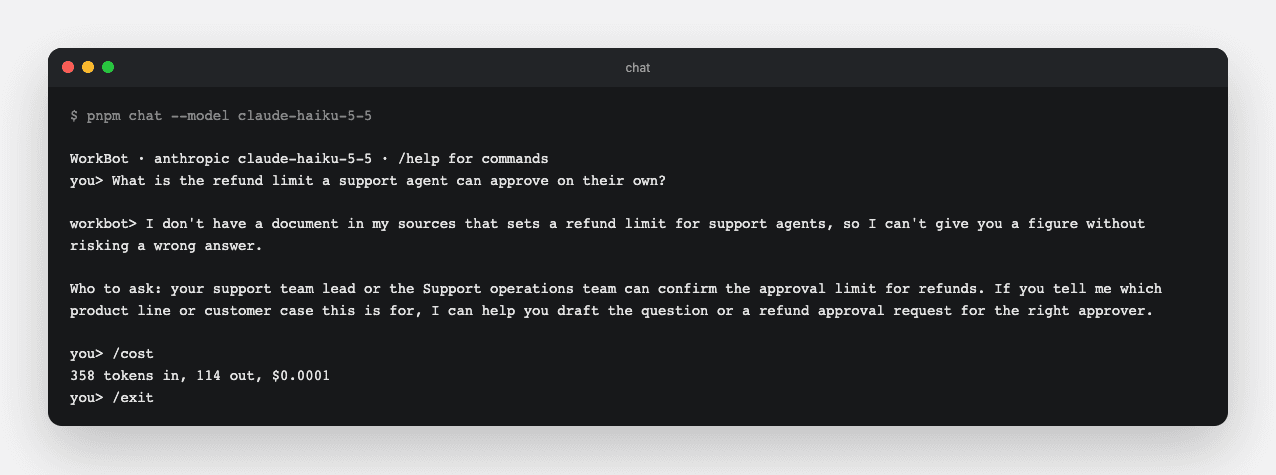
  2. Ask it 2 things it must decline: the refund limit an agent can approve (no document yet) and a colleague's salary. Each reply should decline and name a team.

Done when

  • The prompt is under 200 words, and both probes get a refusal with a team to ask, not a figure or a detail.
A first conversation
The assistant on the small model, with no documents yet: it declines to state a limit it cannot source and names the team to ask. /cost prices the session by the model that answered.
Technical notes
  • The source policy is written before any retrieval exists; on Day 7 the tools give the model documents to cite.
  • A prompt is a product decision, so it is one file with no logic around it.

Part 3

The assistant in the terminal

A session object holds the conversation; the CLI is a loop around it.

Study first

  • Node's readline/promises with for await, one line per pass; the loop awaits each reply before reading the next line, so questions are answered in order.
  • parseArgs from node:util for flags.

Build

  1. src/lib/session.ts: a Session with the provider, model, system prompt, message history and a list of turns with their usage. send(text, onText) streams one reply and keeps both messages; a failed turn leaves no trace. use(provider, model) switches mid-conversation. cost() sums tokens and dollars by each turn's model.
  2. cli/chat.ts: flags --provider, --model, --effort, --temperature, --max-tokens; commands /model [provider] [model] to switch or list, /system [text] to show or replace the prompt, /cost for tokens and dollars, /help, /exit. The chat script runs it with Node's --env-file-if-exists=.env.local.
  3. Tests for the session with a fake provider: history, cost, the failed turn, the model switch.

Done when

  • pnpm chat holds a conversation, /model openai gpt-5.4-mini continues it on the other provider, and /cost reports tokens and dollars: tokens times the model's published price per million, with unpriced models named.
Technical notes
  • Lines come through the async iterator, so the loop works piped as well as interactive: printf 'question\n/exit\n' | pnpm chat is how the screenshot above was made.
  • The prompt string is only written when stdin is a terminal, so piped output stays clean.
  • A model id not on the list is used anyway, and unpriced.

Part 4

Prove it on the real API

Add a live suite that checks prompt and provider changes against the real API, on the small model.

Study first

  • Vitest's --config flag and test.include: two suites in one project.

Build

  1. vitest.live.config.ts: includes src/**/*.live.test.ts, reads .env.local into test.env with a 6-line parser, and allows 3 minutes per test. The unit config excludes the live files.
  2. src/lib/providers.live.test.ts: "What colour is a clear daytime sky?" to claude-haiku-5-5, the small model on the provider's list, with "Answer in one word." as the system prompt; the reply contains "blue" and both usage counts are above zero.
  3. pnpm test:live in package.json, and a line in AGENTS.md saying when to run it.

Done when

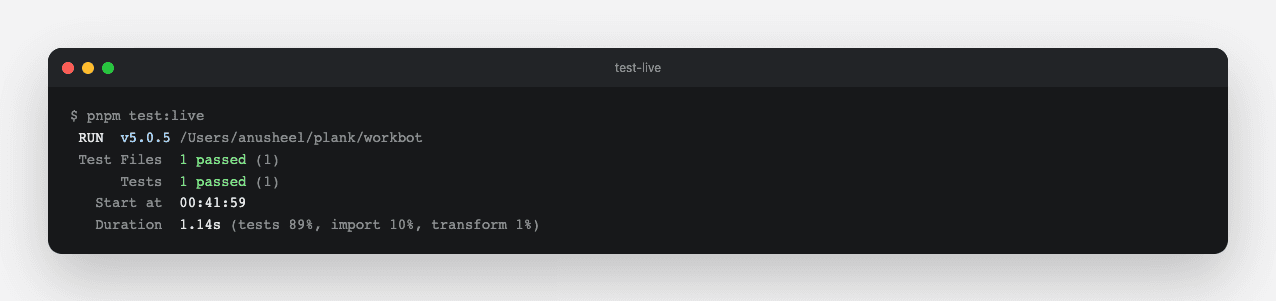
  • pnpm test stays offline and green; pnpm test:live passes with your key and costs under $0.01.
The live suite
pnpm test:live: the provider test against the real API on the small model. The unit suite never touches the network.
Technical notes
  • The live suite uses the small model on purpose. It proves the integration, not the quality of answers.
  • The config reads .env.local itself; in CI the secret comes from the environment instead.
  • testTimeout: 180_000, because a turn that calls tools can take minutes.

Resources