Week 2 · Day 8 of 40 · Build AI

Full-stack AI chat app

You ship: WorkBot's web chat deployed on either provider, with tool status and results in the UI. Builds on: Day 7.

By the end of the day you can

  • Build a production-quality chat app with Next.js and the Anthropic SDK
  • Implement server-to-client streaming
  • Display tool execution status and results in the UI

Topics

Next.js + Anthropic SDK

  • Route Handlers: creating API endpoints in Next.js App Router
  • Server-side streaming: creating a ReadableStream from Anthropic's stream, piping to the client
  • Vercel AI SDK: useChat hook for managing chat state, StreamingTextResponse helper
  • Provider packages: the same streamText call for Anthropic and OpenAI; the route handler reads the provider from a setting
  • Environment variables: managing API keys securely in Next.js

Streaming UI Patterns

  • Displaying streamed text as it arrives: buffering, rendering partial markdown
  • Markdown rendering: react-markdown
  • Code block highlighting: syntax-highlighted code with copy button
  • Typing indicators: show while waiting for first token
  • Auto-scroll: scroll to bottom as new content streams in, pause if user scrolls up
  • Message states: sending, streaming, complete, error

Tool Calls in the UI

  • Showing tool execution: "Searching the web...", "Reading page...", progress indicators
  • Displaying tool results inline: search results as cards, calculations as formatted output
  • Collapsible tool details: show/hide the raw tool input and output
  • Error states: what to show when a tool call fails

Chat App Architecture

  • Message storage: in-memory → localStorage → database progression
  • Conversation management: new chat, switch between conversations, delete
  • Input UX: auto-resize textarea, send on Enter, Shift+Enter for newline, keyboard shortcuts
  • Responsive layout: sidebar for conversations, main area for chat, mobile-friendly

Build

Features shipped today

  • WorkBot: Web chat with streaming, markdown, tool status and results, and conversation history, plus a chat panel in the admin console on the same route handler; deployed

Build an end-to-end AI chat app with Next.js:

  1. Backend: Route Handler that streams responses from either provider through the AI SDK, supports tool calls (reuse Day 7 tools)
  2. Frontend: Chat interface with:
    • Streaming text display with markdown rendering
    • Code blocks with syntax highlighting and copy button
    • Tool execution status indicators (spinner, status text)
    • Tool results rendered inline (search results as cards, etc.)
    • Conversation history in localStorage
    • New chat / switch conversation
  3. Deploy: Push to GitHub, deploy to Vercel, verify it works in production

Walkthrough

Put the assistant on the web: a route handler that streams from the configured provider through the AI SDK with the Day 7 tools, a chat page with Markdown, code blocks, tool status and conversation history in the browser, and the same chat in the admin console. Deploy it.

Part 1

The route handler on the AI SDK

Use streamText with the Day 7 tool registry; useChat consumes the UI message stream it produces. The Day 6 provider loop stays in the terminal.

Study first

  • The AI SDK's chatbot guide: useChat, UI messages and their parts, and the route handler shape.
  • streamText with tools and stopWhen, and convertToModelMessages from UI messages.

Build

  1. pnpm add ai @ai-sdk/react @ai-sdk/anthropic @ai-sdk/openai. src/lib/chat.ts: chatModel() returns the configured provider's default model from the Day 6 list, or the id in CHAT_MODEL, through that provider's AI SDK adapter; chatTools maps the registry's tools into the SDK's tool() shape, schema and execute from the same definitions.
  2. src/app/api/chat/route.ts: validate the body, then safeValidateUIMessages against the tools; stream with the system prompt, the tools and stopWhen: isStepCount(8); answer with createUIMessageStreamResponse.
  3. A unit test with the SDK's MockLanguageModelV4 for the stream's shape, plus a body without an id and a message without parts, both 400; and a live test that asks the real small model for a calculation and finds the calculator call in the stream.

Done when

  • curl -N against /api/chat with one user message prints a UI message stream, and pnpm test:live shows the tool call.
Technical notes
  • Validate the envelope with Zod and the messages with safeValidateUIMessages, which knows the tool parts' shapes. A bad body is a 400 with the failure, not a stream that fails halfway.
  • isStepCount(8) matches the 8 rounds of the Day 7 loop.
  • The model id comes from the provider list in src/lib/providers.ts, so the web and the terminal agree on the default; CHAT_MODEL overrides it, which the live suite uses to run on the small model.
Part 2

The chat page

Study first

  • UI message parts: text, and tool parts with a state of input-streaming, input-available, output-available or output-error.
  • useSyncExternalStore for a store outside React, here localStorage.

Build

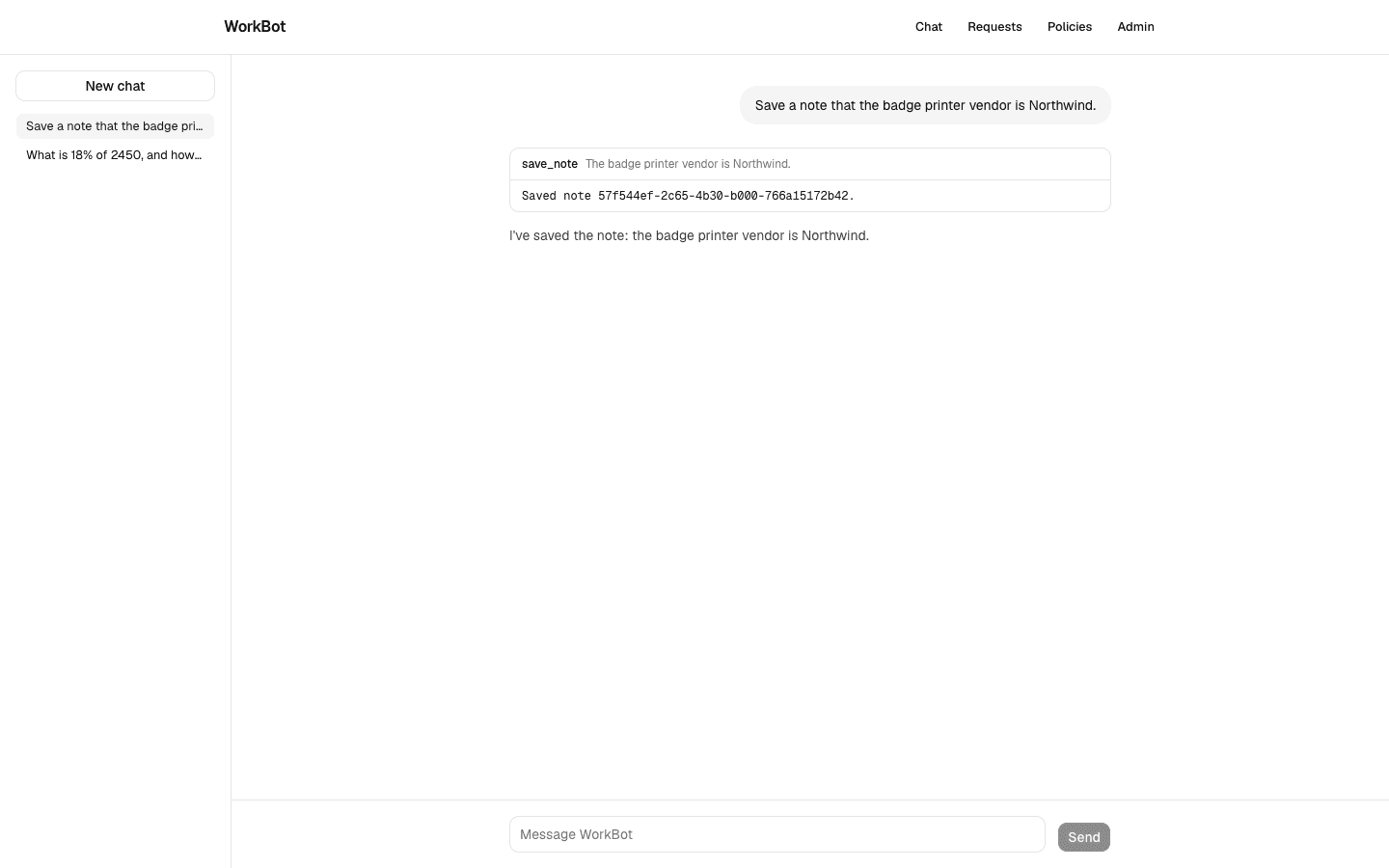
  1. Message: a user message as a bubble; an assistant message as Markdown for text parts and a collapsible ToolCall for tool parts, labelled by state, with the input while it runs and the output or error when done.
  2. Markdown on react-markdown with rehype-highlight, and CodeBlock, a pre with a button that copies its textContent.
  3. Chat: the message list, following the stream while the reader is at the bottom and pausing when they scroll up; a pulsing dot while the request is pending; a Textarea that grows with its content, sends on Enter and takes Shift+Enter as a newline; a Stop button while streaming.
  4. src/lib/conversations.ts: conversations in localStorage behind subscribe, getConversations and saveConversations; upsert keeps a title from the first question and moves the conversation to the front.
  5. Conversations: the list in a sidebar, a select and a button on a phone, and the open chat; a new id from crypto.randomUUID() behind io(), so the build does not bake one id into the page. /chat renders it inside Suspense.

Done when

  • A question with arithmetic shows the calculator call running, then its result, then the answer with Markdown; a reload shows the conversation in the list, New chat starts another, and pnpm build prerenders /chat with no conversation id in the HTML.
The web chat
Two conversations in the browser's list. The open one shows a tool call expanded, with its input and result, above the reply.
Technical notes
  • useChat is keyed by the conversation id; the component is remounted with key={activeId} when the user switches, so one hook never holds two conversations.
  • onMessages fires when the status returns to ready, so a conversation is saved once per reply, not per token.
  • The store caches the parsed list by the raw storage string, so unchanged data keeps the same array reference and useSyncExternalStore does not re-render.
  • getServerConversations returns a constant empty list: the server render and the first client render agree, and the browser's list arrives after hydration.
  • CodeBlock copies textContent, so what is copied is the code, not the highlighting markup.
  • Deleting a conversation and rendering a search result as a card are left for a later day; the list, the switch and the tool panel are the shape they will extend.

Part 3

The assistant in the admin console

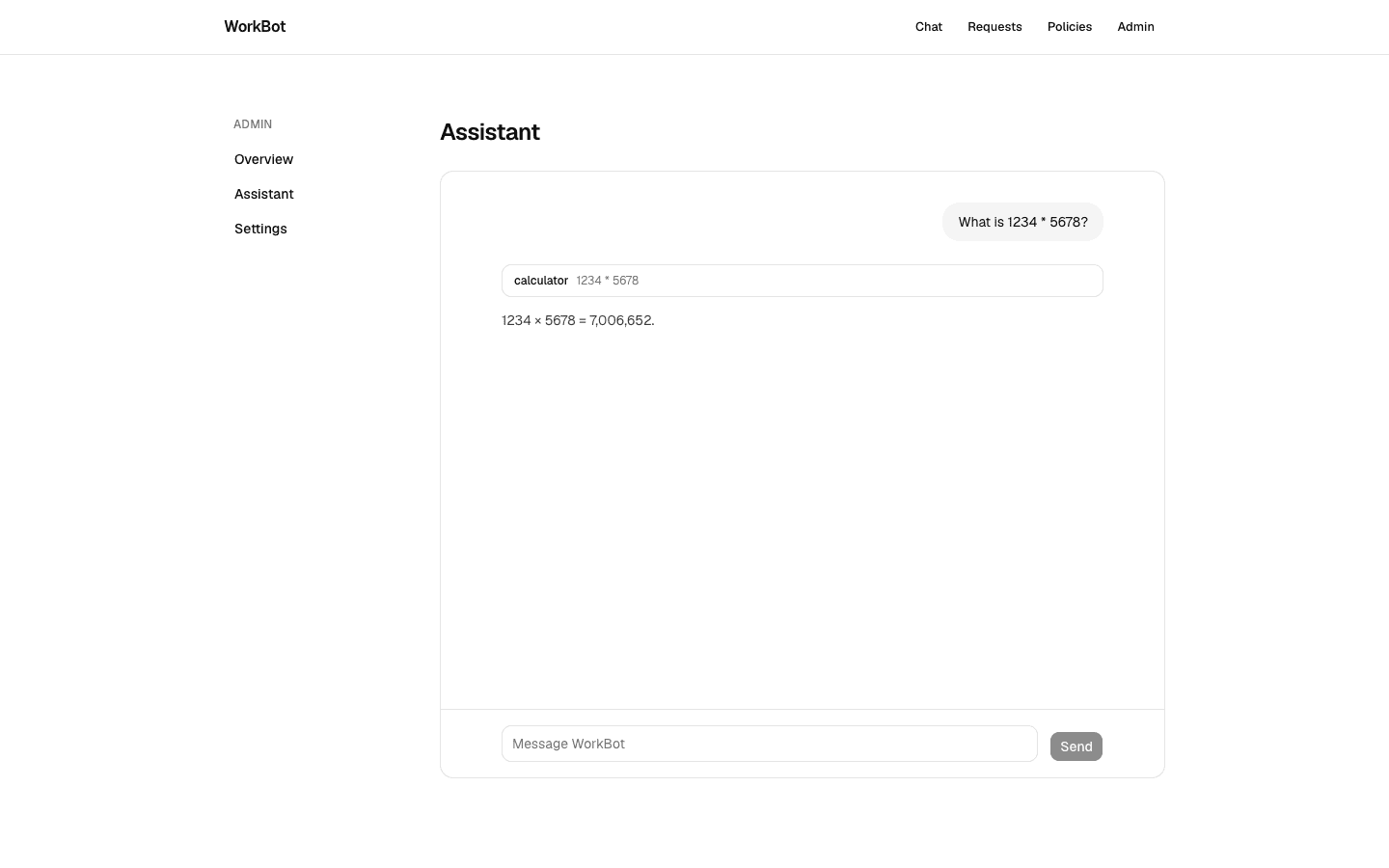
The same component, on the same route handler, inside the console.

Build

  1. /admin/assistant: a page with Chat in a fixed-height panel, and a link in the console's navigation.
  2. Links from the header and the landing page to /chat.

Done when

  • The console's assistant answers, and its conversation is separate from the public page's.
The assistant in the admin console
The same chat component in the console, with its own conversation id.

Part 4

Deploy and verify

Build

  1. Set ANTHROPIC_API_KEY and DATABASE_URL in the Vercel project's environment variables for production and preview, and export const maxDuration = 60 on the chat route, so a tool loop on the large model is not cut off by the function's default limit.
  2. Open the pull request's preview, ask a question that calls a tool, then merge and do the same on production.

Done when

  • /chat streams a reply with a tool call on the preview and on production, and /api/health reports the database on both.
Technical notes
  • The route runs on the Node.js runtime; the SDKs and the database driver need it.
  • A streamed response on Vercel runs within the function's duration limit, which depends on the plan; maxDuration raises it for this route up to the plan's ceiling.

Resources