Week 1 · Day 5 of 40 · Use AI

MCP servers and complete feature development

You ship: A database MCP server and a PostHog MCP server, both used from Claude Code. Builds on: Day 1.

By the end of the day you can

  • Understand MCP architecture (tools, resources, prompts)
  • Build custom MCP servers from scratch in TypeScript
  • Practice complete feature development: code + tests + analytics + monitoring

Topics

MCP Fundamentals

  • What MCP (Model Context Protocol) is: a standard for giving AI tools access to external data and systems
  • MCP architecture: servers expose tools/resources, clients (Claude Code) consume them
  • 3 MCP primitives:
    • Tools: functions the AI can call (e.g., query a database, create a ticket)
    • Resources: data the AI can read (e.g., a file, a database schema, a config)
    • Prompts: reusable prompt templates the server provides
  • MCP transport: stdio (local) vs SSE (remote)

Pre-built MCPs

  • Context7: documentation-aware development - pulls live library docs into Claude Code's context
  • File system MCP: read/write/search files beyond the project directory
  • Database MCPs: query PostgreSQL, SQLite, etc. directly from Claude Code
  • Finding MCP servers: where to look, how to evaluate them

Building Custom MCP Servers

  • MCP server in TypeScript: using @modelcontextprotocol/sdk
  • Defining tools: name, description, input schema (Zod), handler function
  • Defining resources: URI templates, read handlers
  • Registering and testing your server locally
  • Connecting to Claude Code: updating .claude/settings.json

Complete Feature Development

  • "Done" means more than code: tests, analytics, monitoring, error handling, documentation
  • Analytics instrumentation: PostHog event tracking, what events to track, naming conventions
  • Error handling patterns: error boundaries, fallback UI, error reporting
  • Monitoring: health checks, performance tracking, alerting on errors

Build

Build exercise 1: Database MCP Server

Features shipped today

  • WorkBot: A database MCP server over its database, used from Claude Code while building; analytics on the intake funnel (sign up, submit a request, ask a question), verified through the PostHog MCP server

Build an MCP server that wraps your project's database:

  • Tool: query - execute a read-only SQL query and return results
  • Tool: schema - return the full database schema (tables, columns, types, relationships)
  • Tool: describe-table - return detailed info about a specific table including row count and sample data
  • Resource: tables - list all tables as a browsable resource

Connect it to Claude Code. Verify it works by asking Claude Code questions about your data while implementing features.

Build exercise 2: PostHog MCP Server

Build an MCP server that connects to PostHog analytics:

  • Tool: get-events - query recent events by name, user, or time range
  • Tool: get-event-definitions - list all defined events and their properties
  • Tool: check-event-fired - verify if a specific event was captured in the last N minutes

Then use it in a real workflow:

  1. Run your app on localhost
  2. Go through a user flow (e.g., sign up → create item → complete action)
  3. Ask Claude Code to use the PostHog MCP to check if the right events fired
  4. Have Claude Code identify gaps: missing events, missing properties, un-instrumented steps
  5. Let Claude Code add the missing analytics instrumentation
  6. Verify the new events fire by repeating the user flow

Walkthrough

Build 2 MCP servers for the project, one over its database and one over PostHog, and use both from Claude Code while finishing a feature. First, move Day 3's requests from memory into Postgres, so the database server has tables to read and analytics has ids that persist.

Part 1

Requests in Postgres

Study first

  • The MCP server quickstart for TypeScript: tools, resources, and stdio as the transport Claude Code uses for a local server.
  • postgres.js and PGlite. PGlite is Postgres compiled to WebAssembly, so the SQL in this project runs on both.

Build

  1. A local Postgres: on macOS, brew install postgresql@18, brew services start postgresql@18, createdb workbot; on Linux, the distribution's package. DATABASE_URL=postgres://localhost/workbot in .env.local.
  2. src/lib/db.ts: one query(text, params) function that runs one statement with $1 to $n parameters and returns the rows as objects. With a postgres:// URL it uses postgres.js; without one it opens an embedded PGlite database in .data/pg, and memory:// for tests. The schema, a list of idempotent statements in src/lib/schema.ts, runs at startup.
  3. Split the request model: schemas, constants and labels in src/lib/request-model.ts, which client components may import; the queries stay in src/lib/requests.ts.
  4. Rewrite createRequest, listRequests, getRequest and updateRequest as SQL, and parse every row through the WorkRequest schema.
  5. /api/health runs select 1 and answers 503 when the database is unreachable. error.tsx and not-found.tsx give the app an error boundary and a 404 page.

Done when

  • pnpm test passes on the in-memory database, a request filed in the app is still there after pnpm dev restarts, and /api/health reports the database.
The health check and the table
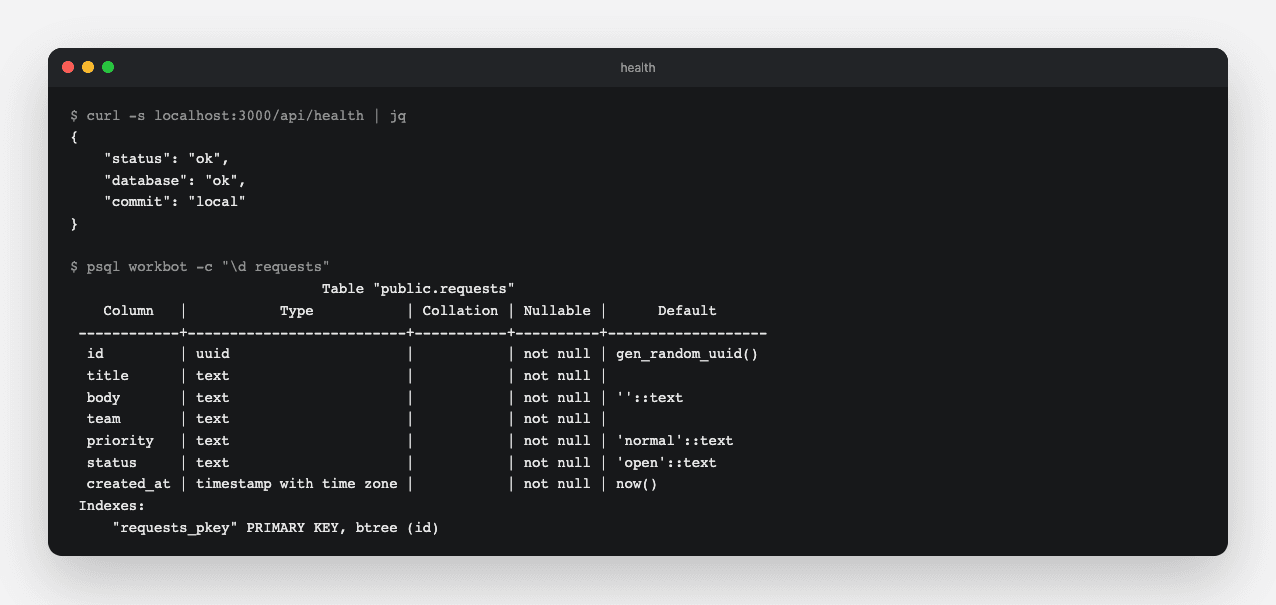
The health check reports the database, and the requests table exists on the local Postgres, created by the schema at startup.
Technical notes
  • Route bundles do not share module instances, so the connection is kept on globalThis, as the in-memory list was. An embedded database can only be open in one process.
  • created_at as "createdAt" in the select list, so rows arrive in the shape the schema expects and no mapping code exists.
  • A uuid column with a default: an id that is not a UUID is answered as not found before the query runs.
  • Each schema statement is idempotent, create table if not exists and the like, so the list can run on every start against any earlier state. An earlier statement is never edited, because databases that already ran it would not see the edit; a change is a new statement at the end.
  • The health test runs against the in-memory database, so it checks the report's shape. The server's reachability is checked by opening /api/health after a deploy.

Part 2

A database MCP server

Claude Code can answer questions about the data while you build, if it has a read-only way in.

Study first

  • The server side of the TypeScript SDK: McpServer, registerTool with a Zod input schema, registerResource, and StdioServerTransport. The SDK also offers prompts and resource templates, URIs with parameters; this server needs neither.
  • How Claude Code runs a local server from .mcp.json: a command and its arguments, started on demand; the entry is in the technical notes.

Build

  1. src/mcp/database.ts exporting databaseServer(query): tools query (one statement, up to 100 rows), schema (columns and constraints from information_schema and pg_constraint), describe-table (columns, row count, 5 sample rows), and a tables resource at db://tables.
  2. Test every tool in process: connect a client over InMemoryTransport, create a request, call each tool.
  3. mcp/database.ts: opens a read-only connection to DATABASE_URL and serves on stdio.
  4. In Claude Code, run /mcp to confirm the server is connected, then ask how many requests each team has.

Done when

  • The in-process test passes, and Claude Code answers a question about your data by calling the query tool.
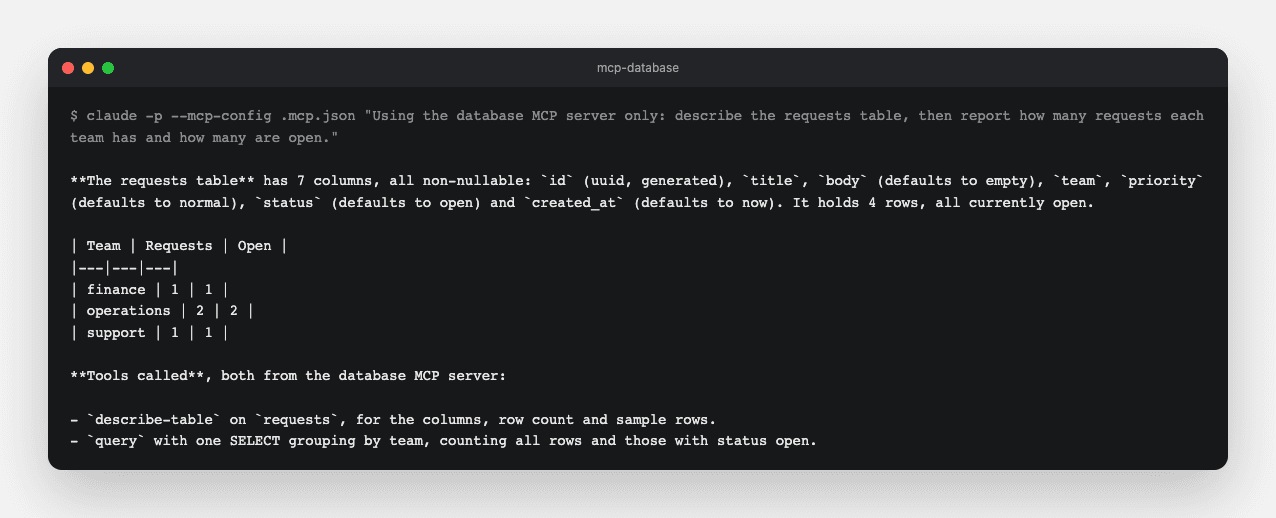
Claude Code using the database server
A headless session asked to describe the requests table: the answer comes from the describe-table and query tools, read-only, against the local Postgres.
Technical notes
  • The .mcp.json entry. The node flag loads .env.local into the server's process, which is how it gets DATABASE_URL:
{
  "mcpServers": {
    "database": {
      "command": "node",
      "args": ["--env-file-if-exists=.env.local", "--import", "tsx", "mcp/database.ts"]
    }
  }
}
  • Read-only at the database, not in the prompt: the connection sets default_transaction_read_only, so a delete is rejected by Postgres whatever SQL the model writes.
  • describe-table checks the table name against the list of tables before interpolating it; identifiers cannot be parameters.
  • A tool returns errors as a result with isError: true and the message as text, so the model can read the error and try again, rather than the call failing.
  • stdio is the transport for a server Claude Code starts itself; the remote servers from Day 3 speak HTTP. An embedded PGlite database can only be open in one process, so the stdio server refuses to start without a postgres:// URL.

Part 3

Analytics on the intake funnel

4 events mark the funnel: the form viewed, a request submitted, a request viewed, a status changed. Each carries ids, never a person.

Study first

  • PostHog's capture endpoint: POST {host}/i/v0/e/ with JSON holding the project key, a distinct_id, the event name, properties and a timestamp.
  • after() from next/server: work that runs after the response is sent, or after prerendering, within the platform's function duration limit.

Build

  1. src/proxy.ts: every visitor gets a visitor cookie holding a crypto.randomUUID(), with a matcher that skips /api, /_next and the favicon.
  2. src/lib/analytics.tsx: track(event, properties) posts to PostHog in after(); without a POSTHOG_KEY it does nothing. A Track component posts a page-view event from inside a Suspense boundary.
  3. Call track from the submit and status actions and the detail page, and render Track on the form page. Event names are snake_case and properties name records, such as requestId and team.
  4. With POSTHOG_KEY set, run the funnel locally: open the form, file a request, open it, change its status.

Done when

  • The 4 events appear in PostHog's activity view, each with the request id as a property and no personal data.
Technical notes
  • after() keeps the capture off the response path; the request is not held for PostHog's answer.
  • The cookie is httpOnly, and the id identifies a browser profile: cleared cookies mean a new id.
  • Track lives inside Suspense because, with Cache Components, cookies() is request-time work and must run inside a boundary; the page around it still prerenders.

Part 4

A PostHog MCP server

A second server, over PostHog's API, so a session can check which events fired after a change.

Study first

  • PostHog's project API: GET {api host}/api/projects/{id}/events/ with event, distinct_id and after filters, and /event_definitions/, both with Authorization: Bearer <personal key>. The project key writes events; a personal key reads them.

Build

  1. src/mcp/posthog.ts exporting posthogServer(api): tools get-events (name, visitor and time window), get-event-definitions, and check-event-fired, which answers in one sentence whether an event was captured in the last N minutes. The server strips PostHog's own $ properties from what it returns.
  2. A test against a fake fetch, asserting the URLs the server builds and the shape it returns.
  3. mcp/posthog.ts on stdio, reading POSTHOG_PROJECT_ID and POSTHOG_PERSONAL_KEY from .env.local, and its .mcp.json entry, shaped like the database one.
  4. Run the funnel again, then ask Claude Code which funnel events fired in the last 10 minutes, which step has no event, and which event is missing a property. Let it add what is missing, re-run the funnel, and ask again.

Done when

  • Claude Code reports the 4 events from PostHog through the server, with their properties, and the second run shows what it added.
Technical notes
  • The server takes fetch as a parameter so the test needs no network; the stdio entry passes nothing and gets the real one.
  • check-event-fired exists because "did it fire" is the question asked most; one sentence is easier for the model to act on than a list of events.
  • The personal key never leaves .env.local; the project key is write-only by design, and this app sends it from the server, not the browser.

Resources