Week 1 · Day 4 of 40 · Use AI

Multi-project and multi-feature workflow

You ship: 4 or more features shipped in parallel, with throughput measured. Builds on: Day 1.

By the end of the day you can

  • Use git worktrees to enable parallel Claude Code instances on the same repo
  • Configure Ghostty tabs and splits for multi-project and multi-feature workflows
  • Write effective CLAUDE.md files at project and folder levels
  • Ship 4+ features in parallel in a single session

Topics

Git Worktrees

  • What worktrees are: multiple working directories from the same git repo
  • Why they matter for AI dev: each Claude Code instance needs its own working directory
  • Creating worktrees: git worktree add ../feature-x feature-x
  • Managing worktrees: listing, removing, pruning
  • Worktree + branch naming conventions for team workflows
  • Gotchas: shared git state, lock files, node_modules per worktree

Ghostty for Multi-Project Workflow

  • One tab or window per project: quick switching between entirely different codebases
  • Split panes per feature: see multiple Claude Code instances working simultaneously; zoom one split when it needs the whole tab
  • Notification-driven attention management: work on something else while agents build; Ghostty bounces the dock icon and marks the tab title when an agent in an unfocused pane needs input
  • Configuration in a file: keybinds for splits and tabs, committed with your dotfiles

Putting It Together: Worktrees + Ghostty + Parallel Claude Code

  • The full setup: create worktrees per feature → open each in a Ghostty split → run Claude Code in each
  • Monitoring multiple agents: checking progress, providing input, reviewing output
  • Merging parallel work: handling conflicts when multiple features land

CLAUDE.md

  • Project-level CLAUDE.md: conventions, architecture overview, common commands, project-specific instructions
  • Folder-level CLAUDE.md: module-specific context (e.g., api/CLAUDE.md describes API patterns)
  • What to include: file naming conventions, import patterns, testing patterns, deployment instructions
  • What not to include: obvious things, information that changes frequently
  • Iterating on CLAUDE.md: adding learnings as you work, using /claude-md to update

Prompt Engineering for Claude Code

  • Writing better prompts: be specific about what you want, provide context, reference files
  • When to use /compact: managing context in long sessions
  • Context management: how Claude Code tracks conversation, when to start fresh
  • Advanced patterns: breaking complex tasks into steps, using plan mode, providing examples
  • Getting more out of each session: asking for explanations, requesting alternatives, iterating

Build

Features shipped today

  • WorkBot: 4 or more features shipped in parallel across worktrees; the public site scaffolded as a second project

Set up 2 projects, WorkBot and its public site, with multiple features each:

  1. Create 3-4 worktrees for different features on the main project
  2. Configure a Ghostty tab with split panes - one Claude Code instance per worktree
  3. Write CLAUDE.md files for each project (project-level + at least one folder-level)
  4. Run all Claude Code instances in parallel
  5. Ship 4+ features in a single session
  6. Merge all features, resolve any conflicts, deploy

Track your throughput: how many features shipped per hour with parallel agents vs sequential?

Walkthrough

Build the request detail page, status changes, filters and Markdown policies in separate worktrees, one Claude Code session each, then scaffold the public site as a second app.

Part 1

Worktrees and panes

A worktree is a second checkout of the same repository on its own branch, in its own folder, so 4 sessions can edit files without touching each other's.

Study first

  • git worktree add, list, remove and prune. Worktrees share one object store; only the working files are separate.
  • Ghostty: one tab for the project, one split per worktree; zoom to fill the tab with one split, and the bell mark on a tab when an agent in an unfocused split needs attention.
  • Claude Code's /compact, and when a fresh session beats a long one.

Build

  1. One worktree per ticket, from main: git worktree add ../workbot-wb-12 -b wb-12 main, and the same for WB-13, WB-14 and WB-15. pnpm install in each; node_modules is per worktree.
  2. A Ghostty tab with 4 splits, a Claude Code session in each, started inside its worktree.
  3. Start each session with the same brief: the ticket id, its acceptance criteria, pasted or read through the Linear MCP server, the branch name, and the instruction to run pnpm check and open the pull request when done.
  4. Watch the bells. When a session asks for a decision, answer it; when its context fills, /compact.

Done when

  • git worktree list shows 4 worktrees on 4 branches, and each pane has a session working in one of them.
Technical notes
  • The pnpm store is shared, so an install in a new worktree writes links, not packages.
  • .env.local and .next are per worktree too. Copy the env file; Next.js recreates .next on the next build or dev run.
  • Two dev servers cannot share port 3000: pnpm dev --port 3002 in the second worktree, and so on.

Part 2

Folder-level instructions

Claude Code loads a CLAUDE.md in a subdirectory the first time it reads or edits a file there, in addition to the root file it loads at launch.

Study first

Build

  1. src/app/api/CLAUDE.md: a route is a folder with route.ts, types.ts and route.test.ts; the schemas are the contract; the status codes; handlers call src/lib and hold no logic.
  2. content/policies/CLAUDE.md: one policy per file, the front matter fields, and how a policy is written.
  3. A line in the root AGENTS.md saying these files exist.

Done when

  • A route scaffolded with Day 2's /api-route skill has the 3 described files and passes pnpm check, and a 9th policy file with the described front matter passes pnpm test.
Technical notes
  • A subdirectory file loads only in sessions that touch that folder, so its rules take no context elsewhere.
  • Keep each one under 10 lines. A rule that applies to the whole repository belongs in the root file.

Part 3

4 tickets in parallel

The 4 tickets touch the same module, src/lib/requests.ts, so expect conflicts at merge time.

Study first

  • refresh() from next/cache: called in a Server Action, it refreshes the client router, so the page shows the data the action changed.
  • "use cache" and generateStaticParams: cached reads for content that changes only with a deploy, and a prerendered page per known slug.

Build

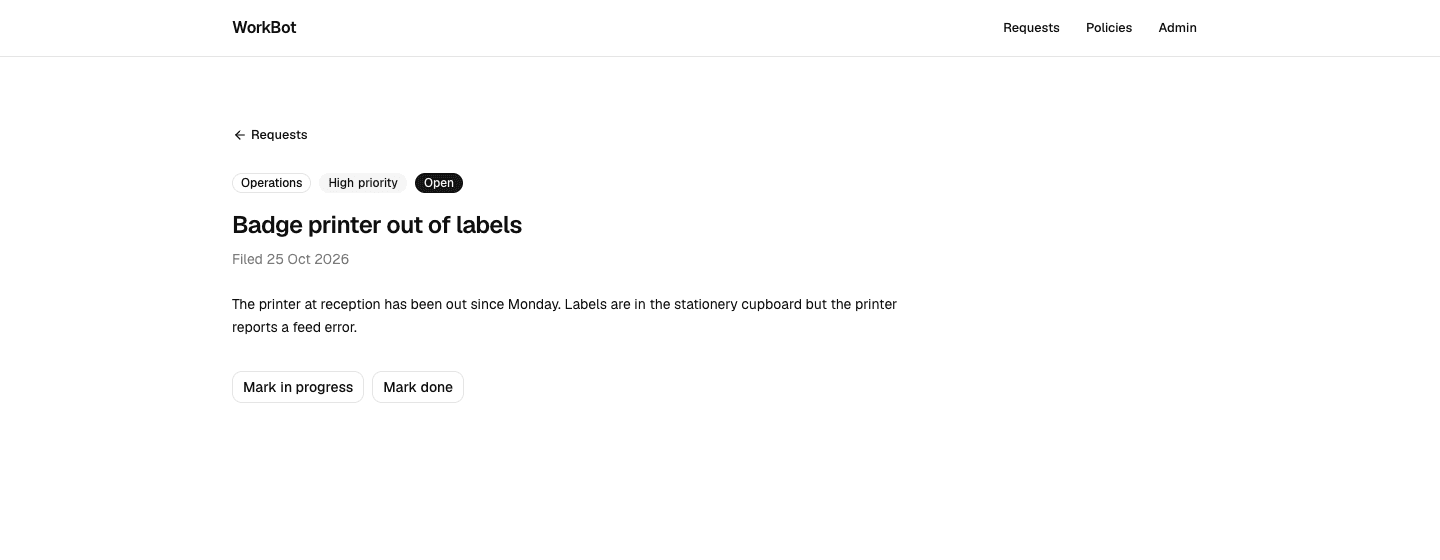
  1. WB-12, the detail page: /requests/<id> with the request in full, badges for team, priority and status, a 404 for an unknown id. The list links each title to it.
  2. WB-13, status changes: one button per other status on the detail page, each bound to a Server Action that updates the request and calls refresh().
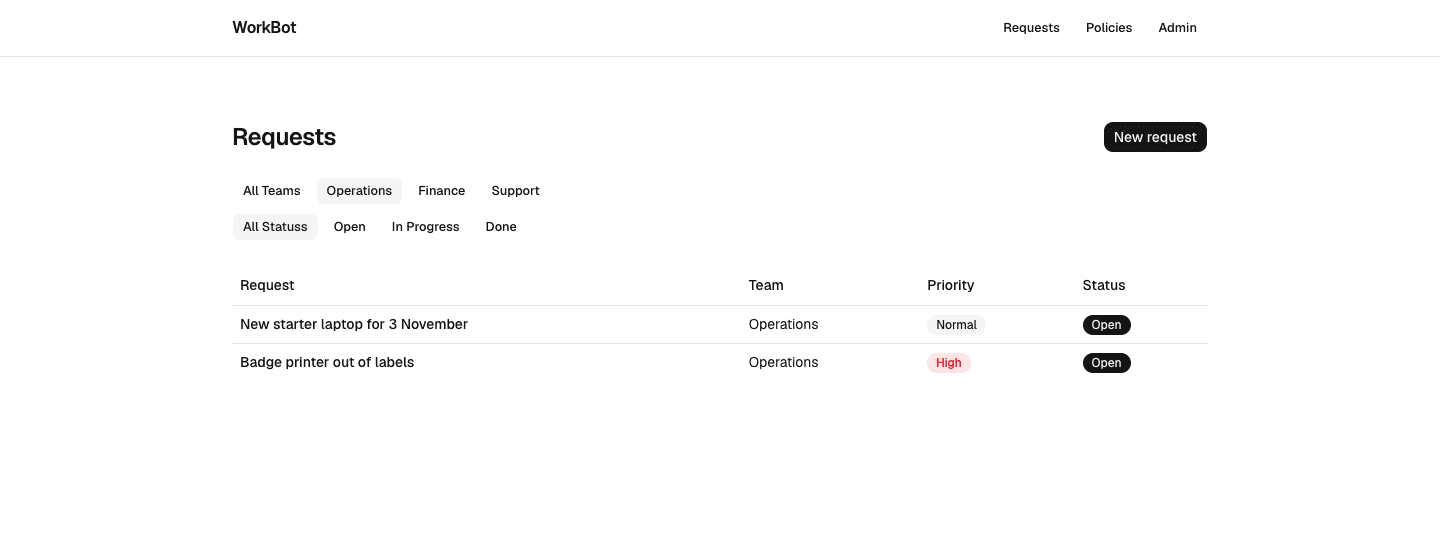
  3. WB-14, filters: /requests?team=&status= parsed by a schema that ignores unknown values, as rows of links, so a filtered list has an address.
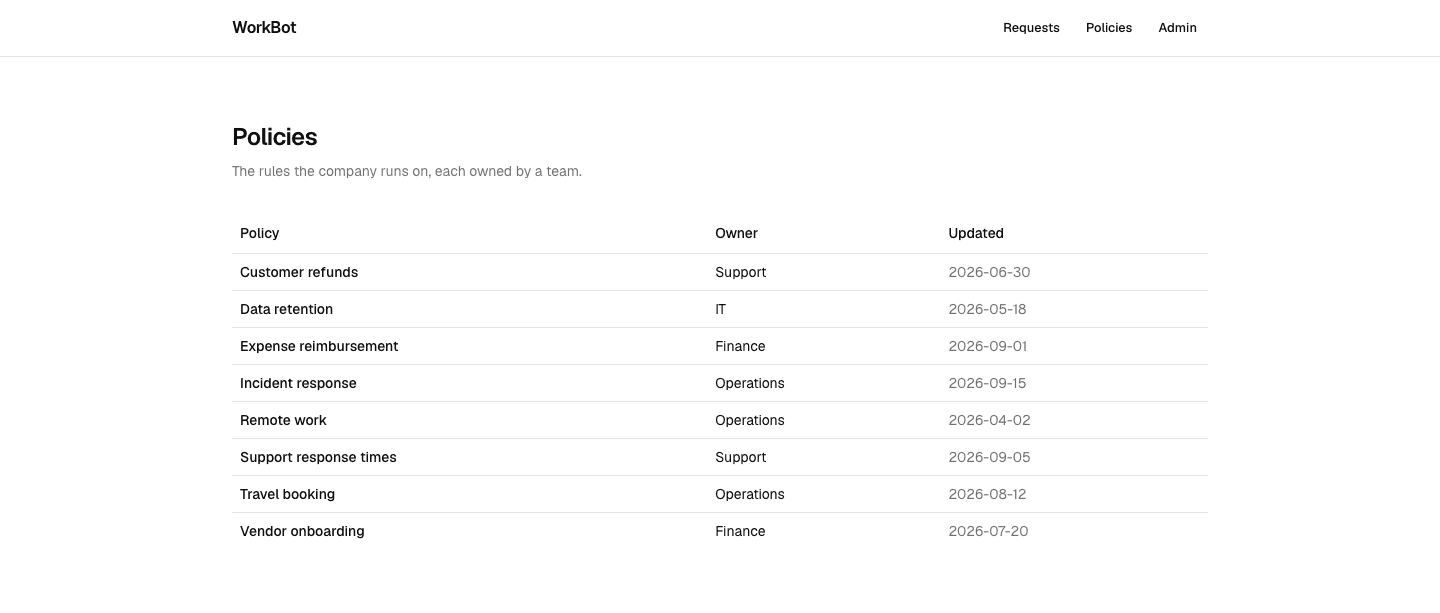
  4. WB-15, policies: 8 company policies as Markdown files with front matter, read and validated by one module, listed at /policies and rendered at /policies/<slug>.
  5. Merge in order. Rebase each later branch on main before its pull request, and resolve the conflicts in the requests module by hand; they are small and expected.
  6. After the last merge, git worktree remove each folder and git worktree prune.

Done when

  • All 4 pull requests merged with CI green, and on production: a request's status changes from its page, a filtered list loads from its address, and a policy renders from its file.
A request's page
The detail page: the request in full, and one button per status it can move to.
Filtered requests
The list filtered to one team. The filters are links, so the address carries the filter.
The policies
8 policies from Markdown files, each owned by a team.
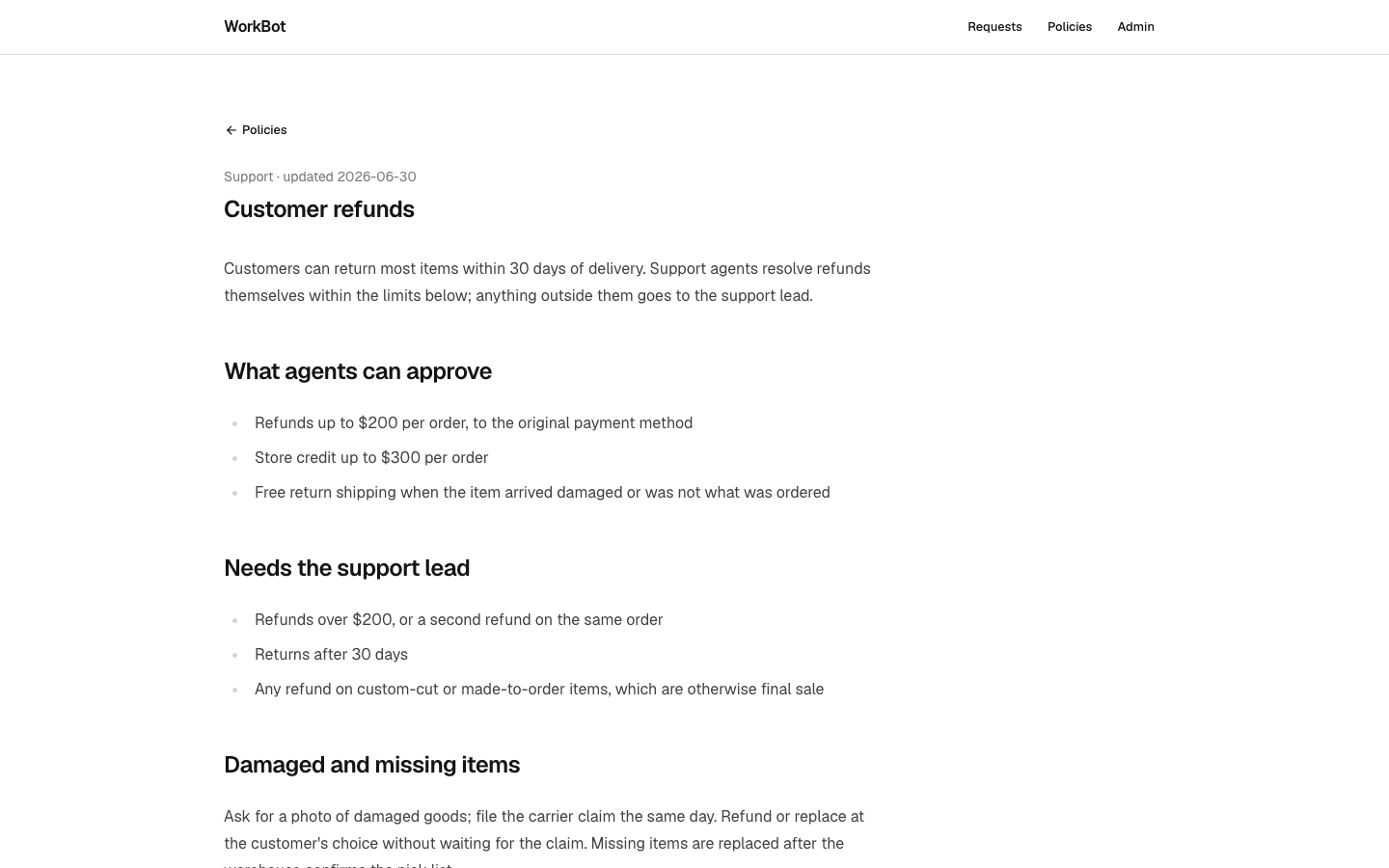
One policy
A policy page: front matter above, the Markdown body rendered with the typography plugin.
Technical notes
  • The status buttons are one form with a formAction per button, setStatus.bind(null, id, status). The action validates the status with the schema's enum before writing.
  • The filter schema uses .optional().catch(undefined) per field, so ?team=legal is the unfiltered list rather than an error.
  • The policy module reads the files inside "use cache" functions, so a file is parsed once per cache lifetime rather than per request. generateStaticParams lists every slug, so the build prerenders a page per policy.
  • react-markdown renders the body and @tailwindcss/typography styles it through the prose class; neither needs configuration.
  • A path that is not a slug, such as ../package, is refused before any file is read.

Part 4

The public site

Add a second Next.js app with the same checks. Nothing is shared between the apps yet; Day 29 adds shared packages.

Study first

  • pnpm workspaces: pnpm-workspace.yaml, --filter, and one lockfile for every package.

Build

  1. create-next-app into site/ with --skip-install; name it workbot-site and give it port 3001 in its scripts.
  2. Add site to pnpm-workspace.yaml, exclude it from the root tsconfig.json and ESLint config, and make the root check run pnpm --filter workbot-site check last.
  3. A landing page with the product in one sentence and 3 capabilities, and a site/AGENTS.md that says what the site is and is not.

Done when

  • pnpm check at the root builds both apps, and pnpm --filter workbot-site dev serves the site on port 3001.
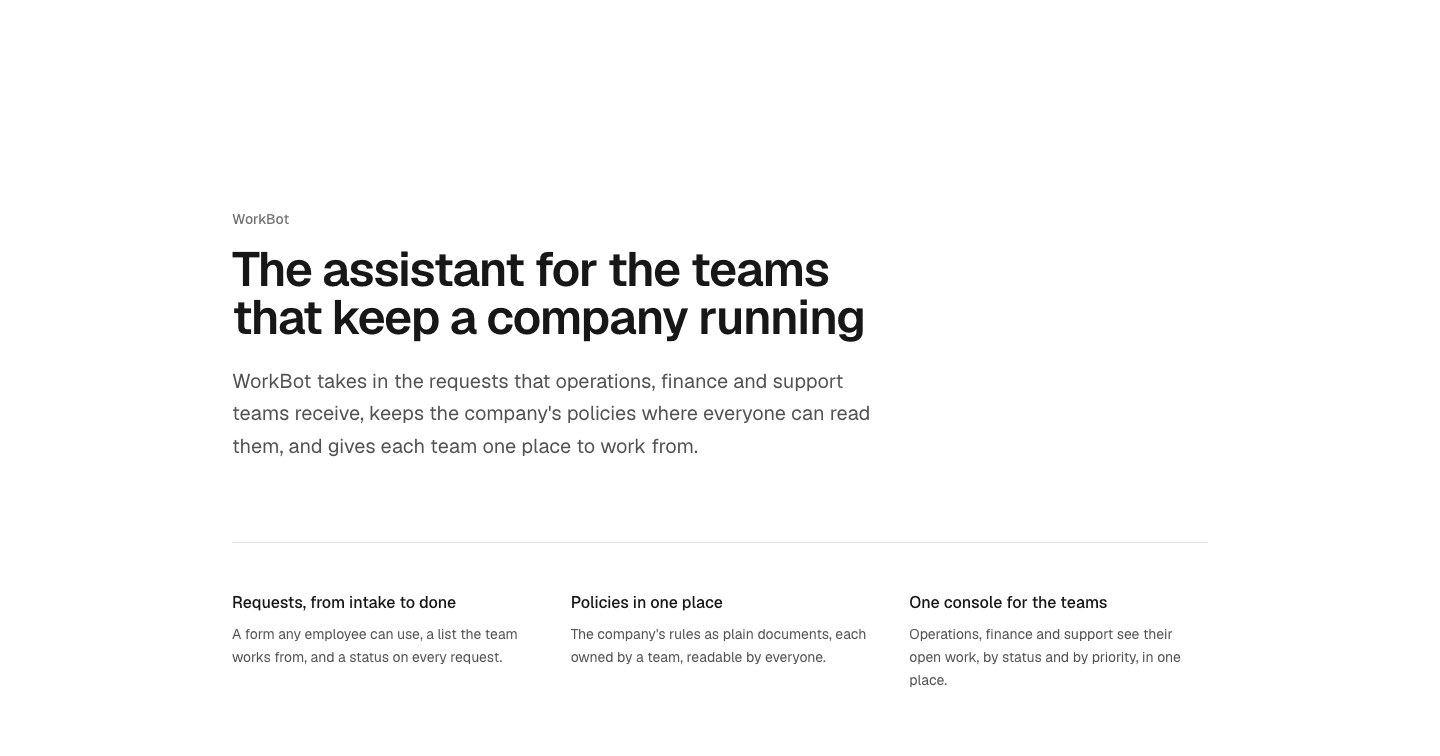
The public site
The public site's landing page: the product in one sentence and 3 capabilities, with nothing that needs a secret.
Technical notes
  • Each app has its own next.config.ts, tsconfig.json and ESLint config; the root ones exclude site/ so a file is checked by one config only.
  • The site has no database and no API routes, and nothing in it needs an environment variable.

Part 5

Throughput

The curriculum asks for features per hour with parallel sessions against one at a time. The site is one feature of a different kind, so treat the result as a first measurement.

Build

  1. Parallel: the time from the 4 sessions starting to the last of the 4 pull requests merging, divided by 4.
  2. Sequential: the time from starting the site's session to its merge, for 1 feature.
  3. Write both numbers and the slowest step in the Day 4 pull request descriptions.

Done when

  • Two numbers, one per feature in each mode, with the time spent merging counted in the parallel one.

Resources