Network tiers and one way out
Isolation starts with the network. The data should sit where the internet cannot reach it, and the agent, which fetches pages for people, needs a single way out that you can watch.
Study first
- Learn the three tiers. The edge takes traffic from the internet, the app tier is reached only from the edge, and the data tier is reached only from the app. The curriculum calls them the public, private and isolated tiers. Private routes connect the app to the cloud's own services, so those calls never cross the internet. AWS's guidance on network layers draws the same three tiers, with a control at each boundary that admits only the traffic the next tier needs.
- Learn what egress control means: control over the calls that leave the system. An agent that can fetch any page is the easiest path out for a customer's data. A forward proxy closes that path, with an allowlist of hosts and a log of every request. Squid's access control FAQ shows how its rules are read. They run from top to bottom, the first match decides, and the list should end by denying everything else.
Build
- Add an egress proxy in
infra/egress. It runs Squid with an allowlist of the services WorkBot calls, and nothing else. When a customer wants the agent to read a page, add that page's host to the allowlist for that customer. - Send every outbound call through the proxy. Set its address in
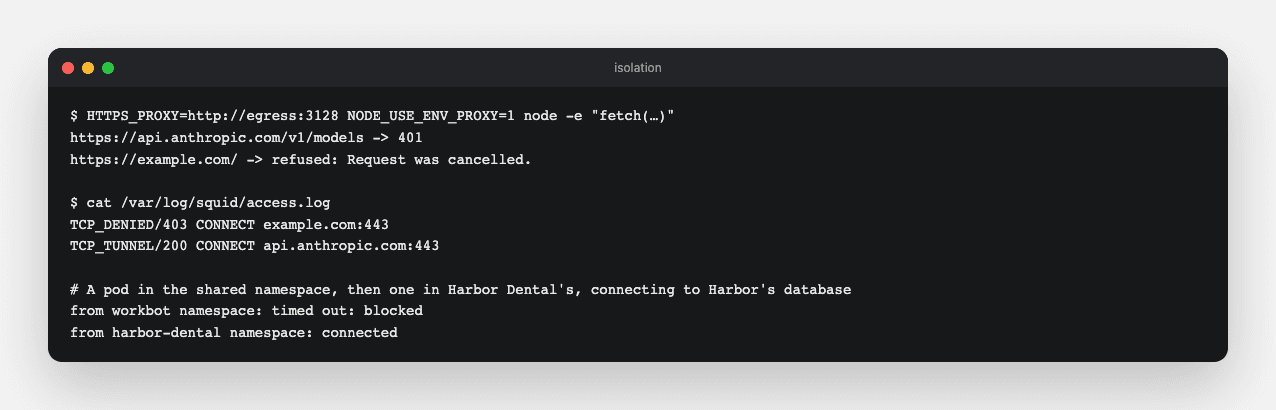
HTTPS_PROXY, and Node'sfetchhonours it onceNODE_USE_ENV_PROXY=1is set, as Node's proxy support describes. Point the agent's browser at the proxy directly as well.
Done when
- An allowed host answers through the proxy, any other host is refused with 403, and both requests appear in the log.
Technical notes
- Squid drops its privileges before it opens its logs, so it cannot write to standard output and needs a log file of its own.
- On your machine the proxy is an app setting. In a virtual private cloud (VPC), the private network the deployment runs in, the proxy is the only route out.