Day 37

User research, and ship to a customer cloud

You ship
A findings page from interviews and usability sessions, and a customer-style deployment of WorkBot proven by someone else from the runbook.

What you'll build today

WorkBot now runs in a hardened, isolated deployment, and on paper it is ready for a customer. What nobody has tested is whether the customer's own people can take it over. Their platform engineer has to deploy it from your runbook, their security reviewer has to approve it, and their on-call engineer has to keep it running at night.

Today you prepare that handover and test it on the people who will receive it. You run a release checklist, write a one-page review for the customer's security team, and run a usability study of everything the customer receives. You learn how to watch someone work without helping, and how to turn what you see into findings rather than opinions.

In the reference run, no customer account or staff were available, so agents played each role. By the end of the day, you have a findings page, the most severe fixes shipped, and a research plan ready for the customer's own people.

By the end of the day you can

  • Deliver WorkBot into a fresh cloud account, the way a customer's platform team would receive it
  • Prove reproducibility, isolation, observability and rollback from end to end
  • Plan and run user research inside a customer deployment: discovery interviews, observation of real work, and usability sessions on the deployed product
  • Turn sessions into findings with evidence, and findings into configuration changes and backlog items, with consent and data handling in order

Topics

Why Forward Deployed Engineers (FDEs) Do User Research

  • A deployment succeeds when the customer's people use it: adoption is the outcome, and uptime is the precondition
  • 3 questions the first week answers: who does the work today, where it breaks, and what "done" looks like to them
  • The FDE's position: on site, with the people doing the work. The research happens in the deployment

Discovery Interviews

  • Who: the people who do the work (operators, support agents, finance clerks), their managers, and the admins who will run the product
  • 5 to 8 people per role show the patterns
  • Ask about the past and the specific: "walk me through the last ticket you handled", never "would you use this"
  • Follow the pain: what they do when the system fails, what lives in spreadsheets, what they explain to every new hire
  • Notes: one interviewer and one note-taker, verbatim quotes, and no interpretation during the session. Record only with consent

Observation and Contextual Inquiry

  • Contextual inquiry: watch the work as it happens, at their desk and in their tools, and ask about it as it happens
  • Capture steps, handoffs, workarounds, time per step, interruptions, and which tabs are open
  • The runbook test is contextual inquiry. Someone else follows the runbook while you observe. Record every stall, and do not help

Usability Sessions

  • Task-based: 5 realistic tasks, written as goals. The participant thinks aloud, and the observer does not help
  • 5 participants per round surface most of the serious problems. Run rounds between fixes
  • When the product is an agent, record what the person expected the agent to do and what it did. Record whether they trusted the result, and where they checked its work
  • Severity per task: it blocks the task, slows it, or is cosmetic. Count occurrences across participants

Synthesis

  • From notes to themes: cluster observations across sessions. Each theme carries a count and a quote
  • A finding names the behavior, the evidence and the consequence. An opinion names none of them
  • Agents help with the first pass, turning transcripts into candidate themes with quotes attached. A person merges, names and decides
  • Output: a findings page with severity, evidence and a proposed change per finding. Most changes are configuration (Day 29) or backlog items. Tell participants what changed

Consent, Privacy and Personal Data

  • Ask for consent before any recording. Participants can stop at any point. Delete raw recordings on a schedule
  • Usability sessions use scripted scenarios, never a participant's own records. Store notes without identifiers
  • Measuring after: the analytics stack (Day 39) shows whether the change moved the behavior

Build

Features shipped today

  • WorkBot: A production release checklist, run against the most recent full deployment. WorkBot delivered into a fresh customer account by someone else, from the runbook. The runbook test observed as a usability study, with the deployer interviewed as the customer's operations team. 5 usability sessions on scripted scenarios, and findings routed into configuration and the backlog

Deploy WorkBot into a new account as if it were a customer's.

Deliverables

  1. A fresh AWS or GCP account (or project), provisioned entirely by the Day 35 Terraform, with the Day 36 isolation
  2. The full system running: web, API, workers, queue, database, object storage, secrets, tracing
  3. Evals, the scored tests of WorkBot's output, and load tests passing against the deployment, with the Day 25 scoreboard pointed at it
  4. A deployment runbook a customer platform engineer can follow without you present, tested by someone else following it
  5. A security note and an architecture diagram suitable for a customer's review
  6. A research plan: who is interviewed, 5 usability tasks, the consent text, and where notes are stored. Whoever runs the runbook plays the customer's operations and platform teams in the interviews
  7. A findings page: themes with counts and quotes, severity per task, and a proposed change per finding, marked documents, configuration or code. Ship or ticket the top 3 the same day

Delivery test: someone else runs the runbook, deploys WorkBot and runs the smoke evals, the small eval set from Day 25. You observe without speaking, and keep timestamped notes of every stall and question. Those notes are the first input to the findings page.

Step by step

The release checklist

Before anyone else touches WorkBot, check what must hold for a customer to rely on it. A checklist turns that into items you can mark done, planned or open, each with the place it was checked.

Study first

  • Learn what must hold before WorkBot serves a customer. The evals and the load test pass on the release, a bad release rolls back, and the system can be recovered from code. Secrets, encryption, backups, monitoring, spend alerts and isolation are in place. Runbooks exist, retention is enforced, a security review pack is ready, and an owner is on call.
  • Read the launch checklist in the chapter on reliable product launches from Google's Site Reliability Engineering book. Each area of its checklist, from dependencies and capacity to failure modes and rollout, has questions and the action items they lead to.

Build

  1. Write docs/release-checklist.md, marking each item done, planned or open with the place it was checked. When an item needs a cloud account, say so. In the reference run, the checklist ran against the local cluster from Days 35 and 36, recreated from nothing by the pipeline's scripts.
  2. Close the gaps the checklist finds in code. Add an uptime check on /api/health and a monthly budget with alerts at 50, 90 and 100%. Put both in infra/gcp, and assert them in its tests.

Done when

  • Every item is done or names exactly what it waits for.
A page for security reviewers

A customer's security team reads before it approves, and it needs one page that sends it to the evidence. That page draws on the isolation and the questionnaire you wrote on Day 36.

Study first

  • Read the Open Worldwide Application Security Project's entry on prompt injection. You should be able to say why it has no foolproof fix, and why the defense is least privilege and checks in code rather than in the prompt.
  • Read the system modeling section of the same project's threat modeling cheat sheet. Your diagram should show the data flows, the data stores and the trust boundaries that a reviewer asks about.

Build

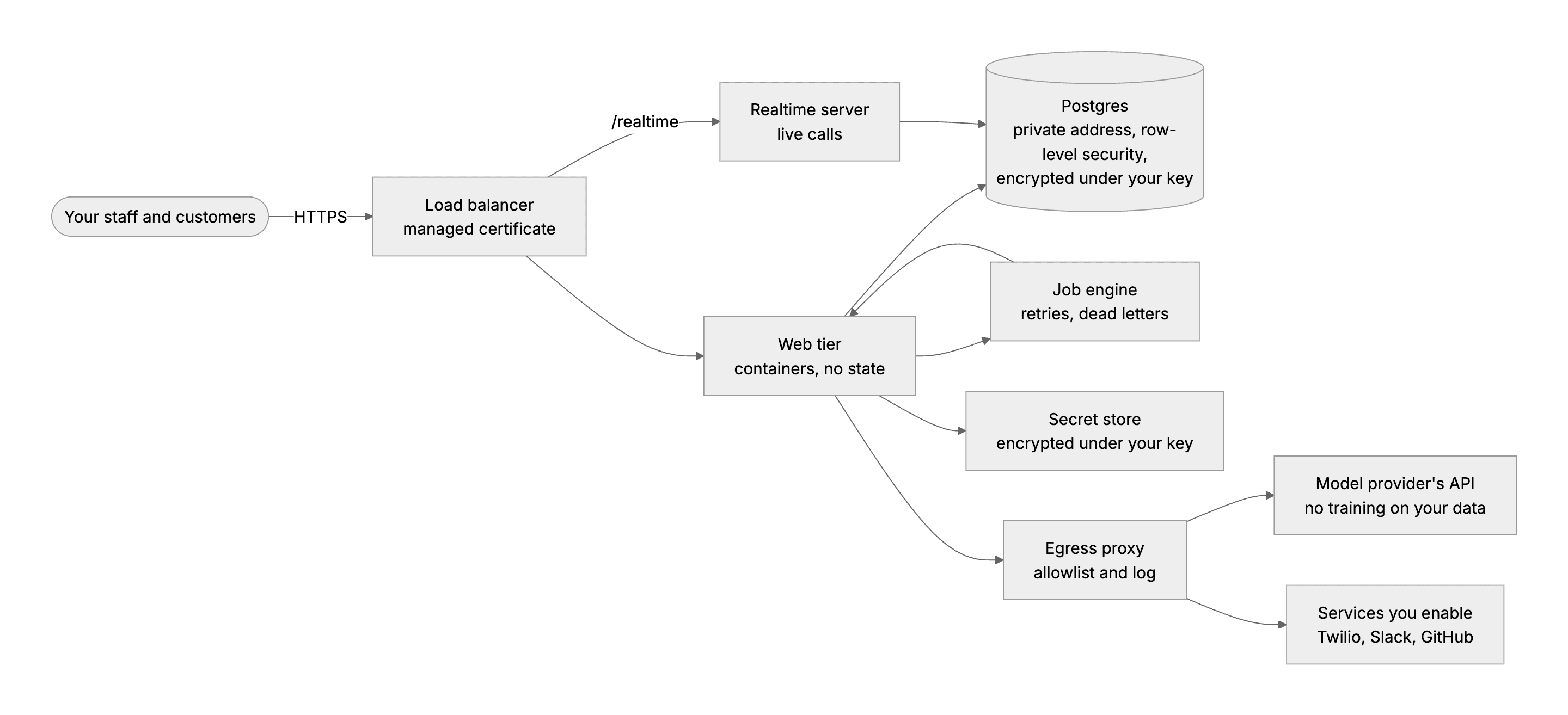
  1. Write docs/review.md, one page for the customer's security reviewers, with the architecture drawn as one diagram. Say where the data goes, who can read it, and what happens when someone tricks the AI. Then say how long data is kept, how it ends, and what the page does not cover.

Done when

  • A reviewer can find, for each claim, where to check it.
Review
The reference run's architecture for a customer's review has one host and a private database. Secrets and data sit under the customer's key, and every outbound call goes through the egress proxy.

The research plan

The checklist says what is built, but not whether the customer's people can use it. A research plan sets out who you watch, what they try and how you record it, so that the same sessions can run with the customer's own people. The study covers the runbook, the admin pages, the incident runbooks, the security documents and the cost estimate.

Study first

  • Read how moderated usability testing works. A participant works through scripted tasks and thinks aloud, saying what they think as they go. The one facilitator only ever asks "what would you do if I weren't here?". You record the outcome of each task, every point of difficulty with its severity, and quotes word for word.
  • Learn who receives the system. Five people do: the engineer who deploys it, the lead who runs it, the reviewer who approves it, the on-call engineer, and the person who pays for it.

Build

  1. Write docs/research.md with the five roles and five tasks, the session format, the consent text you read at the start, and where the notes live.

Done when

  • The plan could be run with the customer's people tomorrow.

Five usability sessions

Now you run the plan. The curriculum's delivery test has someone else deploy WorkBot into a fresh account from your runbook while you watch without speaking. In the reference run, no customer account or staff were available, so each participant was an agent given one role, one task and only the repository. Agents show whether someone who did not write the documents can follow them, but they do not show what real people need.

Study first

  • Read Nielsen Norman Group's case for testing with five users, and for fixing between small rounds. Its five come from one kind of user, while yours are five roles, so say what one session per role cannot show.
  • Read how to rate the severity of usability problems by frequency, impact and persistence. Give each sticking point a severity you can defend from what you saw.

Build

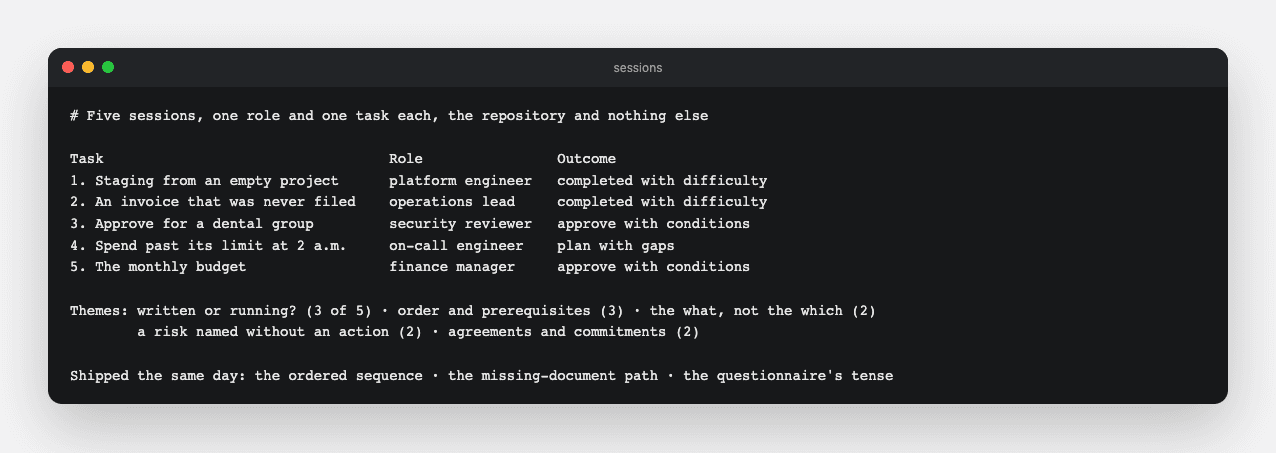
  1. Give each participant one role, one task and the repository, and nothing else. The platform engineer stands up staging from an empty project, and the operations lead traces an invoice that was never filed. The security reviewer decides whether to approve WorkBot for a dental group. The on-call engineer stops spend running away at 2 a.m., and the finance manager sets the monthly budget. The first task is the curriculum's delivery test, run from the runbook to a passing smoke suite.
  2. Collect each participant's outcome, their sticking points with severity, and their quotes.

Done when

  • Every task has an outcome, and every sticking point has a place in the documents or the product.
Sessions
In the reference run, two sessions completed with difficulty, two approved with conditions, and one ended with a plan with gaps. Five themes ran across them.
Technical notes
  • Give the deployer one ordered sequence. In the reference run, the platform engineer reached a working sequence only by merging Terraform, a release script and parts of the hand-written runbook. Three Google Cloud APIs were missing or out of order. So were two service agents, the accounts Google runs so that Cloud SQL and Secret Manager can use the Day 36 key in the key management service (KMS). The secret values, needed before the services, and the DNS record, needed before the release, were missing or out of order too.
  • Say which controls run and which are only written. In the reference run, the security reviewer found the questionnaire answering "yes" in the present tense for controls that are written and tested but not applied in a cloud account. The finding was about tense, not code.
  • Send a finding that needs code to the backlog. In the reference run, the on-call engineer found that no switch holds spend without taking the assistant down, and since that is code, it went to the backlog.

Findings and the top three

Notes only help once they become findings with a place to change. A finding names what happened, the evidence and the consequence, and it points to the documents, the configuration or the code.

Study first

  • Read how the UK government's Service Manual says to analyze a research session, moving from observations to themes, findings and actions. You should be able to say how a finding differs from an observation.
  • Read Nielsen Norman Group's guide to affinity diagramming, the step that clusters notes into themes. Name each theme so that it covers every note in it.

Build

  1. Write the themes, each with the number of sessions that met it and a quote, and mark every finding's change as documents, configuration or code.
  2. Ship the three most severe findings the same day. In the reference run, the first was an ordered sequence from an empty project, with the missing APIs added to Terraform. The second was a path for a document that was never filed. It added dates in the inbox and put the document's name on its dead letter, the record of a failed job from Day 33. The third was a questionnaire that says which controls run and which are only written.
  3. File the rest in the backlog.

Done when

  • The top three are merged, and every other finding has a ticket or a reason it has none.
Technical notes
  • Read the document's id from where the stored event keeps it. In the reference run, the dead letter's document name first read the id from the wrong place in the stored event. The label was then empty for exactly the failures it was meant to name. A code review caught it, and a test of the stored shape now guards it.

Resources