Week 8 · Day 36 of 40 · Build AI

Isolation, keys and scale thinking

You ship: A hardened, optionally single-tenant deployment with runbooks, a game day and a completed security questionnaire. Builds on: Day 30, Day 35.

By the end of the day you can

  • Design network isolation for an agent system that handles customer data, and explain it to a security team
  • Operate key management for infrastructure and for the agent's credentials
  • Plan capacity and failure for 10 times the current load without rebuilding

Topics

Infrastructure Isolation

  • Tiers: a public tier for the load balancer only, a private tier for services, an isolated tier for data; VPCs, subnets, security groups
  • Private connectivity: VPC endpoints to cloud services, private links or VPNs to customer systems; no database reachable from the internet
  • Single-tenant vs multi-tenant: per-customer accounts or VPCs for regulated customers, shared infrastructure with Day 30 separation for the rest
  • Egress control: an agent that calls the internet is an exfiltration path; allowlists and a logging proxy

Key Management

  • Cloud KMS for encryption keys; envelope encryption for data at rest; rotation schedules
  • Secrets managers for application secrets; the app reads at runtime through an IAM role, never from a file in the image
  • Agent credentials (Day 30): encrypted with a tenant key, access logged
  • Audit: who read which secret when; alerts on anomalies

Data Separation at the Infrastructure Level

  • Per tenant by tier: storage prefixes, databases or schemas; backups and restores per tenant
  • Residency: provider endpoints per region, enforced by configuration
  • Logs and traces: redaction (Day 30), retention, per-tenant deletion on request

Scale Thinking

  • Bottlenecks in order: provider rate limits, queue depth, database connections, worker memory, egress cost
  • Capacity arithmetic: requests per second × tokens per request against provider limits; connections per worker against database limits
  • Failure planning: provider down for an hour, a tenant imports a million records, a worker loops; a runbook for each
  • Observability: saturation metrics per bottleneck; alerts on trend as well as threshold
  • 10-times tests: double the load until something breaks, fix the cheapest thing, repeat

Build

Features shipped today

  • WorkBot: The single-tenant option for regulated customers; KMS, envelope encryption, audited secrets; data residency enforced by configuration; egress control on the agent

Harden the deployment for a regulated customer:

  1. Network: 3 tiers in the VPC, no public database, VPC endpoints for cloud services, an egress proxy with an allowlist and logs for the agent's outbound calls
  2. Keys: KMS keys per environment, envelope encryption for tenant data and agent credentials, rotation configured, secret access audited
  3. Single-tenant option: a Terraform variable that deploys an isolated stack for one tenant; deploy one
  4. Scale: a capacity spreadsheet for 10x current load; load test to the first bottleneck; fix it; repeat twice; record what broke each time
  5. Runbooks for 3 failures (provider outage, runaway tenant import, looping worker); run one as a game day
  6. Security questionnaire: answer the 20 most common questions from a standard vendor questionnaire for WorkBot

Walkthrough

Make WorkBot fit for a regulated customer: data kept apart from other customers and from the internet, keys held in KMS, a stack of its own when the customer needs one, and a deployment pushed until it breaks. Then the runbooks for the failures that will come, one rehearsed, and answers to the questions a vendor review asks.

Part 1

The network in tiers, with one way out

Study first

  • Three tiers: an edge that takes traffic, an app tier reached only from the edge, a data tier reached only from the app. Private routes to the cloud's own services.
  • Egress control: an agent that can fetch any page is the easiest path out for a customer's data. A forward proxy with an allowlist and a log of every request.

Build

  1. An egress proxy, infra/egress: Squid with an allowlist of the services WorkBot calls and nothing else. Pages the agent may read are added by host, per customer.
  2. Every outbound call uses it: Node's fetch honours the proxy with NODE_USE_ENV_PROXY=1, and the agent's browser is pointed at it directly.

Done when

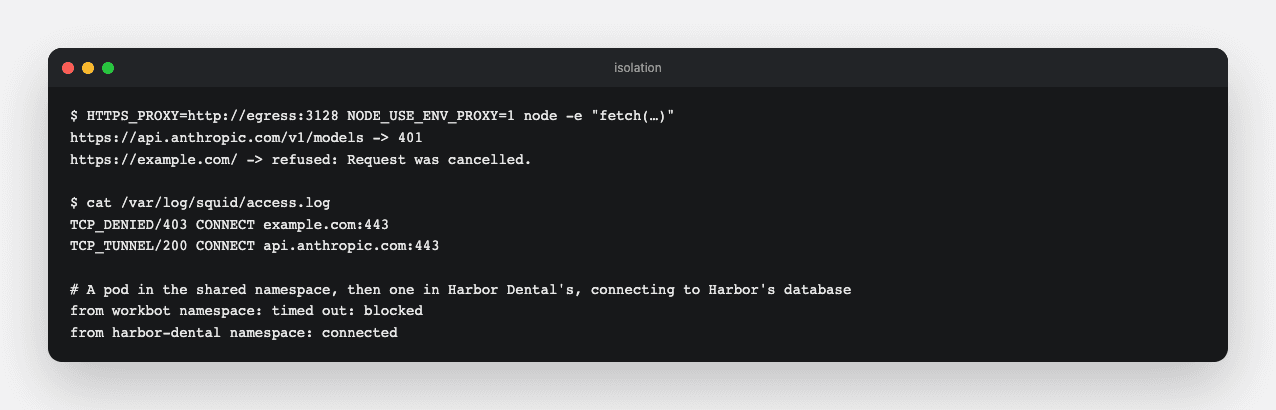
  • An allowed host answers through the proxy, any other is refused with 403, and both are in the log.
Isolation
Through the proxy the model's API answers and example.com is refused, both logged; a pod in the shared namespace cannot reach Harbor Dental's database, while Harbor's own pod can.
Technical notes
  • Squid drops its privileges before it opens its logs, so it cannot write to standard output; the log is its own file.
  • Locally the proxy is an app setting. In a VPC it is the only route out.
Part 2

Keys in KMS

Study first

  • Envelope encryption: data encrypted with data keys, data keys encrypted with a key that never leaves KMS. Customer-managed keys, rotation, and audit logs of every use.

Build

  1. One KMS key per environment in infra/gcp, rotated every 90 days, under Cloud SQL and every Secret Manager secret.
  2. Data-access logs for Secret Manager and KMS, which are off by default.
  3. A test against the mocked plan: rotation set, the database and the secrets encrypted under the key, both logs on.

Done when

  • The plan shows the database and the secrets encrypted under the environment's key, and every read of either logged.

Part 3

A customer kept apart

Study first

  • Isolation options: a tenant column with row-level security (Day 30), a namespace and database per tenant, a project per tenant. What each costs to run.

Build

  1. On Google Cloud, a variable file: infra/gcp/harbor-dental.tfvars, the customer's own project, database, key and host.
  2. On the cluster, a tenant in infra/kubernetes: a namespace with its own secrets and Postgres, and a network policy admitting traffic only from the namespace itself, the gateway and KEDA. moved blocks carry the existing state over.
  3. Deploy Harbor Dental's stack on its own host and try to reach its database from the shared namespace.

Done when

  • The shared namespace cannot connect to the tenant's database, and the tenant's own pods can.

Part 4

Ten times the load

Study first

  • Capacity planning from the cost model's volumes: requests, steps, connections, rate limits. Load testing to the first bottleneck, one fix at a time.

Build

  1. A capacity table for ten times today's users in docs/isolation.md.
  2. pnpm bench: workers that create and list requests on a running deployment.
  3. Raise the load until something breaks, fix it, and run again; write down each round.

Done when

  • Each round names what broke and what fixed it, with the numbers before and after.
Bench
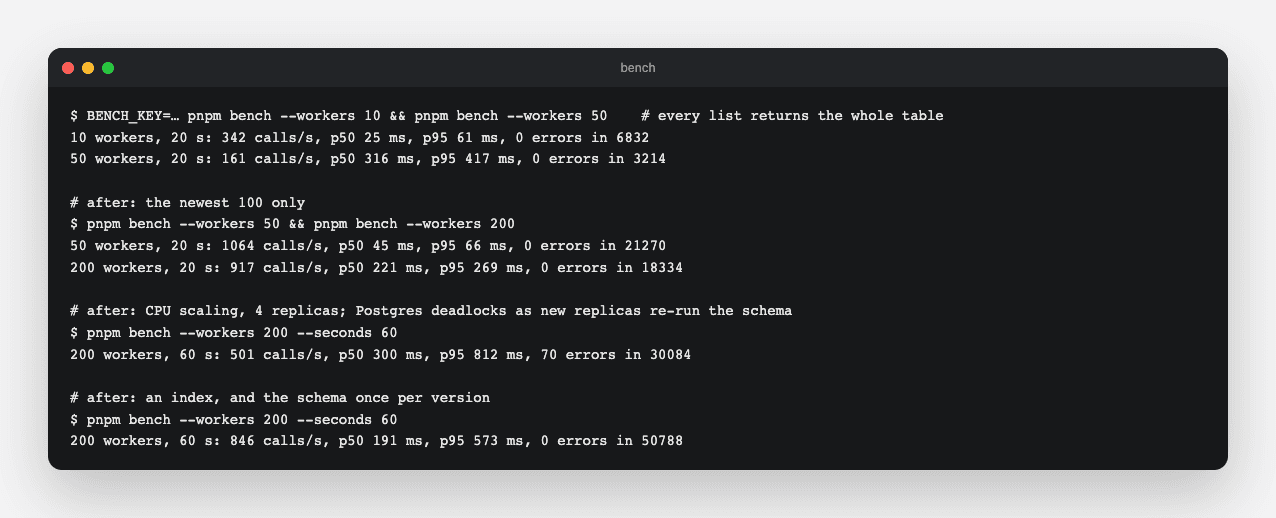
Four rounds: an unbounded list, a scaler blind to CPU, DDL and a missing index under scale-out, then the machine's own limit.
Technical notes
  • The list returned all 10,000 rows, 1 MB a call; the newest 100 multiplied throughput by six.
  • KEDA scaled the web tier only on the queue, so one replica took every request; a CPU trigger beside the queue's fixed that, with metrics-server where the cluster has none.
  • Four replicas were then slower than one. Each new replica re-ran the schema's alter table statements, which take exclusive locks, and deadlocked with inserts; and the list sorted the table for want of an index. The schema now runs once per version, recorded in the database.
  • The last round's limit is the machine: one 4-CPU node runs the bench, Postgres and every replica.

Part 5

Runbooks and a game day

Study first

  • What a runbook holds: the signs, the first checks, the actions, and how to know it is over.

Build

  1. Runbooks in docs/isolation.md for a provider outage, a runaway tenant import and a looping worker.
  2. Rehearse the outage: the chat smoke suite with the small model marked out.

Done when

  • The rehearsal shows what the fallback does to quality, cost and latency.
Game day
With the small model out, the large model answered: 0.99 against the 0.94 baseline, at about 22 times the cost per answer.

Part 6

The security questionnaire

Build

  1. docs/questionnaire.md: the 20 questions a vendor review asks most, each answered for WorkBot as built and pointing at where it can be checked.

Done when

  • Every answer is true of the code today, and none promises what is not built.

Resources
