Week 7 · Day 35 of 40 · Build AI

Infrastructure as code: Terraform and deployment targets

You ship: WorkBot's infrastructure as Terraform on 3 targets, through a plan, review and apply pipeline, with a demonstrated rollback. Builds on: Day 34.

By the end of the day you can

  • Define your infrastructure in Terraform and reproduce it from scratch in a new account
  • Deploy containers to ECS on Fargate, to Kubernetes and to an Azure VM, and know what each is for
  • Run deployments through CI with plan, review and apply

Topics

Terraform Fundamentals

  • Building blocks: providers, resources, data sources, variables, outputs
  • State: remote and locked, always
  • Modules: one per unit created more than once (a service, a database, a queue)
  • Plan, apply, destroy; reading a plan before approving it; drift detection
  • Environments: workspaces or directories, never one state for everything
  • Secrets: what ends up in state, how to keep keys out of it

Containers Everywhere

  • One image for API and workers, different commands; multi-stage builds; health checks; read-only filesystems
  • Registries per cloud; tagging by commit; promotion from staging to production by tag

Deployment Targets

  • ECS on Fargate: tasks and services, autoscaling on queue depth or CPU, no nodes to manage; the default on AWS
  • Elastic Beanstalk: platform-managed environments for a single web application; where it still fits
  • Kubernetes (EKS, GKE): deployments, services, ingress, horizontal pod autoscaling, secrets and config maps; the operational cost, and when a customer requires it anyway
  • Azure VMs: a hardened image, a systemd service, a load balancer in front; Container Apps as the managed alternative
  • Choosing: managed containers first, Kubernetes when the customer's platform team runs it, VMs when policy demands it

Delivery Pipeline

  • CI: build and test → build image → push. CD: terraform plan on PR → apply on merge with approval → deploy the tag → smoke evals → roll back on failure
  • Migrations: forward-only, run before the new version serves traffic
  • Parity: the same modules for staging and production with different variables

Build

Features shipped today

  • WorkBot: Infrastructure as Terraform on 3 targets, through the pipeline; neo-cloud configuration kept as code where the provider allows

Make the Day 34 deployment reproducible and portable:

  1. Terraform for the AWS (or GCP) deployment: network, database, queue, secrets, container service, load balancer; remote locked state; one module per unit; staging and production from the same modules
  2. Prove it: destroy staging and recreate it in a clean account with one command sequence; time it
  3. Second target: the same images on a Kubernetes cluster (EKS or GKE) with deployments, a service, an ingress and autoscaling on queue depth
  4. Third target: an Azure VM running the API as a systemd service behind a load balancer, provisioned by Terraform
  5. Pipeline: plan on PR, apply on merge with manual approval, deploy by tag, smoke evals, automatic rollback
  6. Keep the evidence linked from the runbook: the timed recreation of staging from a clean account, the same images running on Fargate and Kubernetes, and the rollback

Walkthrough

Make the Day 34 deployment reproducible: infrastructure as Terraform on three targets, WorkBot as a Helm chart, releases that migrate, test and roll back, and a pipeline that runs them. The Kubernetes target ran for real on a local cluster that stands in for a clean account: released, scaled, rolled back and recreated. Google Cloud and Azure are planned in tests against mocked providers, since applying them bills an account; the VM's own setup was checked locally, but not on Azure.

Three targets
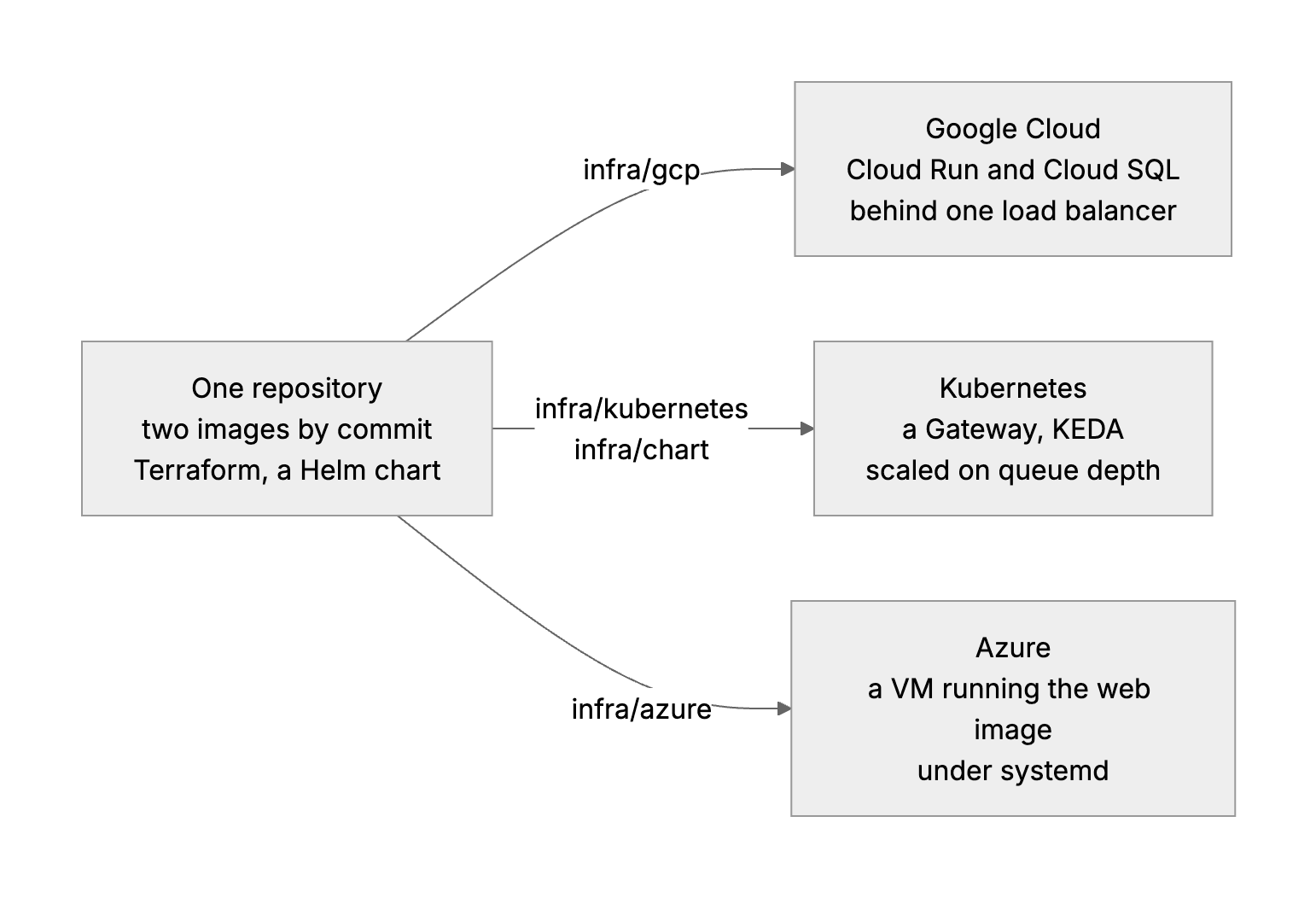
One repository, two images, three targets: Cloud Run with Cloud SQL, a Kubernetes cluster scaled on queue depth, and an Azure VM behind a load balancer.

Part 1

Choose the targets

Study first

  • The deployment targets and what each costs to run: ECS on Fargate or Cloud Run (managed containers, no nodes), Elastic Beanstalk (one web app, platform-managed), Kubernetes on EKS or GKE (deployments, services, ingress, autoscaling, and a platform team to run it), virtual machines (a hardened image, a systemd service, a load balancer).
  • The order of preference: managed containers first, Kubernetes when the customer's platform team runs it, a VM when policy demands one.

Build

  1. A table in docs/infrastructure.md of the three targets, what each is for, where its code is and how it was proven.

Done when

  • You can say which target a given customer gets, and what the next one down would cost their team.
Part 2

Terraform for Google Cloud

Study first

  • Providers, resources, data sources, variables, outputs; plan, apply, destroy; reading a plan before approving it.
  • State: remote and locked, one per environment. Modules for a unit made more than once.
  • Secrets: what ends up in state, and the two ways to keep keys out (ephemeral values with write-only arguments, and secrets Terraform creates empty).

Build

  1. infra/gcp: Cloud SQL on a private address, Secret Manager, the registry, the web and realtime services from one module, infra/modules/cloud-run-service, and a load balancer that serves /realtime on the app's host.
  2. Staging and production from the same root, with staging.tfvars and production.tfvars and a state each under its own prefix in one bucket, the one thing made by hand before Terraform runs.
  3. The database password as an ephemeral value, written through password_wo and secret_data_wo. The API keys never pass through Terraform.
  4. terraform test plans both environments against a mocked provider and asserts the differences: a standby and deletion protection only in production, no public address, the password absent from the plan.

Done when

  • Both environments plan from the same code with only the differences you meant, and no secret appears in a plan.
Technical notes
  • Services start on Google's placeholder image, and Terraform ignores the image and command after that. A first apply then needs no image in the registry, and releases own what runs.
  • infra/gcp/release.sh runs the migration and the smoke suite as Cloud Run jobs with the new tools image first, then moves both services, and restores both revisions if either fails.

Part 3

The cluster's platform and the app as a chart

Study first

  • Kubernetes: deployments, services, secrets and config, horizontal autoscaling. The Gateway API, which replaces Ingress now that ingress-nginx is retired. KEDA, which scales on an external metric.
  • Helm: charts, values, hooks and tests.

Build

  1. infra/kubernetes, applied by Terraform: the Gateway API's resource types, Traefik serving them, KEDA, the namespace, and the secrets through write-only arguments. State lives in Postgres outside the cluster, locked.
  2. infra/chart: every service from one template that loops over values.yaml; Postgres for a cluster that stands alone; a Gateway with the realtime server under /realtime; a ScaledObject on the documents waiting to be read; the migration as a hook; the smoke suite as helm test.
  3. Install it on a kind cluster and fix what breaks.

Done when

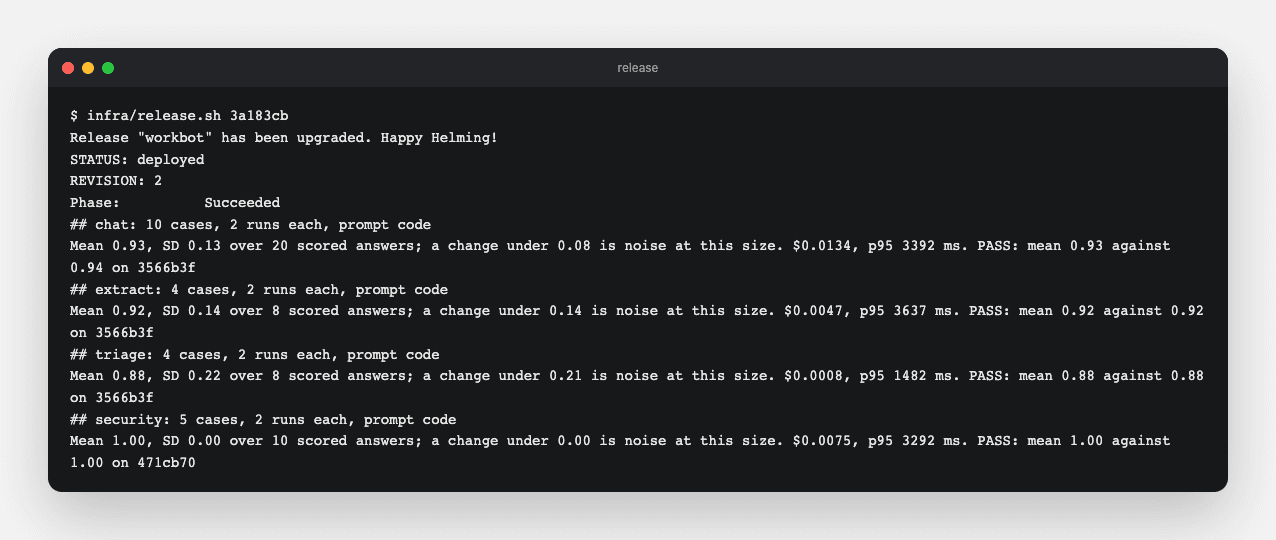
  • A release on an empty namespace installs, migrates and passes every eval gate inside the cluster.
Release
A release through the Gateway: installed, migrated, and the eval smoke suite passed in the cluster.
Technical notes
  • Kubernetes sets a variable per service, so the inngest service gave every pod INNGEST_PORT=tcp://…, which Inngest read as its port. enableServiceLinks: false on every pod.
  • runAsNonRoot cannot verify a user given by name, so the images now run as user 1000.
  • The web pod's first query ran before Postgres was ready, and the failed connection was cached for every query after. The connection is now tried again; Compose had hidden it by starting the database first.
  • KEDA reads the queue from its own namespace, so the database's address is the service's full name.
  • The Gateway API's resource types are too large for a Helm release, which Helm stores in one Secret of at most 1 MiB, so Terraform applies the project's manifest directly.

Part 4

Scale on queue depth

Study first

  • Why CPU is the wrong signal for a worker that waits on a model: the backlog is.

Build

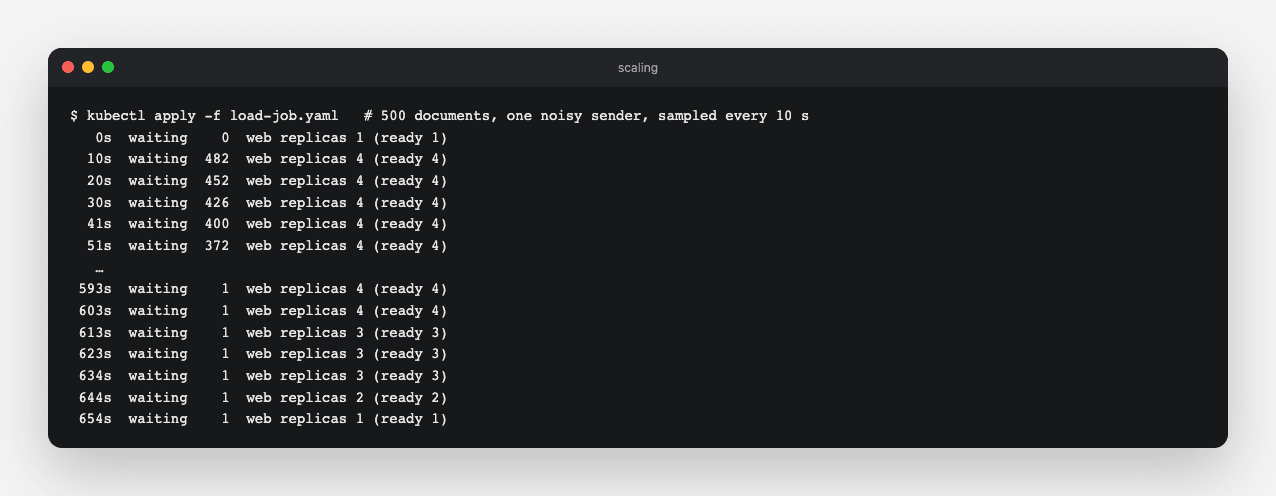
  1. A KEDA trigger counts inbox rows still received, one web replica per 20, from 1 to 4. The web tier is the worker, because Inngest calls it for each step.
  2. Run the 500-document load test as a Job in the cluster and watch the replicas.

Done when

  • The web tier scales out while documents wait and returns to one when the queue is empty.
Scaling
482 documents waiting and 4 web replicas within 10 s; back to one replica about 5 minutes after the backlog cleared. One document stayed waiting, an open item in docs/infrastructure.md.
Technical notes
  • Inngest runs at most 10 steps at once, so replicas past that add nothing. The cap and the maximum are set together.
  • With a minimum of one replica, KEDA hands scaling down to the autoscaler, which waits 5 minutes of low readings before removing pods.

Part 5

Release, smoke, roll back

Study first

  • Promotion by tag: one image per commit, released to staging then production unchanged.
  • Migrations forward-only, before the new version serves traffic.

Build

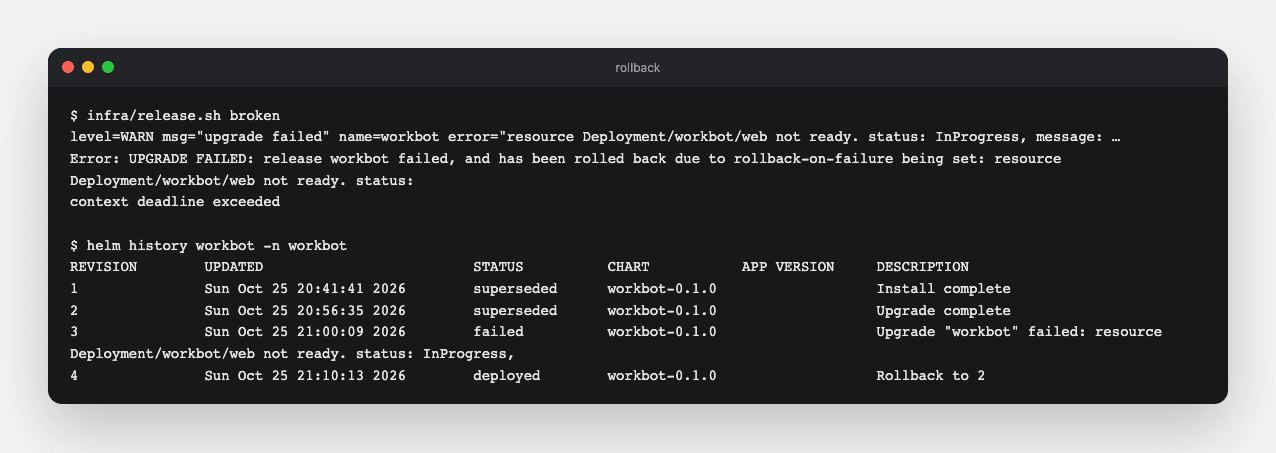
  1. infra/release.sh <tag>: a Helm upgrade that migrates first, waits for the new pods and restores the previous release if they never become ready, then helm test and a rollback if it fails.
  2. Release a good tag, then a broken one whose web container exits at once.

Done when

  • The broken release never takes traffic, and the history shows the previous release restored.
Rollback
The broken tag's pods never became ready while the old ones served; Helm restored revision 2.

Part 6

Recreate from nothing

Build

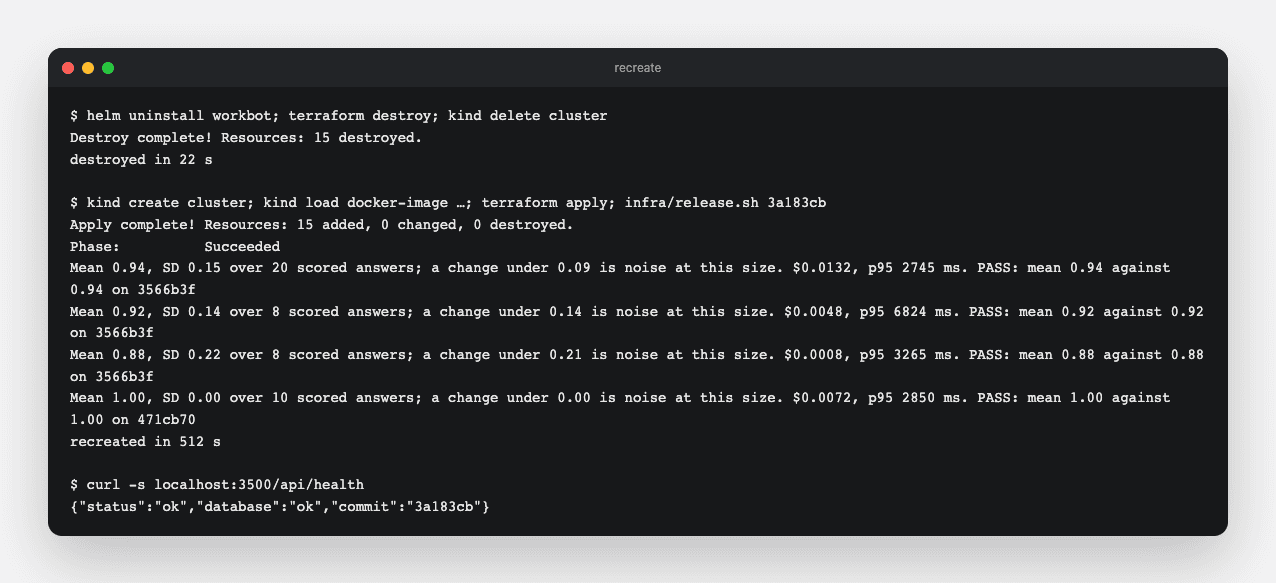
  1. Destroy the environment (the release, the platform and the cluster), then make it again with one sequence: create the cluster, load the images, apply the platform, release the tag. Time both.

Done when

  • The app answers through the Gateway on the new cluster, and you know how long the sequence takes.
Recreated
Destroyed and recreated from nothing, timed, ending with the health check through the Gateway.

Part 7

The Azure VM

Study first

  • cloud-init, systemd units, Standard load balancers and their health probes, managed identities and Key Vault.

Build

  1. infra/azure: a network with no SSH rule, a load balancer probing /api/health, an outbound rule, and an Ubuntu VM with its own identity. cloud-init installs Docker and a unit that runs the web image read-only with every capability dropped. A script reads the keys from Key Vault into memory.
  2. Check it without a subscription: a mocked plan, cloud-init schema and systemd-analyze verify on Ubuntu 24.04, and the unit's own docker run line against Postgres.

Done when

  • The unit's container serves health read-only as user 1000, and the plan admits nothing but the app's port.

Part 8

The pipeline

Study first

  • Plan on a pull request, apply on merge behind a reviewer, deploy the tag, smoke, roll back. Workload identity federation instead of stored cloud keys.

Build

  1. .github/workflows/infra.yml: on every pull request that touches infra/, format and validate every root, run the mocked tests where a root has them, and lint the chart. With Google Cloud connected by four repository variables, the real plan on the pull request and an apply after merge in the production environment, configured to wait for a reviewer.
  2. .github/workflows/release.yml: a v* tag builds the two images and runs the release script of each connected target, Cloud Run or a cluster.

Done when

  • The checks pass on the pull request without an account, and connecting one is setting variables, not writing code.

Resources