Week 7 · Day 32 of 40 · Build AI

Multi-channel chat: web, SMS, WhatsApp, iMessage and Slack

You ship: The agent on 4 channels with shared sessions, delivery callbacks and retries. Builds on: Day 8, Day 18.

By the end of the day you can

  • Run one agent across several messaging channels with shared session state
  • Implement webhook channels (Twilio SMS and WhatsApp, iMessage providers) with delivery and retry handling
  • Ship the same bot to Slack and other workplace chat with the Vercel Chat SDK

Topics

One Agent, Many Surfaces

  • Channel adapter pattern: normalize inbound messages to { channel, userId, threadId, text, attachments } → agent → per-channel renderer
  • Identity across channels: the same person on web and WhatsApp, linked by verification, never by guessing
  • Channel constraints: length limits, no markdown on SMS, limited rich elements on WhatsApp, threads on Slack
  • Latency expectations: web streams, SMS waits; typing indicators where supported

Webhook Channels: Twilio SMS + WhatsApp

  • Inbound: Twilio posts to your webhook; validate the signature; respond fast, process asynchronously (Day 18)
  • Outbound: Messaging API, status callbacks (queued, sent, delivered, failed), retries with idempotency keys
  • WhatsApp rules: the 24-hour customer service window, approved templates for business-initiated messages, opt-in
  • Meta's WhatsApp Cloud API: the alternative to Twilio, same window and template rules

iMessage

  • No public API for personal iMessage; business messaging goes through Apple Messages for Business and approved providers
  • Provider-backed iMessage: webhooks in, API out, delivery receipts; SMS fallback when the recipient is not on iMessage
  • Compliance: consent before the first message, STOP handling, quiet hours

Workplace Chat with the Vercel Chat SDK

  • One codebase, many platforms: Slack, Microsoft Teams, Google Chat, Discord, Telegram adapters behind one API
  • Primitives: threads, mentions, reactions, ephemeral messages
  • Serverless operation: event delivery, retries, deduplication

Tool Calls + Generative UI per Channel

  • Tools run the same everywhere; rendering differs: cards on Slack, plain text on SMS, interactive components on web only
  • Human handoff: escalate a thread to a person on any channel, with the transcript

Build

Features shipped today

  • WorkBot: Slack for employees; WhatsApp, SMS and iMessage for customers alongside the web app, with one session store; email intake stays on the workflow

Put your agent on 4 channels with one session store:

  1. Channel adapter and session store (Postgres), with a channels table linking verified identities
  2. SMS and WhatsApp via Twilio: inbound webhook with signature validation, async processing, outbound with status callbacks and retries
  3. Slack via the Vercel Chat SDK: a mention starts a thread, replies continue it, tool results render as cards
  4. iMessage via a provider sandbox where available; otherwise document the integration and ship the SMS fallback
  5. Test: a conversation started on web and continued on WhatsApp keeps its context; a failed outbound message retries and reports; WhatsApp template rules hold outside the 24-hour window

Walkthrough

Put WorkBot's one assistant on four channels with one store of conversations: the web, SMS, WhatsApp and Slack. A customer who starts on the web and continues on WhatsApp keeps the conversation, because it now lives on the server, and two identities become one person only when a code shown in one is sent from the other. Text messages arrive through signed webhooks and are answered by a workflow that does not resend a reply Twilio has accepted and respects WhatsApp's rules; Slack runs on the Chat SDK. Any channel can hand a conversation to a person. No Twilio account or Slack workspace was available, so the day runs everything up to the provider's API.

Channels
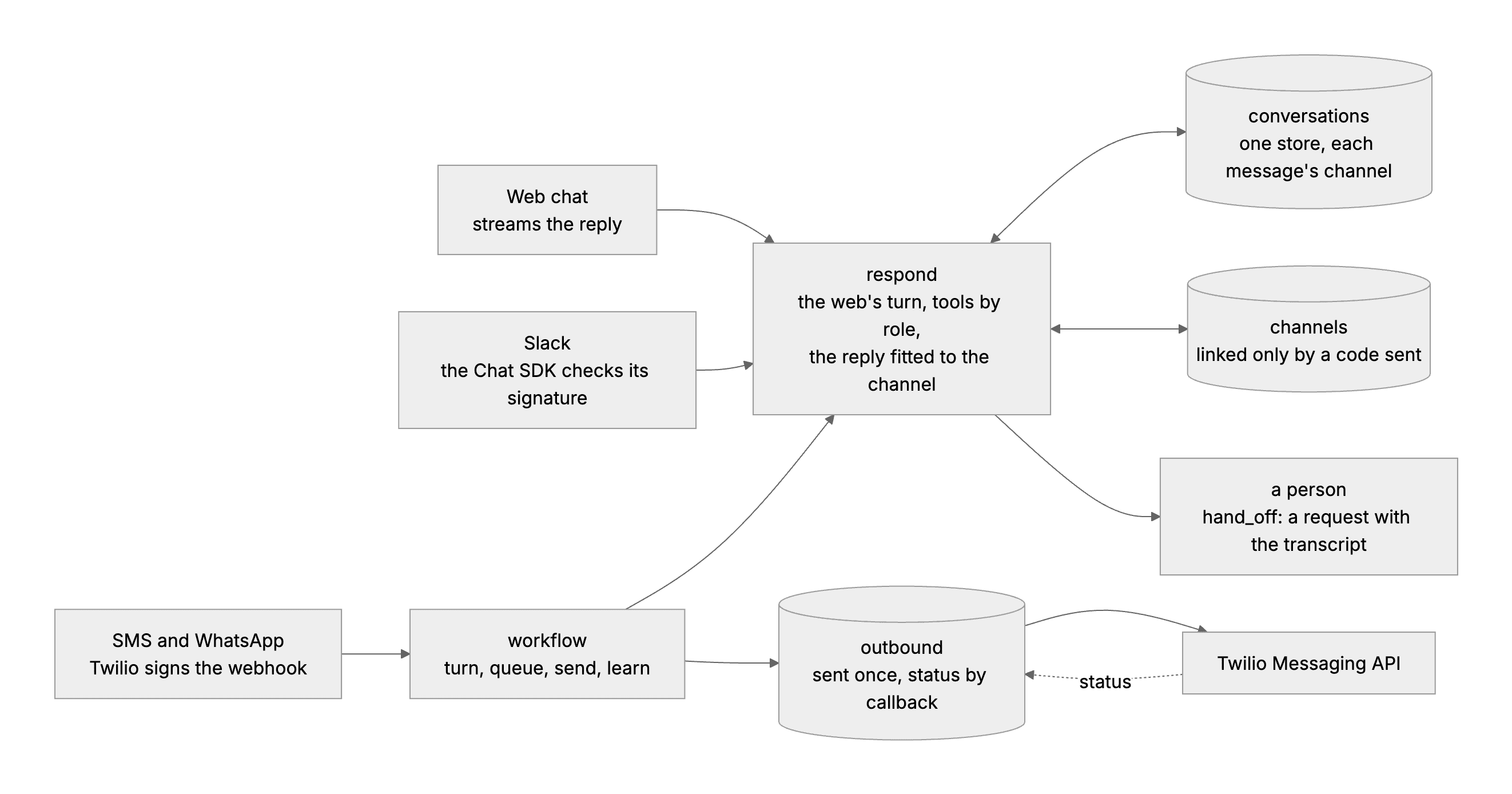
Each channel's adapter hands the same turn one message; the turn reads and writes one store of conversations and the identity links. Text replies go out through a workflow and an outbox; a person gets a hand-off with the transcript.

Part 1

One turn for every channel

Study first

  • The adapter pattern: each channel turns what arrives into one shape, { channel, address, text, thread }, and renders what goes back. The agent in the middle does not know which channel it is on, except for a line about how to write.
  • Where a conversation lives decides where it can continue. A history kept in the browser cannot be continued from a phone.
  • Latency: the web streams, SMS waits for the whole reply. The same turn serves both; only the call that runs it differs.

Build

  1. prepare in src/lib/assistant.ts: the web chat's turn taken out of its route, the versioned prompt first so the provider can cache it, then what is known about the person and the conversation trimmed to the context budget. The web streams it; the other channels wait for it.
  2. A conversations table and src/lib/history.ts: each conversation with its person and its messages, each message marked with the channel it came by.
  3. The web route starts from the server's copy when there is one, so turns taken on another channel are part of the next answer, and updates the copy after each reply. The chat page fetches the server's copy when it opens a conversation and labels each message that came by another channel.

Done when

  • A conversation that includes WhatsApp turns reaches the model whole, even when the browser sends only its own older messages and the new question; a turn whose save has not landed yet is kept from the browser's copy.
Technical notes
  • The save is guarded in SQL: an update applies only where the stored person matches, so a client that sends someone else's conversation id cannot overwrite it.
  • Taking the server's copy as the conversation is safe because the web chat retries only after a failed turn, and a failed turn saves nothing.
Part 2

One person across channels

Study first

  • Identity across channels is linked by verification, never by guessing. A matching phone number or name is a claim; possession of both accounts is proof.
  • A one-time code is the proof: shown in one channel, sent from the other, short-lived, single-use, stored as its hash.

Build

  1. linkCode(person, conversation) in src/lib/channels.ts: 8 characters from an alphabet without look-alikes (no 0, O, 1 or I), valid for 10 minutes, stored as a SHA-256 hash.
  2. A channels table: each sender on each channel, the person behind it, the conversation it continues, when it last wrote and whether it opted out. A sender who never linked is a person of their own, such as whatsapp:+15105550142.
  3. link <code> from a phone or a Slack account links that address to the person and their conversation. A linked WorkBot user gets their role's tools; anyone else gets the customer's.
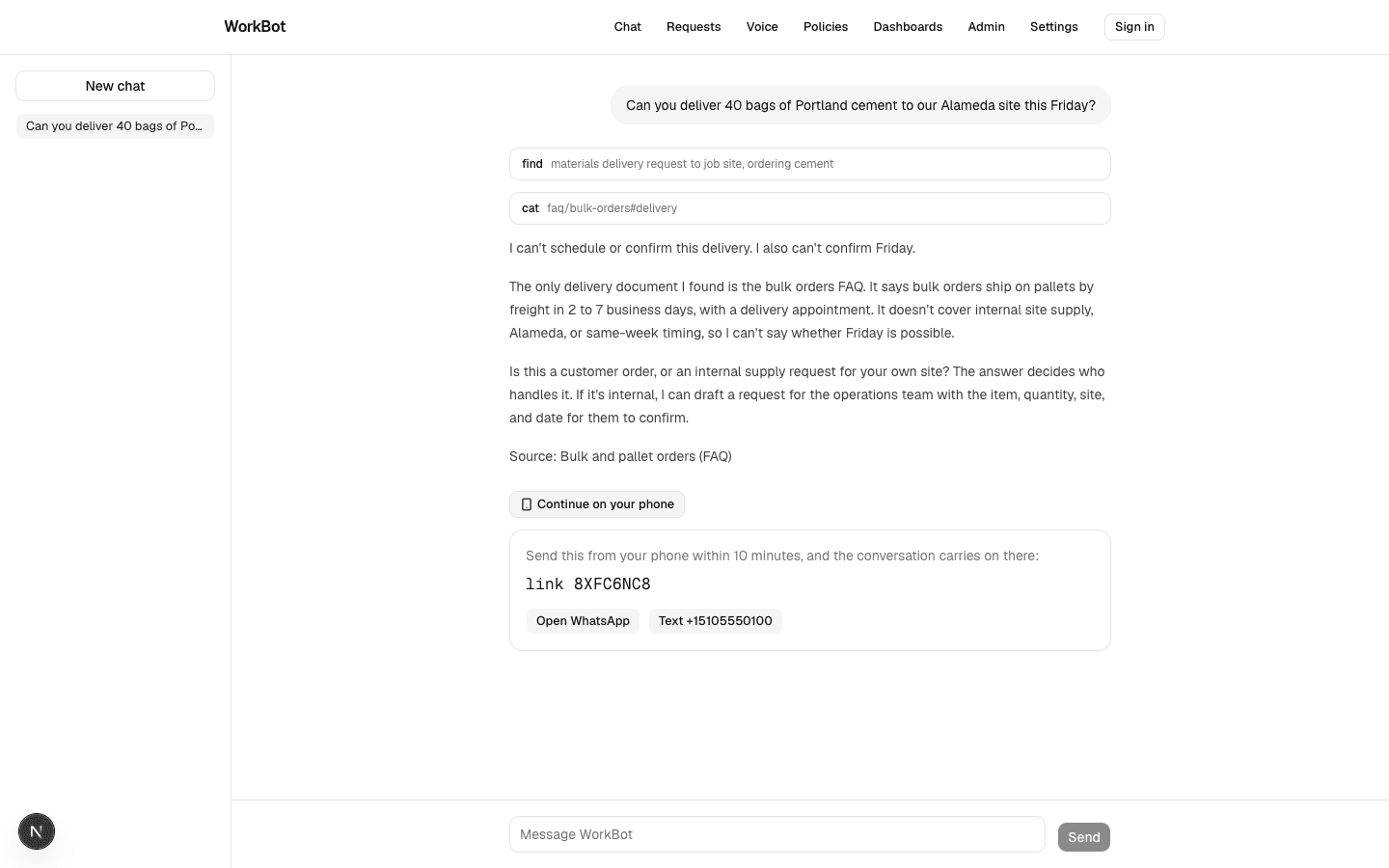
  4. "Continue on your phone" on the chat page shows the code with links that open WhatsApp or the SMS app with the message typed in. Employees link Slack from their settings.

Done when

  • A code links once and then expires; a wrong code links nothing; a number that never sent one keeps a conversation of its own.
A code to continue on a phone
The web chat offers a one-time code; sending it from WhatsApp or by SMS carries this conversation on there.

Part 3

SMS and WhatsApp through Twilio

Study first

  • Twilio's webhook signature for a form-encoded request: HMAC-SHA1 of the exact URL it called followed by each parameter, name then value, sorted by name, keyed with the account's auth token. Twilio's SDKs ship a validator; the check is a few lines either way.
  • Respond fast, process asynchronously (Day 18). Twilio needs an answer within seconds; a model's turn takes longer.
  • Outbound: the Messaging API, status callbacks (queued, sent, delivered, undelivered, failed), and retries that do not resend a message the provider accepted.
  • WhatsApp's rules: a customer's message opens a 24-hour window for free-form replies; outside it, only an approved template. A business needs the customer's opt-in before it writes first, and STOP must be honoured on every channel.

Build

  1. src/lib/twilio.ts: the signature check, computed over the configured public URL, because behind a proxy the server sees a different one; and one function that sends through the Messaging API with a status callback.
  2. /api/webhooks/twilio: check, then hand the message to Inngest under Twilio's message id, so a redelivery is the same run, and answer with empty TwiML at once.
  3. src/inngest/channel-reply.ts: the turn, the reply queued in outbound, the send, then memory extracted from the exchange, each a step.
  4. deliver in src/lib/outbound.ts: a message that already has the provider's id is not sent again. A 429 or a 5xx is recorded and retried; anything else fails for good with the provider's code. WhatsApp outside the window sends the approved template, without variables here, or fails with that reason. /api/webhooks/twilio/status records Twilio's word on each message.
  5. STOP, UNSUBSCRIBE, CANCEL, END and QUIT silence an address until START.

Done when

  • A signed message reaches the workflow and an unsigned or altered one does nothing; a send whose id is stored is not repeated; a provider failure retries and is reported; WhatsApp's window holds in both directions.
Technical notes
  • The send is tested against a stand-in for the Messaging API on the machine, reached through the same setting that points WorkBot at a regional Twilio host. It answers with the next scripted response: a message id, a 503, an invalid number.
  • A send that crashes after Twilio accepts it but before the id is stored would be sent again on retry. Storing the id is the next statement after the call, which keeps that window small; it does not close it.
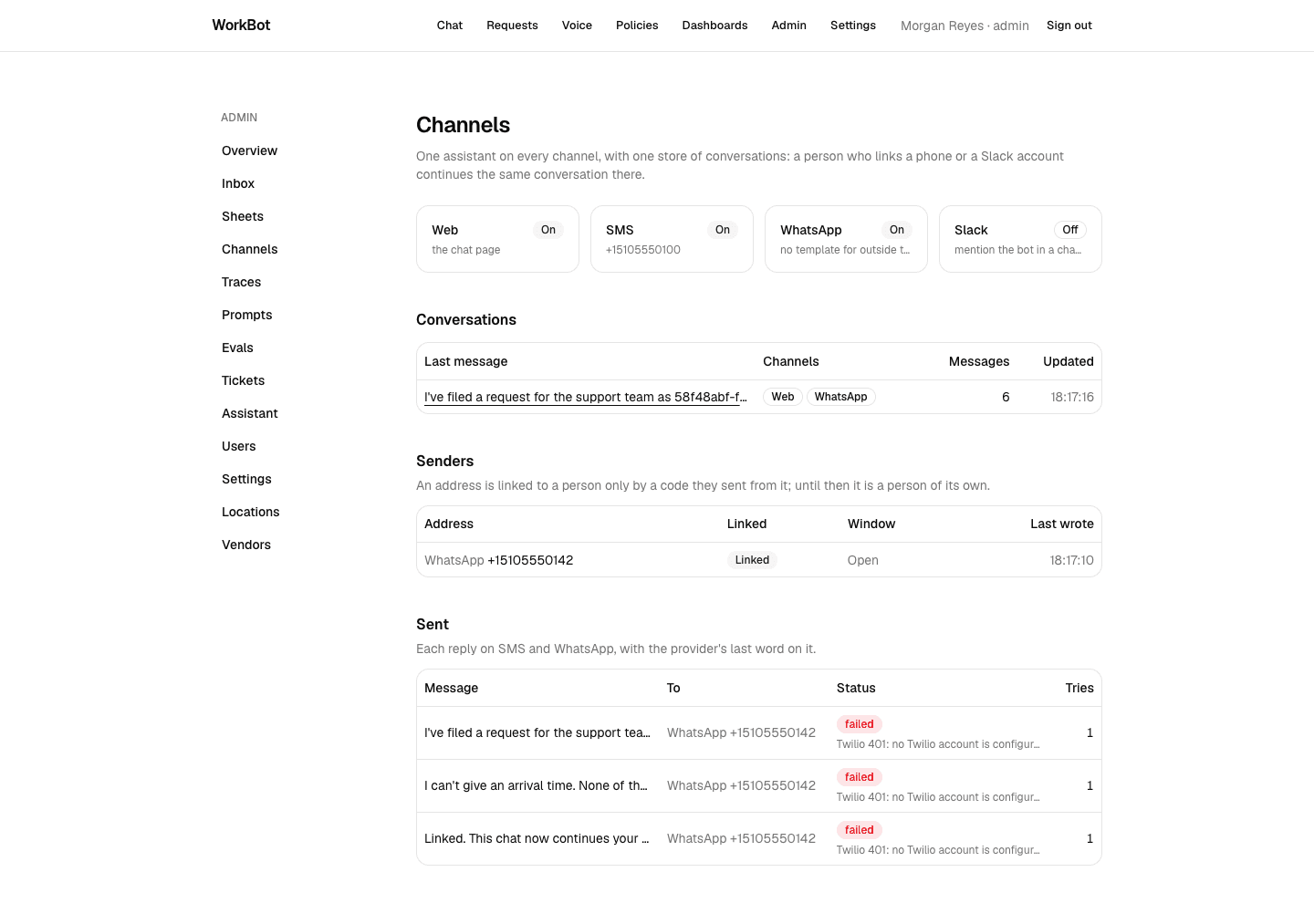
  • Without an account, the send fails immediately with "no Twilio account is configured", and the Channels page shows that against each reply.
  • STOP silences the address it came from, not every channel of a linked person, and nothing collects WhatsApp opt-in: WorkBot only answers people who wrote first, inside their window.

Part 4

Slack through the Chat SDK

Study first

  • One codebase, many platforms: the Chat SDK has adapters for Slack, Teams, Google Chat, Discord and others behind one API of threads, mentions, posts and cards.
  • Serverless operation: Slack expects an answer within 3 seconds and redelivers when it does not get one, so the handler runs after the response and duplicate deliveries are dropped.
  • The SDK keeps state between requests: followed threads, a lock per thread, deduplication keys, queues.

Build

  1. src/lib/chat-state.ts: the SDK's state interface over one table of WorkBot's, each operation one statement.
  2. src/lib/bot.ts: a mention starts a thread the bot follows, and each message in it continues the conversation; the thread is the conversation, and the author's linked account sets the role. A reply that used tools goes as a card naming them.
  3. /api/webhooks/slack, served by the SDK, and a Slack app manifest in docs/channels.md.

Done when

  • The route answers Slack's address check and refuses an unsigned event, and a mention in a thread is answered in that thread with the conversation kept.
Technical notes
  • The SDK's own Postgres adapter connects with its own driver and creates its own tables, outside the row-level security of Day 30. Writing the adapter over WorkBot's database keeps the bot's state separated by tenant, and it runs on the embedded database in tests.
  • Popping a queue reads the old head through the update's FROM clause; only the thread's lock holder pops, so two readers never race for one entry.
  • The SDK also has a GitHub adapter, and GitHub issues are WorkBot's tickets. With a personal token, the bot and the person commenting are the same account, so the adapter ignores the comment as its own. A GitHub App gives the bot an identity of its own.

Part 5

A reply for each channel, and a person when needed

Study first

  • Channel constraints: SMS takes plain text, WhatsApp bold, Slack threads and cards. Tell the model, and enforce it on what comes back.
  • Human handoff: escalate to a person on any channel with the transcript, so nobody asks the customer to start again.
  • Know who is writing. A stranger texting the business number is a customer; a signed-out visitor on the web might be staff.

Build

  1. A line per channel telling the model how to write, and render, which strips markdown for SMS, converts Markdown bold to WhatsApp's and holds each length limit.
  2. hand_off in src/lib/handoff.ts, offered on every channel: a request for the team that looks after customers, with the reason, the conversation and where to reply.
  3. On SMS and WhatsApp the model is told an unlinked sender is a customer: answer from the customer-facing documents, do not send them to an internal team, hand off when they need a person.

Done when

  • A customer who asks for a person on WhatsApp gets a request filed with the transcript, and the next turn knows it was filed.
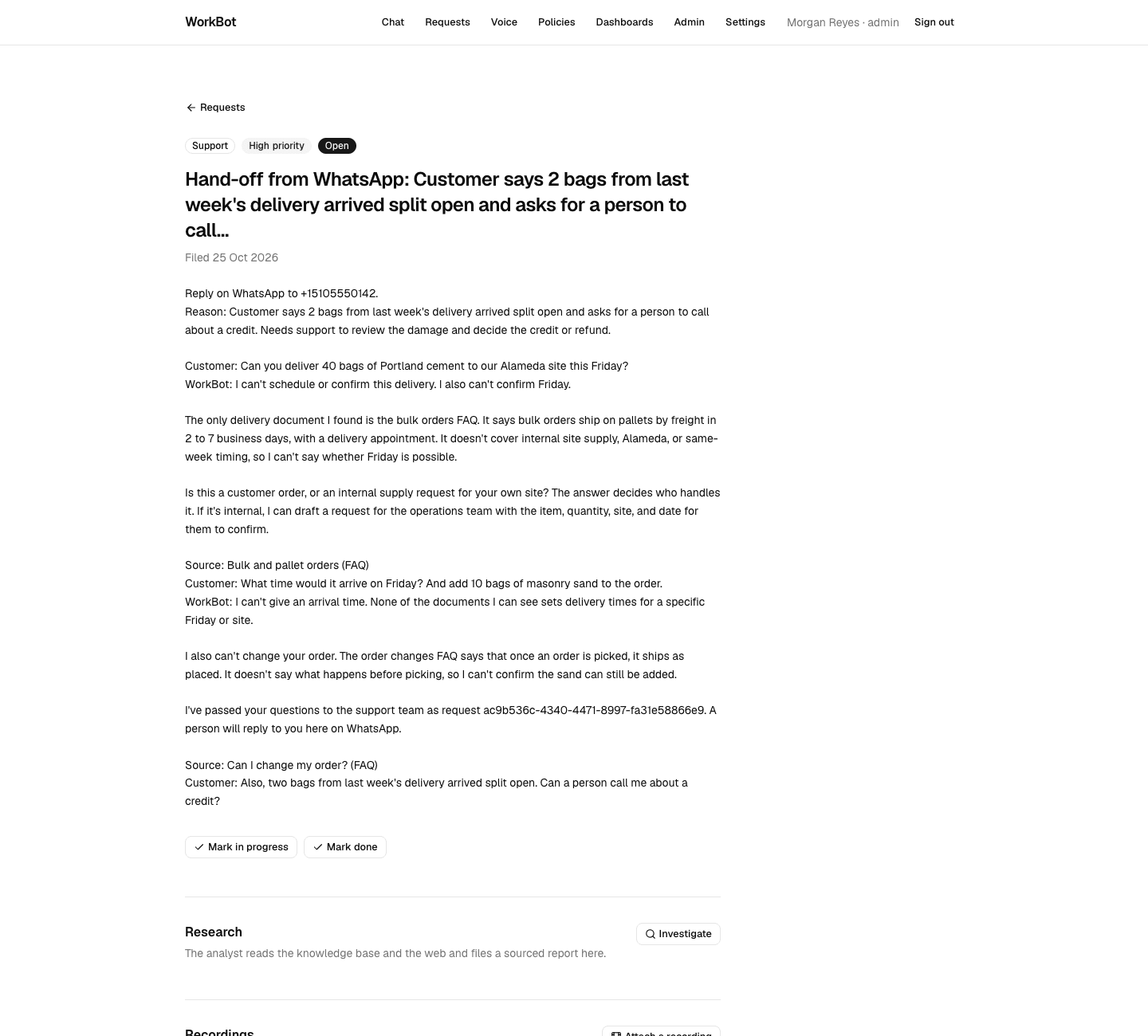
A hand-off
A WhatsApp customer's damaged delivery handed to support: where to reply, the reason, and the conversation from its start on the web.
Technical notes
  • The customer note first went to every signed-out caller, the web included. The chat eval's smoke set fell from 0.94 to 0.80: its cases expect the web assistant to name the team or the approver, because it was written for employees who had not signed in. The note now applies to SMS and WhatsApp only; who the signed-out web visitor is remains a product decision for the eval to hold.
  • The live run found a duplicate. A channel turn kept only its reply's text, so on the next message the model saw "I've filed request ca66be2f…" with no tool call behind it, said it had not really filed anything, and filed again. Channel turns now keep their tool calls and results as the web does, and a test checks the next turn sees them.
  • The first hand-off of the run failed: the model's reason was longer than the 100 characters the tool allowed. The title is now clipped and the reason kept whole in the body.

Part 6

Run it on the dev server

Build

  1. Set APP_URL, a TWILIO_AUTH_TOKEN of your own to sign the test messages with, and point the Inngest dev server at the app.
  2. On the chat page, ask about a delivery, take a code, then post messages to /api/webhooks/twilio signed as Twilio signs them: link <code>, a follow-up, a damaged-goods complaint. Every model turn is real; nothing proves delivery to or from Twilio.
  3. Open the chat page again and /admin/channels: the WhatsApp turns on the web, who has linked, each message sent and why it did not leave the machine.

Done when

  • The transcript reads as one conversation across two channels, with each tool call and hand-off in place.
The web after WhatsApp
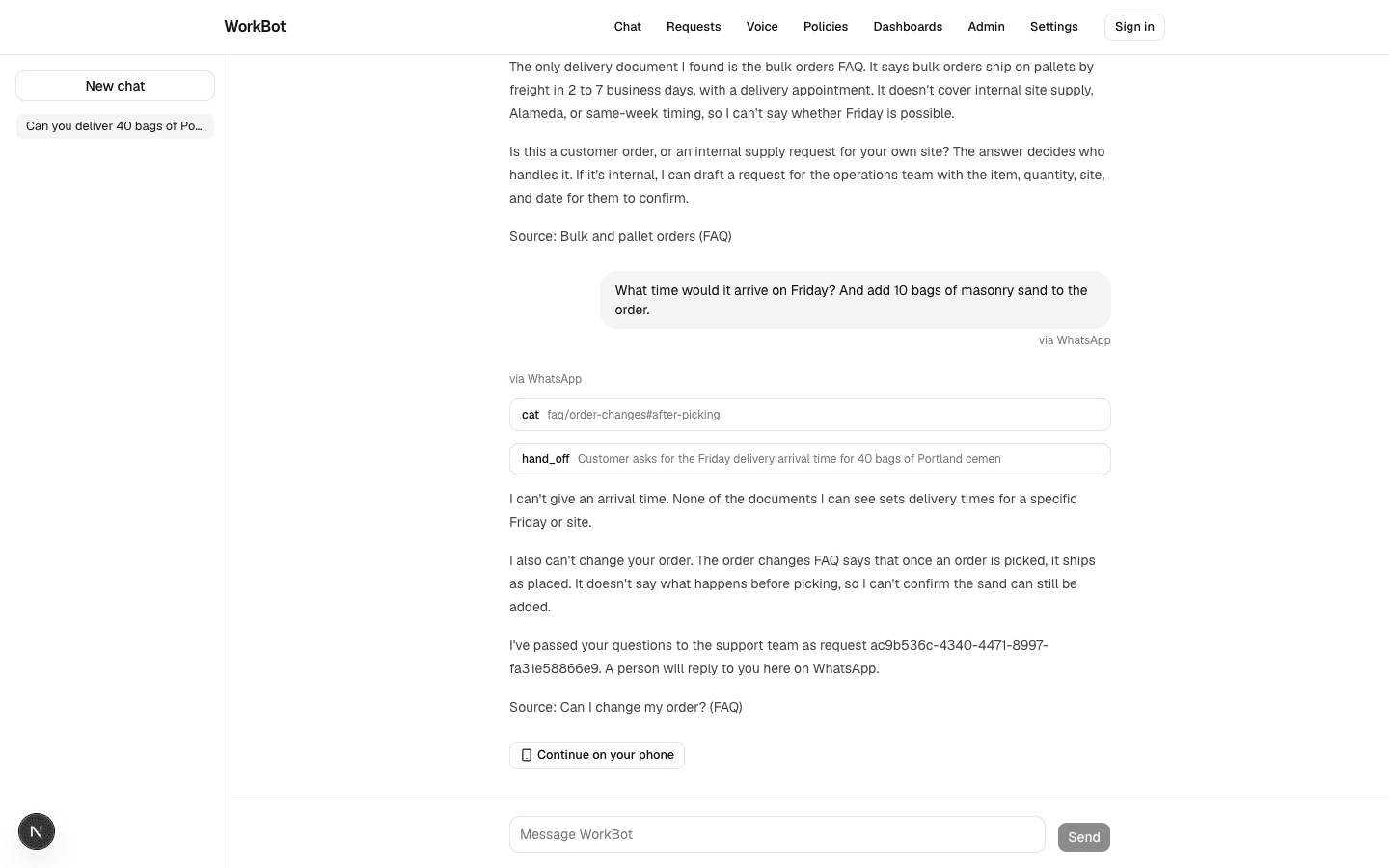
The same conversation on the web, the WhatsApp turns labelled where they came from.
The conversation
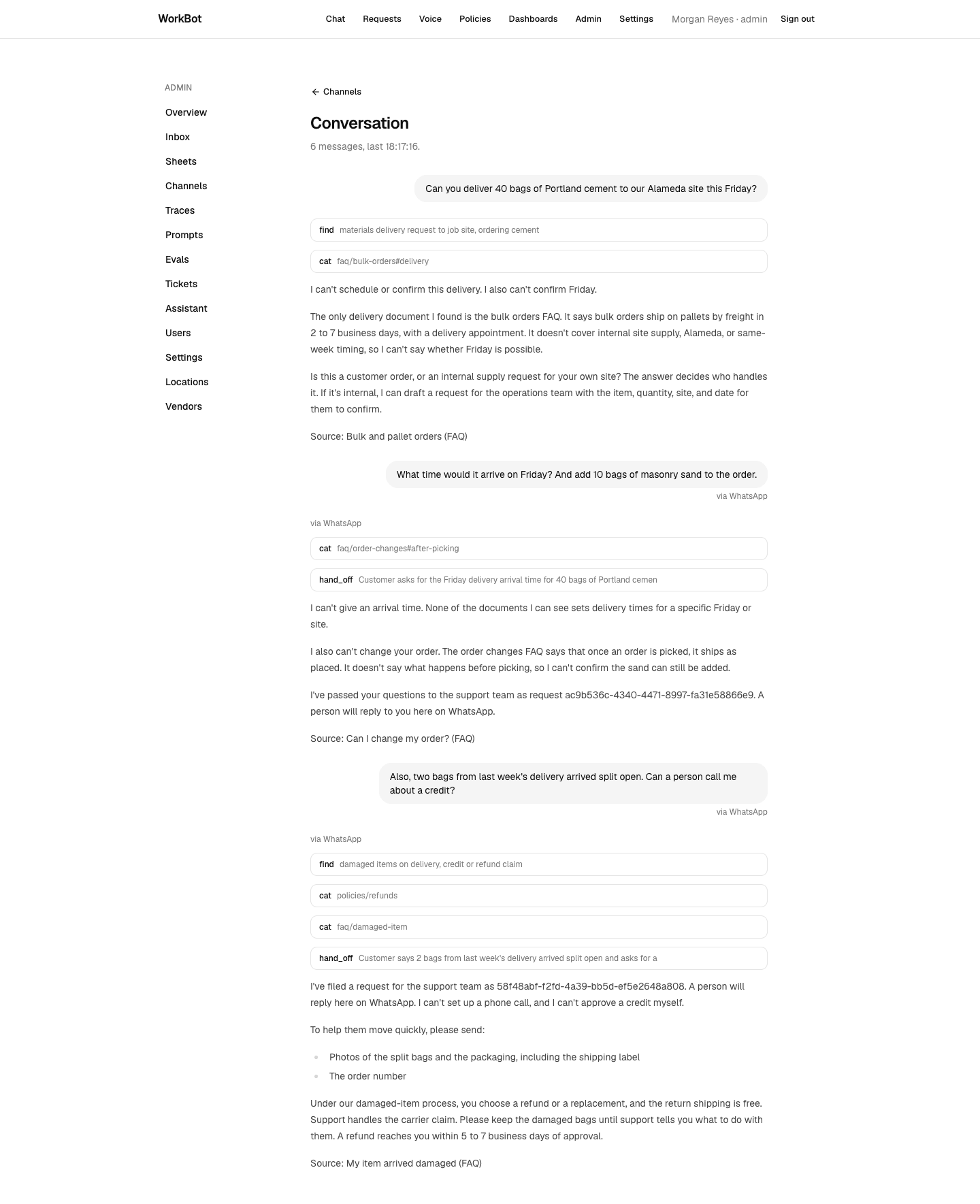
One conversation: a web question, then WhatsApp, with the documents read, two hand-offs and their replies.
The Channels page
Which channels are on, the linked sender with WhatsApp's window open, and each reply marked failed because no Twilio account is configured.
Technical notes
  • Next.js 16 points next-env.d.ts at the dev server's types, and next typegen or a build points it at their own. While the dev server runs, that change sent it into a reload loop that froze the browser. Restart the dev server after a check.

Part 7

What an account adds, and iMessage

Study first

  • iMessage has no public API for business. Apple Messages for Business runs through Apple's approved messaging providers, with webhooks in and an API out. SMS reaches nearly every phone and is the fallback, with sender rules that vary by country and number type.

Build

  1. In docs/channels.md, list what going live needs: a Twilio account and numbers, the webhook URL in Twilio's console, a WhatsApp sender approved by Meta, a template for outside the window, opt-in collected before WorkBot writes first, and a Slack app installed with the manifest.
  2. Write down what is not built: iMessage, quiet hours, typing indicators, attachments, a page or alert when a hand-off arrives (it waits in the team's requests), and a person replying from WorkBot to the channel it came from.

Done when

  • Someone with the accounts can turn each channel on from the environment alone, and knows which claims stay unproven until then.

Resources