Week 4 · Day 18 of 40 · Build AI

Workflow orchestration with Inngest

You ship: A durable document pipeline with human approval, deployed on Vercel. Builds on: Day 17.

By the end of the day you can

  • Build durable AI workflows that survive failures and handle long-running tasks
  • Implement fan-out/fan-in, retries, and human-in-the-loop patterns
  • Deploy event-driven AI workflows on Vercel

Topics

Why Agents Need Durable Execution

  • The problem: AI workflows can take minutes/hours, servers restart, APIs fail, users close browsers
  • Without durability: a 10-step agent that fails on step 7 loses all progress
  • Durable execution: each step is checkpointed, workflow resumes from where it left off after failure
  • Use cases: document processing pipelines, multi-agent research, approval workflows, scheduled AI tasks

Inngest Fundamentals

  • What Inngest is: a workflow engine for TypeScript, serverless-native, works with Vercel
  • Functions: define a multi-step workflow as a TypeScript function
  • Steps: step.run() - each step is individually retried and checkpointed
  • Events: trigger workflows from events (webhooks, API calls, schedules)
  • Sleep: step.sleep() - pause a workflow for hours/days without holding a server connection
  • Vercel integration: deploy Inngest functions alongside your Next.js app

Workflow Patterns

  • Sequential steps: step A → step B → step C, each checkpointed
  • Fan-out/fan-in: process 100 documents in parallel, collect all results
  • Human-in-the-loop: workflow pauses, sends notification, waits for human approval, resumes
  • Scheduled agents: run an AI agent every hour/day/week on a cron schedule
  • Event-driven triggers: user uploads document → triggers extraction workflow → results stored → user notified
  • Error handling: per-step retries with backoff, dead letter queues, alerting on failure
  • Checkpointing: automatic state persistence between steps, resume from any step

Long-Running AI Workflows

  • Document processing: upload → OCR → extract → validate → store → notify (minutes)
  • Research pipelines: gather sources → read each → synthesize → review → publish (10+ minutes)
  • Approval workflows: AI drafts → human reviews → AI revises → human approves → publish
  • Batch operations: process 1000 items with AI, handling rate limits and failures gracefully

Build

Features shipped today

  • WorkBot: The document approval workflow: intake, extract, validate, human approval, store, notify; scheduled check-ins and reminders as durable scheduled agents

Build an orchestrated multi-step AI workflow:

Scenario: Document processing pipeline that receives uploaded documents, extracts data, gets human approval, and stores results.

  1. Event trigger: user uploads a document (PDF, image, or URL)
  2. Step 1 - Pre-process: determine document type, clean/parse content
  3. Step 2 - Extract: use Day 17's extraction pipeline to pull structured data
  4. Step 3 - Validate: check extraction confidence, flag low-confidence fields
  5. Step 4 - Human review: if any fields are low-confidence, pause workflow and notify reviewer via webhook/email
  6. Step 5 - Wait for approval: step.waitForEvent() - workflow pauses until human approves/rejects/edits
  7. Step 6 - Store: save validated data to database
  8. Step 7 - Notify: send confirmation to the original uploader

Requirements

  • Each step retries up to 3 times on failure
  • The workflow survives server restarts (test by restarting during processing)
  • Fan-out: accept a batch of 10 documents, process all in parallel
  • Dashboard: show workflow status (which step, waiting for approval, completed)
  • Deploy on Vercel with Inngest

Walkthrough

Build a durable document pipeline on Inngest: per-step checkpoints and retries, a wait for a reviewer that holds no server, and a morning schedule for the reminders. The app serves the functions; the engine runs them.

Part 1

Why a step function

After a crash, a deploy or a day waiting for a person, the pipeline should resume at the step that was interrupted, not at the top.

Study first

  • Durable execution: a function is re-run from the top after every pause or failure; steps already recorded return their saved result instead of running again. A step's result must be JSON, and a step's side effects can run twice when a result was not recorded, so each write that must not repeat is a step of its own.
  • Inngest's pieces: a client, events with a name and data, functions with triggers (an event or a cron), step.run for work, step.waitForEvent for a pause, step.sleep for time; the engine calls the app's serve route to run each step.
  • Local development: the dev server (inngest-cli dev -u <app>/api/inngest) is the engine on the machine, with a dashboard of runs at localhost:8288.

Build

  1. pnpm add inngest, pnpm add -D inngest-cli @inngest/test. pnpm runs no package's install script unless listed, and inngest-cli's script fetches its binary, so it goes under onlyBuiltDependencies in pnpm-workspace.yaml.
  2. src/inngest/client.ts: new Inngest({ id: "workbot", eventKey, signingKey, isDev: !signingKey }), keys from config. Inngest's own switch is INNGEST_DEV=1 or isDev: true; this build's rule is that no signing key means dev mode, against the dev server.
  3. src/inngest/events.ts: eventType("document/received", { schema }) with a Zod schema, document/reviewed with the decision and corrected fields, reminders/requested.
  4. src/app/api/inngest/route.ts: export const { GET, POST, PUT } = serve({ client, functions }). In route.test.ts, call GET(new NextRequest(url), { params: Promise.resolve({}) }) and expect status 200 and function_count: 3 in the JSON (the workflow, its failure handler and the reminders): the engine's introspection of the app.
  5. pnpm inngest: the dev server pointed at the app; INNGEST_EVENT_KEY and INNGEST_SIGNING_KEY in .env.example for Inngest Cloud.

Done when

  • pnpm test src/app/api/inngest passes, and with pnpm dev and pnpm inngest running, localhost:8288/functions lists document-approval, its failure handler and reminders.
Technical notes
  • The serve route is the only route not written by this repository: the SDK's handler, listed as the exception in src/app/api/CLAUDE.md.
  • Dev mode is decided in code, by the absence of a signing key, rather than by INNGEST_DEV in the environment, so config.ts stays the one module that reads process.env and the tests run in dev mode without setup.
  • On Vercel, the same route serves Inngest Cloud: install Inngest's Vercel integration, which sets INNGEST_EVENT_KEY and INNGEST_SIGNING_KEY in the project and syncs the functions on each deploy. A run that exhausts its retries is marked failed in the dashboard and raises an inngest/function.failed event; onFailure on the function is the handler for it, and an alerting function can trigger on the same event. There is no separate dead-letter queue to drain.
Part 2

The approval workflow

Wrap Day 17's pipeline in a function: classify, extract, validate, a reviewer when a field is doubtful, file, attach, notify.

Study first

  • What goes in a step: one unit of work whose result is worth keeping. The model calls are steps; so is the write that files the request. Reading a row is not.
  • step.waitForEvent: the run suspends until an event arrives whose field matches (match: "data.id") or the timeout passes, and the result is the event or null.
  • NonRetriableError: a failure that a retry cannot fix, such as a document that is not there, ends the run instead of retrying it.

Build

  1. src/lib/inbox.ts and an inbox table: the document's bytes (bytea, Postgres's binary column), its status (received, extracted, awaiting_review, stored, rejected, expired), kind, record, confidence, review fields, the request it became; receive, fileOf, getItem, updateItem, listInbox, waitingSince.
  2. src/lib/notify.ts and a notifications table: an outbox, the rows a mail or chat integration would send, with notify(recipient, message, link) and listNotifications.
  3. src/inngest/document-approval.ts: inngest.createFunction({ id, retries: 3, triggers: [documentReceived], onFailure }, ...) with the steps classify, extract, then ask-for-review and waitForEvent("review", { event: documentReviewed, match: "data.id", timeout: "3d" }) when review is not empty, then file (the request), attach (the record on it, the inbox row) and notify. A null answer is expire; a rejection is reject; an approval's corrected fields are merged before file. onFailure runs when the retries are spent and marks the row failed with the error, so a document never sits at Received for good.
  4. Each step writes its outcome to the inbox row, so the dashboard reads the database, not the engine.
  5. Tests on @inngest/test: InngestTestEngine runs the function with the model's steps mocked by id (classify returns "invoice", extract the record) and everything after them real against the embedded database. 4 tests: a confident extraction is filed and the uploader notified; a doubtful one pauses at review with the right options and notifies reviewers, then an approval with corrections is what gets filed; a rejection and a timeout end without a request; and the real classify and extract steps, on a scripted model, write what they found to the row.

Done when

  • pnpm test src/inngest passes 5 tests (4 for the workflow, 1 for the reminders), and in the paused case ctx.step.waitForEvent was called with match: "data.id" and timeout: "3d".
Technical notes
  • A step's return value is serialized: extract returns the record, the confidences and the review fields, not the row, and file returns the request's id, title and team, not the request with its Date.
  • The document's bytes are read from the database inside each step that needs them, not passed between steps: a step's result must stay small, and a replay must find the same bytes.
  • In @inngest/test 1.0.0 with inngest 4.26, a mocked waitForEvent step fails the engine's event validation before its value is awaited, so the tests replace the step tool itself: transformCtx (the engine's hook for changing the context a function gets) with mockCtx to keep the spies, and step.waitForEvent set to a stub that returns the reviewer's answer. The paused case uses executeStep("review"), which runs the function up to that step, and checks the real tool's call.
  • retries: 3 is 3 retries after the first attempt, per step: a model call that fails 4 times fails the run; the steps before it are not run again. The first run of the batch here failed on a bug in the extract step's row update that the mocked test had hidden, which is why the real steps now have a test.

Part 3

The inbox, the reviewer and the schedule

Study first

  • Fan-out by events: one event per document, one run per event, the engine runs them in parallel. Fan-in is a step that waits for the others, which this workflow does not need.
  • Human in the loop as an event: the Approve button sends document/reviewed with the document's id; the paused run matches it and goes on. Nothing polls.
  • A scheduled agent is a cron trigger and steps: cron("0 9 * * *"), one step per notification, so a retry never repeats a sent one.

Build

  1. src/app/admin/inbox/actions.ts: uploadDocuments keeps up to 10 files in the inbox and sends one document/received each (inngest.send([...])); when the send fails, the rows are discarded and the error surfaces, so no upload is left that the engine never heard of. review(id, decision) sends document/reviewed; runReminders sends reminders/requested. The inbox takes files; a page by address goes through Day 17's POST /api/documents.
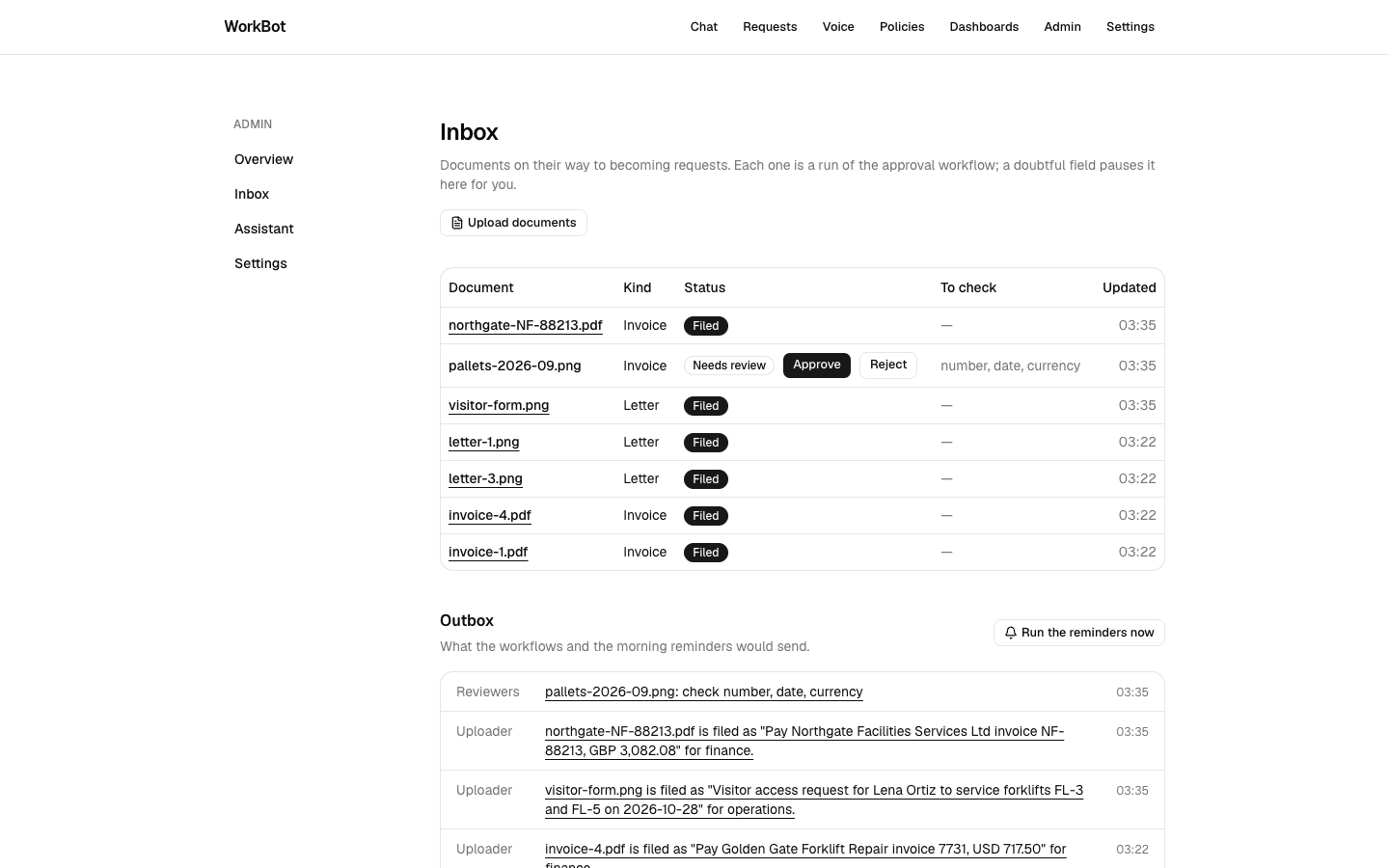
  2. src/app/admin/inbox/page.tsx: the upload button (FileUpload with multiple), a table of documents with kind, status, the fields to check and the time, Approve and Reject on the ones that wait, a link to the request on the ones filed; the outbox underneath, with Run the reminders now.
  3. src/inngest/reminders.ts: triggers cron("0 9 * * *") and reminders/requested; find-waiting (reviews older than a day, waitingSince(24)), a remind-<id> step each; find-stale (open requests older than a week), a check-in-<id> step each.
  4. Tests: the reminders function against rows backdated with SQL, asserting the step ids and the notifications.

Done when

  • At /admin/inbox with the dev server running, 4 documents uploaded at once appear as 4 rows that move from Received to Filed or Needs review as the runs finish (2 model calls each, in parallel); Approve on a waiting row files it; Run the reminders now adds a line to the outbox for each review older than a day.
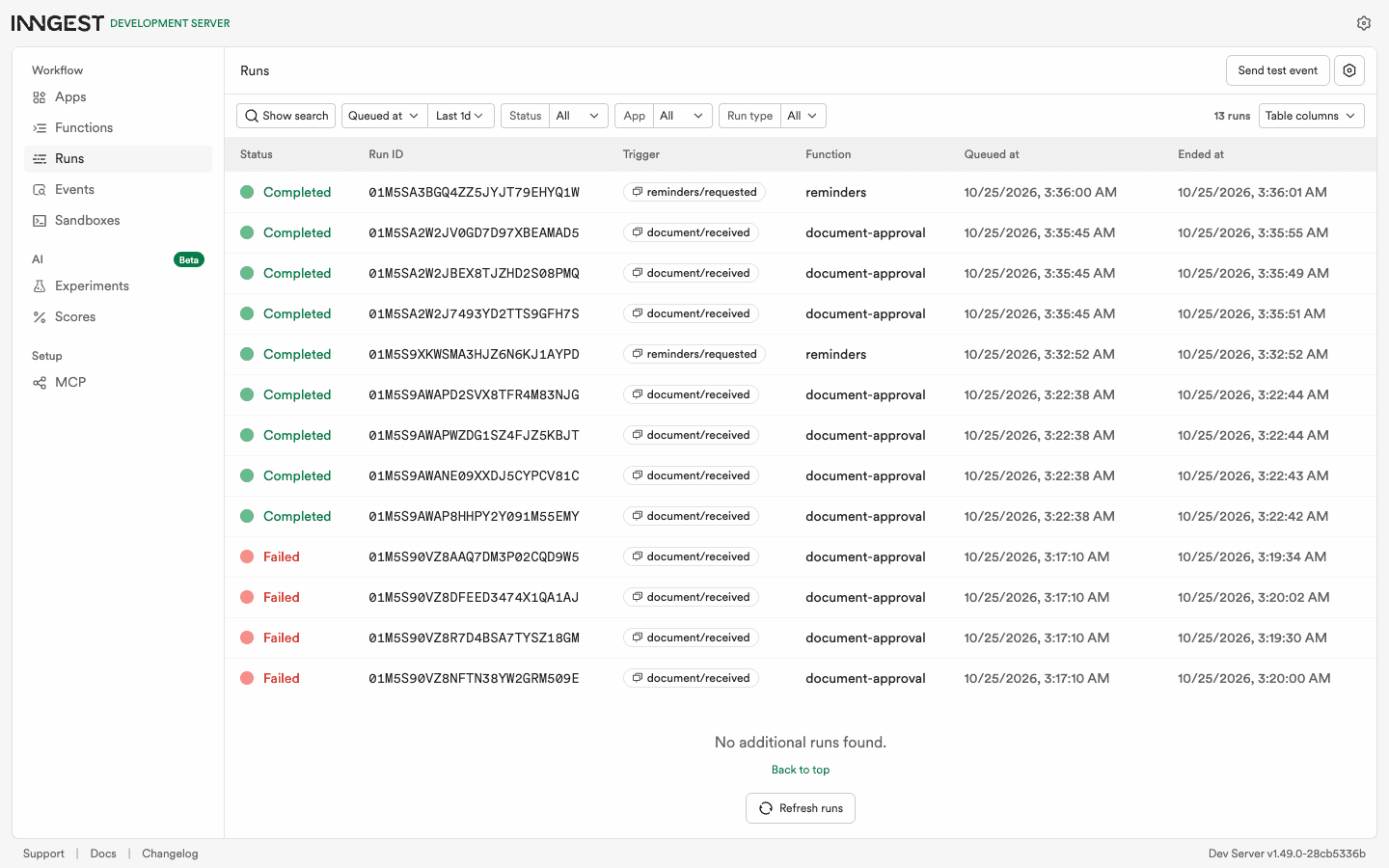
  • Stop pnpm dev while a batch is running and start it again: the runs finish, from the step that was interrupted.
The inbox after a batch
A batch on the small model: 2 filed, 1 paused for a reviewer because 3 fields of a smudged invoice came back doubtful; the outbox underneath, with the reviewers' nudge and the uploaders' notices.
The engine's view of the runs
The dev server's dashboard: the runs of the day, including a batch of 4 that finished after the app was restarted under it, and the 4 the first build failed on its own bug.
Technical notes
  • The upload action stores the files and sends the events, and returns before any model call.
  • review validates the id and the decision with Zod before sending: an event is an input like any other.
  • The reminders' check-ins go to the request's team as the recipient; a mail integration would map a team to its addresses.
  • The restart test works because the engine, not the app, owns the run's state: a step that was executing when the app went away is retried once the app is back, with the backoff of the retry policy.

Resources