Week 6 · Day 27 of 40 · Build AI

Integration platforms: Composio, Nango and MCP

You ship: WorkBot connected to its ticketing system through the vendor's MCP server, with a synced copy, product-level tools and the 3 routes compared. Builds on: Day 5.

What you'll build today

After Day 26, WorkBot follows a short set of principles, and its customer lives in one configuration file. It still knows nothing about the systems that customer already runs, such as its ticketing system or its customer relationship management (CRM) system. A forward deployed engineer usually spends the first week connecting to that stack.

Today you connect WorkBot to a ticketing system, and you learn the 3 routes for doing it. You can use an integration platform with a catalog of tools, a platform that also syncs data, or the vendor's own Model Context Protocol (MCP) server. You keep a synced copy of the tickets, so the assistant reads a table instead of waiting on the vendor. You also learn to design the tools the model sees: a few product-level tools, where every write is safe to repeat and can run as a dry run.

By the end of the day, WorkBot finds, files and comments on tickets. You also have a comparison of the 3 routes that marks what you measured and what you took from documentation.

By the end of the day you can

  • Connect an agent to third-party SaaS through an integration platform instead of hand-built OAuth
  • Compare Composio, Nango and direct Model Context Protocol (MCP) servers on auth, coverage, control and cost
  • Design tool surfaces that expose the few actions an agent needs

Topics

The Integration Problem

  • Every customer runs a different stack: customer relationship management (CRM), ticketing, calendar, email, and enterprise resource planning (ERP). A forward deployed engineer (FDE) usually spends the first week of an engagement here
  • The 3 hard parts: OAuth and token refresh per user, API coverage and change, and rate limits and retries
  • Build versus platform. Hand-build the integrations for the 2 systems that define the product, and use a platform for the long tail

Composio

  • Managed auth plus a catalog of tools across hundreds of apps, exposed as function tools or through MCP
  • Connected accounts: per-user connections, scoped by entity, Composio's record of one of your users
  • Triggers: webhooks from apps into your agent
  • The tradeoff: breadth on day one, and less control over tool definitions and schemas

Nango

  • Unified auth plus syncs. You define what to pull from an API, and Nango keeps a cached copy fresh and streams the changes
  • Unified models across providers, such as one contact shape across several CRMs, and per-provider actions
  • Self-hostable. The sync layer sets it apart when agents need data as well as actions

MCP as the Integration Bus

  • Vendor-provided MCP servers (Day 5 built one of your own). The vendor maintains the tool surface, and you connect
  • Remote MCP with OAuth: per-user authorization flows, token handling and scopes
  • Mixing layers: platform-managed auth with MCP-exposed tools

Designing the Tool Surface

  • Fewer, higher-level tools: create_invoice_for_order instead of 6 REST calls
  • An idempotency key on every write tool, so a repeated call returns the first result instead of writing again. Dry-run modes, and confirmation steps for destructive actions
  • Tool descriptions as documentation: inputs, side effects, and what not to do

Build

Features shipped today

  • WorkBot: Connected to a ticketing system through the vendor's MCP server, with a synced copy and product-level action tools. Where you have the accounts, also a CRM through Composio, ticketing through Nango, and appointment reminders through a calendar integration

Connect your agent to 3 real systems through 3 routes:

  1. Composio: connect a CRM sandbox per user. Add tools to look up a contact, log an activity and create a task, and a trigger that wakes the agent on a new deal
  2. Nango: sync a ticketing system (Linear, or a Zendesk sandbox) into Postgres with a unified ticket model. Add an action that posts a comment
  3. MCP: connect the GitHub remote MCP server with OAuth, and expose 2 of its tools
  4. Wrap each raw surface in 2 or 3 product-level tools, with idempotency keys and a dry-run flag
  5. Compare the routes on time to first working call, the per-user auth experience, schema control, and what breaks when a token expires

Composio and Nango each need an account. Build and measure each route you can run today. For a route you cannot run, fill its column from the documentation and label it so. The walkthrough follows the reference run, where only the MCP route was open. It connects GitHub issues through GitHub's MCP server, with a token, and builds the sync in-house.

Walkthrough

Part 1

Pick a route per system

Before you write any code, decide how WorkBot reaches each system. The route decides what you own yourself, whether that is the auth, the tool definitions or a sync, so it is the first choice of the day.

Study first

  • Every customer runs a different stack, and the same hard parts come back each time. They are OAuth and token refresh per user, API coverage and change, and rate limits and retries.
  • There are 3 routes. Composio is a catalog of tools with managed auth. It gives you connected accounts per user and triggers from the app into your agent, and you use the catalog's tool definitions rather than your own.
  • Nango is managed auth with syncs. You define what to pull, and Nango keeps a cached copy fresh and streams the changes, with unified models across providers.
  • With the vendor's own MCP server, the vendor maintains the tool surface and you connect to it. You add OAuth where a person's own authorization is needed.
  • Weigh building against buying a platform. Hand-build the integrations for the systems at the core of the product, and use a platform for the long tail. A platform gives you auth and breadth, but it takes control of the tool definitions and puts a dependency in the middle of every call.

Build

  1. List each customer system, its route, and what the route needs, such as an account, a token or an OAuth app. In the reference run, the ticketing system is GitHub issues, and its MCP server takes a token, so that route is open.
  2. Of what a platform adds beyond auth, WorkBot needs one piece today, which is the sync. The reference run builds the sync in-house.
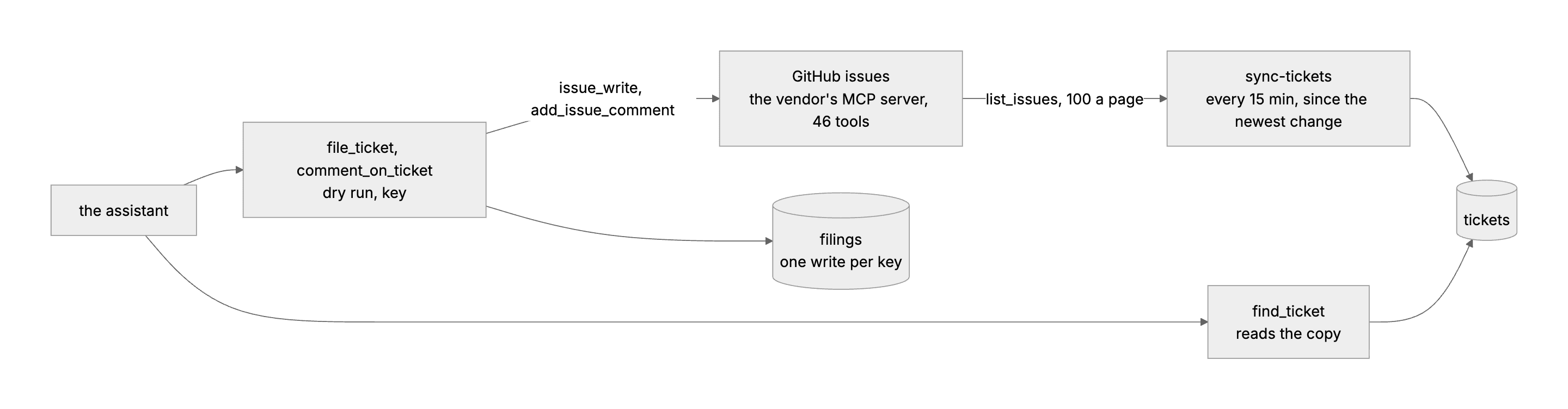
  3. Draw the flow before you write it. Show the system, the copy, the tools, and which arrow carries a write.

Done when

  • You have a table of each system, its route, what the route needs, and whether its result will be measured or taken from documentation. Measure a route only if you can run it today.
The route
The sync pulls the vendor's issues into a table that the assistant searches. The 2 write tools go through the vendor's server, once per idempotency key.
Technical notes
  • GitHub's remote MCP server is at https://api.githubcopilot.com/mcp/, and a bearer token works for the app. An X-MCP-Toolsets: issues header narrows its 46 tools to the 10 about issues, and X-MCP-Readonly makes a connection that cannot write.
  • To act with a person's own access, pass the SDK's OAuthClientProvider in the transport's options in place of the token, and the provider runs the authorization flow. The reference run does not build this, so every filing is attributed to the token's account, not to the person asking.
  • The calendar reminders in the curriculum need a calendar account. The reference run opened none, so the reminders of Day 18 stay on their own schedule.
Part 2

Write an MCP client

The vendor's MCP server needs only a token, so you start there. On Day 5 you built an MCP server, and today you write the client code, one small file that connects, lists the tools and calls them.

Study first

  • An MCP connection needs a Client and a transport from the TypeScript SDK. listTools returns the tools with their schemas, and callTool returns content parts and an isError flag. Streamable HTTP is the remote transport, and stdio is the local one.
  • Read the tool list before you write a line of code. The schemas say what is paged (an after cursor) and what is filtered (since), and they say what a write returns. On GitHub's server, a write returns an id and a link, not the record.
  • An expired token fails the connection with unauthorized, before any tool runs. Try a bad token once, so you recognize the error when it comes.

Build

  1. Write src/lib/mcp.ts. Its connectMcp(transport) returns the tool list, a call and a close, where the call joins the text parts and throws the server's message when isError is set. remote(url, token, headers) builds the transport, and withMcp(connect, fn) opens a connection, runs fn, and closes the connection even if fn throws.
  2. Write src/lib/github.ts with the server's URL, a githubEnabled() that reads GITHUB_TOKEN and GITHUB_REPO, and a githubConnect() that sends the issues toolset header.
  3. Probe the server from the terminal before you write any product code. Write a script of 15 lines with the SDK's Client and StreamableHTTPClientTransport, which connects, lists the tools, and calls list_issues with the owner and repo arguments to read one page. Then connect with a bad token and read the error.
  4. Write a test with the SDK's InMemoryTransport and a McpServer of 2 tools, one that echoes and one that fails.

Done when

  • The test passes.
  • The probe prints a page of real issues. In the reference run, connecting took 1.0 s, the tool list 0.5 s, and a page of 100 issues 0.8 s.
Technical notes
  • list_issues takes orderBy, direction, since, perPage up to 100, and an after cursor from pageInfo.endCursor. since is inclusive, so the newest row of the last pull comes again.
  • The issues carry no link, so build one from the repository and the number. issue_write and add_issue_comment return { id, url } and nothing else, and the issue number is the last path segment of the link.
  • search_issues is semantic and returns near matches. So look up an exact key in the copy, or by the line that every write ends with, which the tool surface below adds.

Part 3

Sync tickets into Postgres

With a working connection, you could send every question to the vendor. A copy in Postgres answers faster and keeps answering when the token or the vendor fails, so you sync the tickets into a table that the assistant searches.

Study first

  • A copy lets find_ticket answer without a call to the vendor, and the page can say how old the copy is. An expired token fails a sync run, which Inngest (Day 18) retries, while searches continue on the last copy. Without a copy, every question waits on the vendor and shares its rate limit.
  • An incremental sync pulls what changed since the latest updated_at already stored, a page at a time. The first pull is the backfill, the copy of everything that exists. A closure is a change, so closed issues come through the same pull and overwrite their rows.
  • Give the concept one shape, with number, title, body, state, assignee, labels, link and updated_at. A second system is then a second pull into the same table, under its own source, and Day 28 maps that shape across providers.

Build

  1. Add 3 tables to src/lib/schema.ts. tickets holds an id of owner/repo#number, the source, number, title, body, state, assignee, labels as JSONB (Day 26), the link and updated_at. syncs holds the time and count of each source's last pull, and filings is for the next part.
  2. Write src/lib/tickets.ts. In it, issuePages(mcp, { since }) is a generator over the pages, and pullTickets(mcp) upserts each issue and records the pull. Add listTickets, a findTickets(words) that matches with ilike on title and body, and lastSync.
  3. Write src/inngest/sync-tickets.ts, triggered by a cron every 15 minutes and by an on-demand event, and register it in the serve route. It does nothing when no ticketing system is configured.
  4. Build /admin/tickets, which shows the copy and when it was last pulled. Its Sync now button is a Server Action that pulls and refreshes the page.
  5. Write tests against a fake GitHub in memory that pages by 2, so the cursor loop runs. The first pull gets all 3 issues over 2 pages and sends no since. After one issue is closed, the next pull sends the latest stored updated_at, gets that row again with the closed one, and updates the closed one.
  6. Test that a pull with nothing new still records its time, and that the Inngest function skips without configuration and pulls with it.

Done when

  • The page shows the repository's issues with their state.
  • A second Sync now sends the stored timestamp, and gets back what changed plus the newest row of the last pull.
The copy
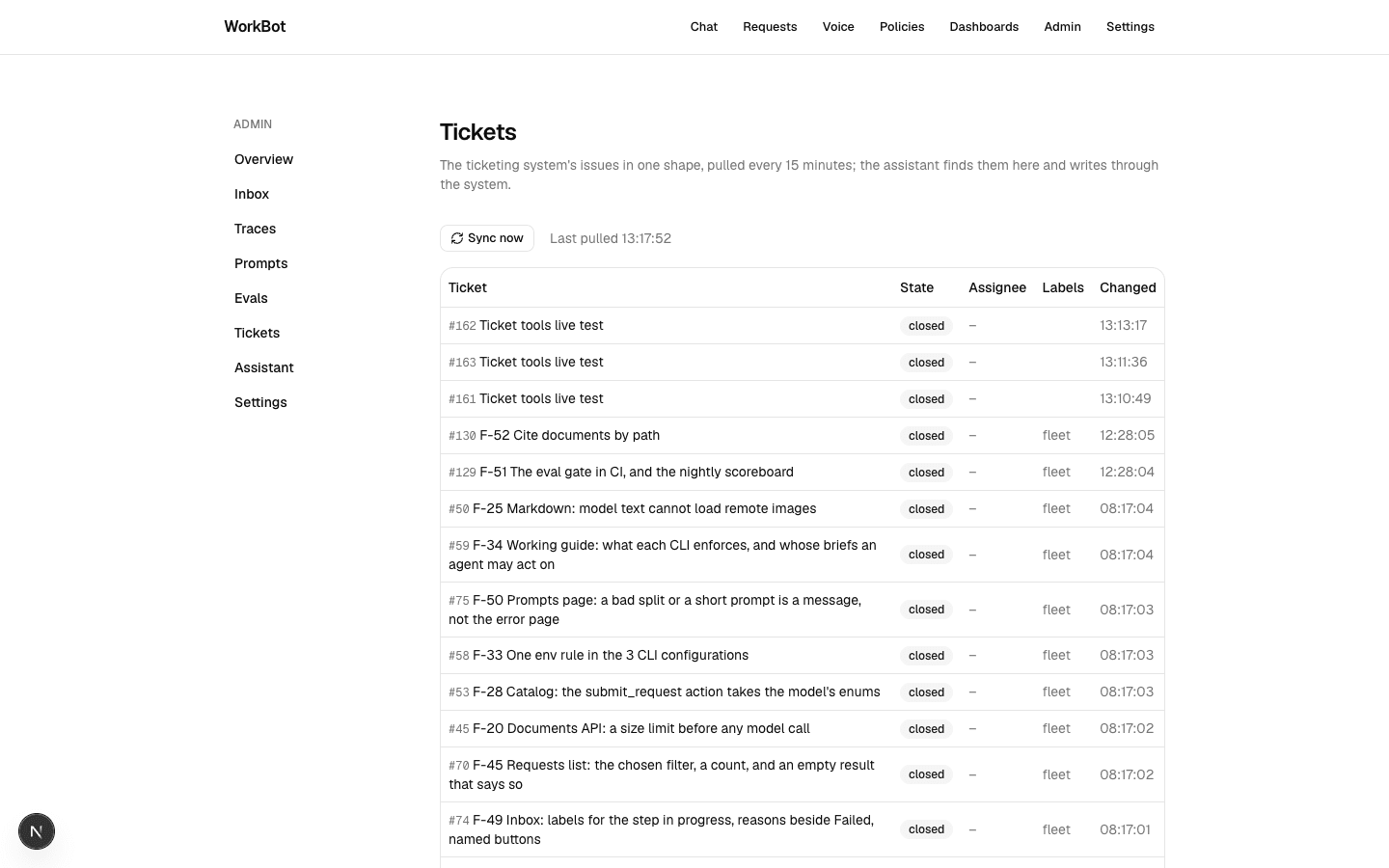
/admin/tickets after the first pull. It shows the repository's issues in one shape, when the copy was last pulled, and a button that pulls now.
Technical notes
  • The upsert on the id overwrites every field but the id, and it deletes nothing, so an issue deleted in GitHub stays in the copy. A periodic full pull closes that gap, and Day 28 builds one.
  • The function runs the pull in one step.run, which Inngest retries. A token that stays expired leaves the copy stale, and the page shows its age, but nothing raises an alert yet.
  • The Inngest route's test counts the served functions, so it changes with every function you add. In the reference run, the count is now 5.
  • The schema only creates what does not exist. So if you change a table during the day, your development database keeps the table's first shape until you drop it by hand. In production, write the migration before you deploy.

Part 4

Design the tool surface

The model should not see the vendor's 10 issue tools. You give it 3 tools that say what WorkBot means, and you make every write safe to repeat, because both the model and the workflow engine repeat calls.

Study first

  • Fewer, higher-level tools work better. Give the model file_ticket, with a title, a body, a key and a dry run, instead of the vendor's issue_write with its 2 methods and its optional fields. The model then works with what the product means, and the adapter supplies the vendor's method and arguments.
  • Every write takes an idempotency key, where the caller names what the write is about, such as a request id or an invoice number. The same key again returns the first result, or says that the write is in flight. You need this because a model in the loop repeats tool calls, and a workflow engine replays steps.
  • Every write tool also takes a dry_run option, which describes the write and makes none. Destructive actions would need a confirmation step, but WorkBot does not expose them at all, so no tool closes, reassigns or deletes a ticket.
  • A tool's description is its documentation. It gives the tool's inputs and its side effects, such as a ticket that everyone with access can see. It also says what not to do: do not file for a question, call find_ticket first, and put nothing personal in a comment.

Build

  1. Write githubTools(connect) in src/lib/github.ts. Its find_ticket reads the copy, while file_ticket (title, body, key, dry run) and comment_on_ticket (number, text, key, dry run) write through the server.
  2. End every write with a line that names WorkBot and the key, such as Filed by WorkBot (REQ-88). on an issue. Then anyone can find the write in the ticketing system by its key.
  3. Write once(kind, key, write, find) in src/lib/tickets.ts. Before the write, it claims the kind and key with an insert, and after the write it records the number and the link. A repeated key gets the recorded result, or hears that the write is in flight.
  4. Handle the 2 cases where once cannot trust its own record. A claim with no result after 5 minutes is a crashed write, and a write that throws may have reached the ticketing system before it failed. In both cases, once first looks there with find, by the signature line, and writes only when nothing was made under the key.
  5. Add the 3 tools to employeeTools when a repository is configured. Add src/lib/github.ts to the trigger paths of the eval workflow (Day 25), because a tool description is a prompt.
  6. Write tests on the fake GitHub for a find by words and for the reply when nothing matches. Check that a dry run files nothing, and that a filing happens once per key with the body's last line. Check also that 2 filings with one key at the same time make one issue.
  7. Test that a write that fails before it is made gives its key back, and test a claim in flight, then stale. Check that a crashed filing that reached the ticketing system is found, not made again, and that the same holds for a write whose response was lost. Check that a comment is made once per key, even under a key the filing also used.
  8. Write a live test against the real server that files, repeats, comments, and then closes its issue through the server's own issue_write, which no product tool exposes.
  9. Try it in the employee chat. Ask for a ticket under a key, and read the tool calls.

Done when

  • The chat searches before it files, files once, and reports the number and the link.
  • The same key again returns the first filing.
  • The issue carries the key in its last line.
The chat files a ticket
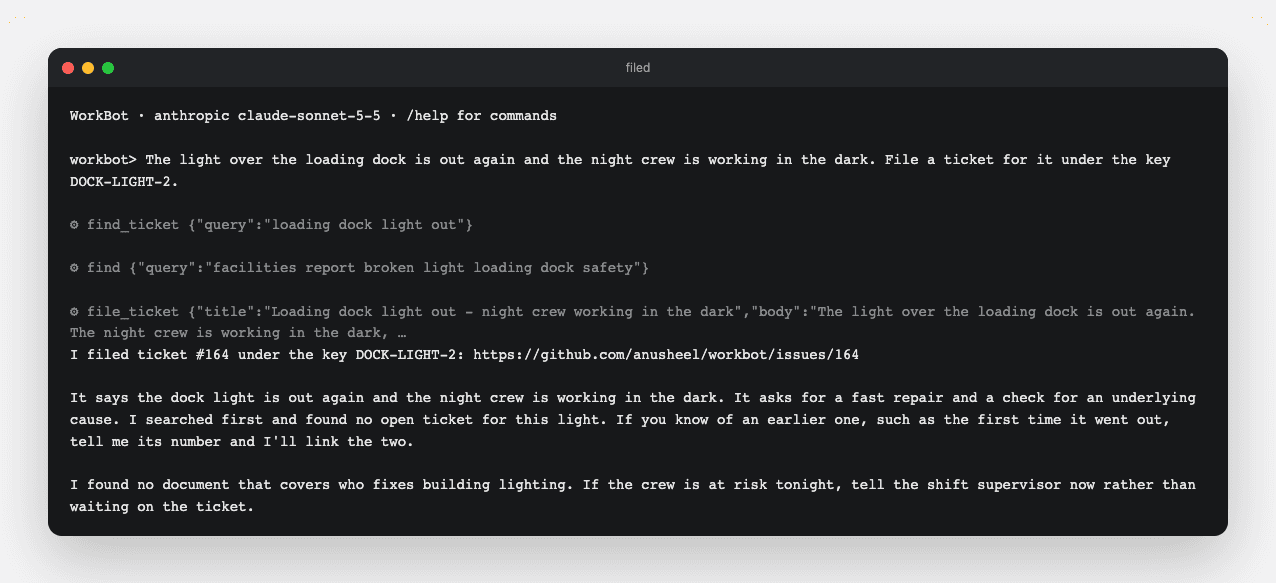
The employee chat searches the copy and the knowledge base first, files once under the key, and reports the number and the link.
The issue
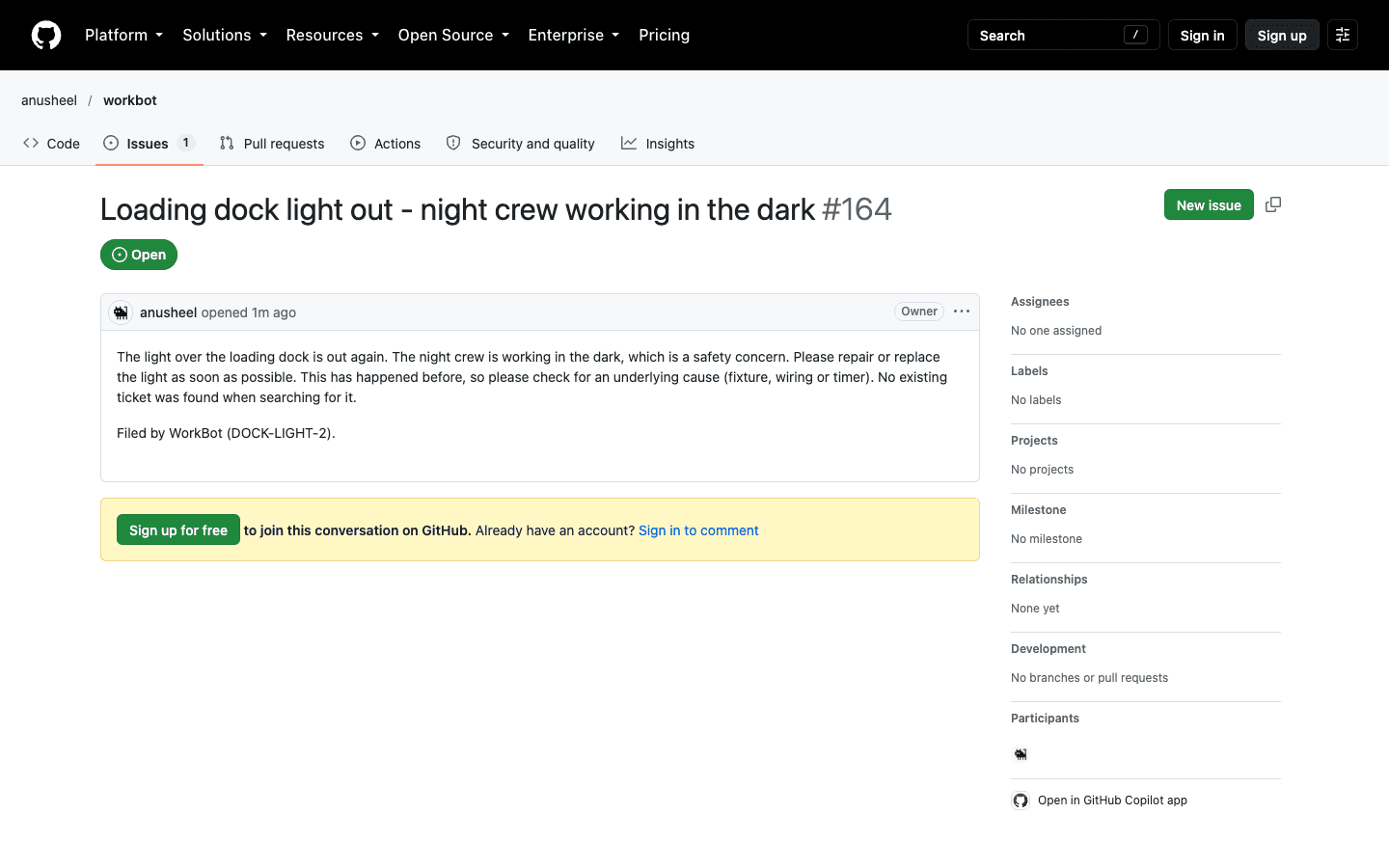
The issue WorkBot filed, with the key in its last line, so anyone can find the filing in the ticketing system itself.
Technical notes
  • In the reference run, the model called find_ticket, then find in the knowledge base for who fixes lighting, then file_ticket. The description told it to call find_ticket first, and the model chose the rest.
  • A check for an earlier filing before the write leaves a race, because 2 calls with one key can both see no filing, both write, and then race to record. The claim fixes it with insert ... on conflict do nothing returning key, and whoever gets the row writes.
  • To take over a stale claim, first look in the ticketing system for what the crashed write may have made. Then take the claim with an update guarded on a null link and an age over 5 minutes.
  • The look is a list_issues since the first claim, less an hour for clock skew, with the body field, scanned for the signature line. For a comment, it reads the issue's comments page by page. The claim keeps its first time in created_at and its last attempt in claimed_at, so the look reaches back however old the claim is.
  • WorkBot's MCP connection cuts a call off after a minute, so no write from WorkBot is still in flight when its claim turns stale. One gap remains in the ticketing system's own consistency. If the server does not list a filing yet, seconds after making it, WorkBot could make the filing again.
  • A key is per kind of write, so a comment under a filing's key is made, not reported as the filing.

Part 5

Compare the 3 routes

Last, you write down what each route cost and what it would cost, so the next system can pick its route from evidence rather than from a sales page.

Study first

  • Compare the time to a first working call, auth per user, schema control, what breaks when a token expires, coverage, and cost.
  • For a platform you did not run, write down its documentation's claims, labeled as such. A question the documentation does not answer stays unknown.

Build

  1. Write docs/integrations.md, which says what you built and gives the tool table and the comparison. In the reference run, GitHub's server is measured, and Composio and Nango come from documentation, because each needs an account and the reference run opened none.
  2. In the same document, state the choice. In the reference run, the choice is the vendor's server where one exists, and a platform for the long tail. It is a platform again when the data must be synced and the team would rather not own the sync.
  3. Then list what is out of scope and why. In the reference run, that is a CRM through Composio, the calendar reminders and a person's own authorization.
  4. Write the decision record in brain/architecture/decisions.md, D16 in the reference run, with the choice and its costs. Unsetting the token turns the integration off, and removing the integration means reverting its code and schema.
  5. Update the README's paragraph, the tools row and data bullet in the architecture document, and the conventions in AGENTS.md.

Done when

  • Every entry in the comparison is labeled measured, from documentation, or unknown.
  • A reader with a token can reproduce the measured column.
Technical notes
  • In the reference run, the code behind the measured column is small. The MCP client code is 57 lines, the sync and its table 70, and the 3 tools 140.

Resources