Week 6 · Day 26 of 40 · Build AI

Architecture principles: what to unlearn

You ship: An architecture audit, 2 migrations measured before and after, and a decision record. Builds on: Day 13, Day 20.

What you'll build today

After Day 25, WorkBot runs on 2 providers, routes each task to the model that suits it, and every pull request passes through its evals. It has grown one feature at a time for 25 days. You have not yet checked whether its shape still suits a small team whose agents write most of the code. This week connects WorkBot to a customer's own systems, so this is the moment to check.

Today you audit WorkBot against a short list of architecture principles. You learn which common architectures add cost without adding capability, and you learn to count what each choice costs instead of arguing from taste. Then you migrate the 2 places that cost most. In the reference run, those were the customer's name written into the code, and a research agent that handed its work to 2 specialist agents.

By the end of the day, you have the audit and 2 migrations measured before and after. You also have a decision record that says what you chose and why, and the principles that hold for Weeks 7 and 8.

By the end of the day you can

  • Apply a set of opinionated principles for AI product architecture, and argue for them with specifics
  • Recognize 5 common architectures that add cost without adding capability for a small team
  • Design a product as a lightweight, config-driven system with few moving parts

Topics

The Principle Behind the Principles

  • The constraint: a small team whose agents write most of the code is limited by how much structure it can hold in its head and change quickly
  • Every layer, service and schema is one more place where you have to make a change
  • Prefer the design that can be regenerated from configuration over the one maintained by hand

Unlearning

  • No microservices. Ship one deployable with modules. Add a network boundary only where scaling or isolation forces one
  • No document databases. Postgres with JSONB (its binary JSON column type) covers the flexible cases. It keeps transactions, joins, constraints and one query language
  • No retrieval-augmented generation (RAG) by default. This is the lesson of Day 13, applied to the whole product. Give the agent tools to find and read. Keep the corpus in files and tables the agent can search exactly. Treat embeddings as one tool among several
  • No multi-layered, service-oriented architecture. Do not send a single table read through a controller, a service and a repository class. Write thin routes, plain functions and typed queries
  • No multi-graph agents, where orchestrators run other orchestrators. Use one agent with good tools, or a small fixed pipeline. Add a second agent only when an eval, a scored test of the output, shows it helps

Learning

  • Config-first. Tools, prompts, routes, rules and schemas live in typed configuration, and the code interprets it. A new customer is new configuration
  • Lightweight app design: a monorepo (Day 29), one database, one deployable, one queue and one observability stack
  • Config-driven customization. A tenant is one customer's separate data and settings inside WorkBot. Per-tenant overrides and feature flags are configuration, never forks of the code
  • Explicit boundaries where they matter: the agent sandbox, the tool layer and the data layer
  • Boring technology: Postgres, a queue, object storage, and a serverless or container runtime

Reading an Architecture

  • How many places adding a field touches
  • What happens when a provider is down
  • Whether one engineer can run the whole thing locally
  • Whether the agent can regenerate this part from configuration

Build

Features shipped today

  • WorkBot: Audited against the principles, with its 2 worst violations migrated

Audit WorkBot and redesign it:

  1. Draw the product as it is: every service, store, queue and layer
  2. Score it against the unlearning list. For each violation, write what it costs today in deploy steps, places a change touches and failure modes
  3. Redesign on the principles: one deployable, Postgres with JSONB where you need flexibility, tools over retrieval pipelines, a flat module structure, and configuration for behavior
  4. Migrate the 2 worst violations today. Measure before and after on lines of code, deploy units, and the time to add a field end to end. If no field is added, count the files a field touches instead
  5. Write the architecture decision record you carry into Weeks 7 and 8

Walkthrough

Part 1

Draw and score WorkBot

You cannot judge an architecture you have not drawn, so the day starts with a picture of WorkBot as it is and a table of what each part costs. The table then tells you which 2 migrations to make.

Study first

  • Start with the constraint behind the principles. A small team whose agents write most of the code is limited by how much structure it can hold in its head and change quickly. Each layer, service and schema is one more place where you have to make a change.
  • Learn the unlearning list, the 5 architectures to drop, and what each one costs. Microservices cost deploys and network boundaries, and a document database costs a second query language and has no joins. Retrieval-augmented generation (RAG) by default builds a retrieval pipeline where a tool would do. A layered service architecture adds files whose only job is to call another file. Multi-graph agents, which hand work to other agents, add prompts, loops and runtimes that no eval asked for, where an eval is a scored test of WorkBot's output (Day 19).
  • Learn the 4 questions to ask of any architecture. How many places does adding a field touch? What happens when a provider is down? Can one engineer run the whole thing locally? Can an agent regenerate this part from configuration?
  • Then look at the redesign the principles ask for, which WorkBot already mostly follows. It has one deployable and flat modules in src/lib, and it uses tools over retrieval (Day 13). It uses JSONB (the Postgres binary JSON column type) where the model decides a record's shape, such as a document's extracted record, a research finding or a recording's scenes. The audit's job is to count the places where WorkBot does not follow the redesign.

Build

  1. Draw WorkBot as it is, with every deployable, engine, store, queue, layer and external dependency. In the reference run, the drawing is the Mermaid diagram at the top of docs/architecture.md. Day 26 adds 3 things to it: the configuration, the site, and the Model Context Protocol (MCP) servers that the coding CLIs use (Day 5). The reference run then renders the diagram with Mermaid for the record.
  2. Score WorkBot in a table with a row per principle, where each row says what WorkBot does and what that costs today in files, deploys and failure modes. Count the files you change for a new customer, for a new request field, and for the public site's configuration. Count each one, and estimate nothing.
  3. Pick the 2 worst by cost, not by taste.

Done when

  • The table names a cost for every row, "nothing" included.
  • The 2 migrations you picked are the 2 largest costs in the table. In the reference run, they were the files touched for a new customer, and the dollars and seconds per question that the analyst's delegation to its specialists cost.
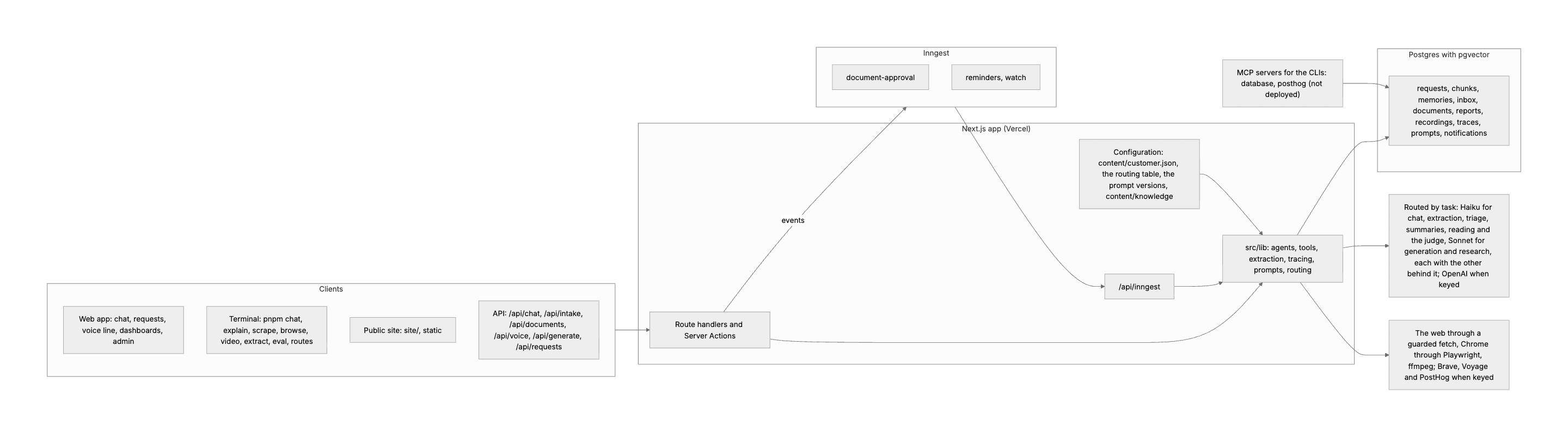
WorkBot as it is
The reference run's system after Day 26. It has 2 deployables, one engine (Inngest, Day 18), one database, the configuration the code interprets, and the MCP servers for the CLIs.
Technical notes
  • In the reference run, 10 source files named the company or its teams. Adding a field to a request touches 10 files: the schema, the model, the queries, intake, the API types, the action, the form, the page, the list and a test. The public site is 140 lines of page with 12 configuration files around it.
  • In the reference run, 2 product designs run more than one agent with no eval of the delegation. They are the analyst with 2 specialists (Day 15) and the explainer's 3 subagents (Day 12). The Day 23 build runs one agent on 3 frameworks, so it is a comparison of frameworks, not a delegation.
  • The curriculum asks you to measure before and after. In the reference run, the deploy units stayed at 2, because the site stayed, with its cost named. No field was added that day, so the reference run did not time adding one end to end, and the count of 10 files stands in for that time.
  • Neither migration touched the request's columns. The migration that would have, JSONB plus configuration for per-customer fields, was not among the largest costs.
  • The site stays a second deployable, because a public page with no database is a different thing from the app. Folding it into the app would take 2 root layouts and a domain decision, to save 12 files.
  • The recordings stay as bytes in Postgres rather than in object storage, which costs at volume but not today.
  • Adding a request field touches 10 files, which is the price of a typed column. A per-customer field would be JSONB plus configuration, and no customer has asked for one yet.
Part 2

Move the customer into configuration

The first migration takes the customer out of the code. While 10 files name the company, a second customer means editing all 10, so you move what varies by customer into one file that the code reads.

Study first

  • In config-first design, tools, prompts, routes, rules and schemas live in typed configuration, and the code interprets it. A new customer is then new configuration. In WorkBot, 3 things are already configuration: the routing table (Day 24), the prompt versions (Day 19) and the knowledge base, kept as files.
  • Today the customer's details move into configuration. They are the company's name and what it is, the assistant's name, and the teams with what gets filed to each. They also include where each kind of document is filed, and the sections of the knowledge base that customers may read.
  • A Zod schema parses the configuration file when it loads, so a wrong file fails at start, not at the first request. The prompts are functions of the parsed object, which means a test can build the prompt for a customer that does not exist.
  • Configuration is for what varies by customer, route or version, and not for logic. So the tools, the document schemas, the workflow and the request's columns stay code.

Build

  1. Create content/customer.json with the company's name, what the company is, and the assistant's name. Add the teams, each with what gets filed to it, and where a document of each kind is filed (filing). Add the sections of the knowledge base that customers may read.
  2. Write src/lib/customer.ts, whose schema requires unique team ids made of lowercase letters a to z only (^[a-z]+$) and a team for every filing rule. Export the parsed customer, and teamList, which joins the team ids into a phrase for the prompts.
  3. Change the 10 files that named the company so that they read the configuration instead. They are systemPromptFor(customer), the triage descriptions, teams in the request model and the filing rules in documents.ts. The others are the voice line (Day 16), the explainer (Day 12), the analyst (Day 15), the researcher (Day 23), customerSections and the case generator (Day 25).
  4. Write a test that parses the file and rejects a filing rule that names no team, and a team named twice. The test also builds the system prompt for another customer, and checks that the prompt holds the new name and not the old one.

Done when

  • grep -rn Fieldstone src cli finds nothing outside tests and fixtures.
  • pnpm eval --task all --smoke --runs 1 runs the smoke subset, the cases that every pull request runs (Day 25). It scores within the noise of the last recorded run, as it should when the configured text is the same text. In the reference run, it scored 0.97, 0.92 and 0.88, against 0.94, 0.92 and 0.88 before.
Technical notes
  • Team ids lose their literal types, because from the file teams is [string, ...string[]]. So z.enum(teams) validates against the configuration, Team is a plain string, and the one Record<Team, number> becomes a record keyed by string.
  • The bundler puts a JSON import into the browser bundle too. That is what lets request-model.ts stay a pure model that client components import.
  • In the reference run, the change took the files that name the customer from 10 to 1, and the mentions of its name in code from 24 to 0. The system prompt stayed the same, byte for byte, so the eval scoreboard (Day 25) did not move.

Part 3

Test one agent against several

The second migration asks whether the research analyst's 2 specialists earn their cost. You answer it with a measurement, because the principle allows a second agent only when an eval shows that it helps.

Study first

  • The principle against multi-graph agents says to use one agent with good tools, or a small fixed pipeline. Add a second agent only when an eval shows it helps. Two designs in WorkBot delegate to other agents without such an eval: the analyst with 2 specialists (Day 15) and the explainer's 3 subagents (Day 12).
  • The eval gives each design the same questions and the same judge, and records 3 numbers per design: the score, the dollars and the seconds. Then work out the detectable change at that size, the smallest difference that is not noise (Day 25).
  • The formula is 1.96 · sd · √(2/n), where sd is the standard deviation of the scores. For 17 answers at an sd of 0.2, it is 0.14. It is a rule of thumb that treats the answers as independent, and a difference under it is no reason to choose a design.
  • A delegation that does not earn its place still has costs. Each agent needs its own prompt and its own loop, the log needs a column for the agent, and the cost needs a breakdown by agent. The nested loops also take time.

Build

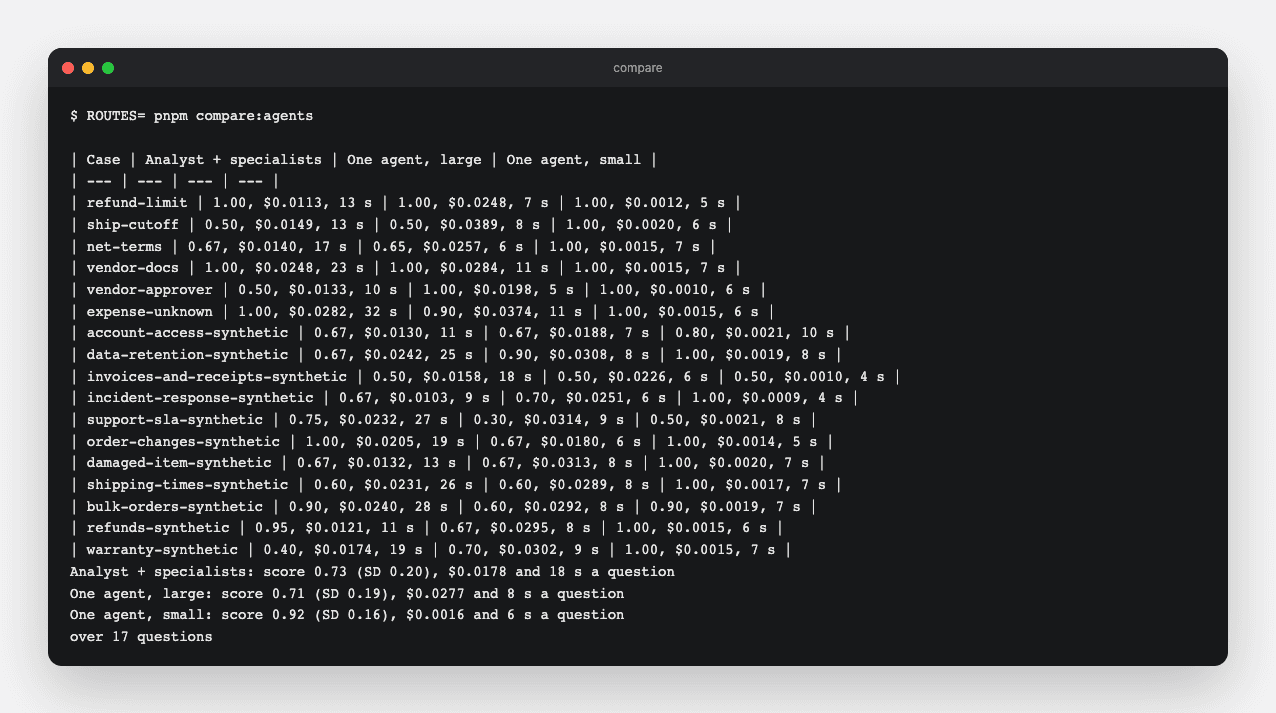
  1. Write cli/compare-agents.ts, which runs the golden answer cases through investigate as it is now, with the analyst on the large model and the specialists on the small one. These are the cases of the golden set (Days 19 and 25) that ask for an answer. The script then runs them through one agent that holds the same tools, once on the large model and once on the small. The judge scores each report against the case's criteria, and the script reports score, cost and time per question, with the means.
  2. Run it on the production routes with ROUTES= pnpm compare:agents, with your key in .env.local. An empty ROUTES sets no override (Day 24). In the reference run, it took about 15 minutes and a dollar for 17 golden answer cases.
  3. Write a decision rule before the run, then read the table and apply it. A difference under the detectable change is no reason to keep the costlier design, and above it the better score wins. If a design wins by less than it costs, write both numbers beside it and let a person decide.
  4. If one agent wins, make investigate one agent. It holds the knowledge tools, read_url, browse_site, web_search when its key is set, save_finding and write_report. Remove the agent column from the log and the breakdown from the cost.
  5. Give one model to each caller: the request page's action, the terminal's /investigate and the retrieval comparison (Day 13). In the routing table, set the research row to the model that won, with the measurement as its reason. Delete the comparison script in the same commit, and keep its table in the architecture document with the commit it ran at.
  6. Rewrite the module's tests for one agent, as 5 scripted cases. They cover a search that saves and reports, the browser's fallback to a page's text, and the retry after a browser fails midway. They also cover the refusal of a private address, and the limits. Rewrite the live test too, so that it asks one question that needs both the vendor onboarding policy and a public store page.

Done when

  • pnpm test passes on the new module.
  • The live test passes, with the key in .env.local. One run on the small model reads the vendor onboarding policy and a public store page, and reports from both, for under $0.30. Run it with pnpm exec vitest run --config vitest.live.config.ts src/lib/investigate.live.test.ts.
The comparison
pnpm compare:agents in the reference run, on its 17 golden answer cases. It compares the analyst with its specialists, one agent on the large model and one agent on the small, by score, cost and time per question.
Technical notes
  • In the reference run, the analyst with specialists scored 0.73, with a standard deviation of 0.20, at $0.018 and 18 s per question. One agent on the large model scored 0.71 at $0.028 and 8 s. One agent on the small model scored 0.92, with a standard deviation of 0.16, at $0.0016 and 6 s.
  • So the delegation added cost and time and no score. Under the same judge, the large model's reports also scored lower than the small model's. The assistant's own eval agrees: pnpm eval --task chat scores 0.92 on the small model with the same tools. The module went from 241 lines to 163, and from 3 prompts to 1.
  • The research row of the routing table routes to the small model first, with the large one behind it. So a call that fails on the small model falls back to the large one.
  • The live test checks what the scripted tests cannot, which is that one run reads both the knowledge base and a public page and reports from both.
  • The explainer's 3 subagents are the next delegation to measure. The explainer runs on the Claude Agent SDK so that it works the way Claude Code does, which is decision D12 in the brain, from Day 23. The same comparison decides whether it stays.

Part 4

Write down the decisions

The audit and the 2 migrations only help the next 2 weeks if their reasons stay with the code. So you finish by recording what you measured, what you decided, and the principles that every later design is held to.

Study first

  • A decision record gives the decision, the evidence, what you kept with its cost, and what reversing it takes, so a later change can see what it would undo. The records live in brain/architecture/decisions.md, the numbered decisions of the brain (Day 21).
  • The principles file turns the audit into a principle and a test for each item, with the 4 questions beside them. A reviewer can then hold a design or a pull request to it.

Build

  1. Add the migration's before and after to the audit section of docs/architecture.md, for lines, prompts, agents, score, cost and time.
  2. Write the decision record in brain/architecture/decisions.md, with the decision, the evidence, what you kept with its cost, and what reversing it takes. In the reference run it is D15.
  3. Write brain/architecture/principles.md, with the 7 principles, a test for each, and the 4 questions. In the reference run, the 7 are the 5 unlearning items stated as rules, plus configuration for what varies and boring technology. They hold for Weeks 7 and 8.

Done when

  • The comparison's table is in docs/architecture.md, with the commit it ran at.
  • The decision record and the principles are in the brain, with a test for each principle.

Resources