Week 2 · Day 9 of 40 · Build AI

Generative UI

You ship: An AI dashboard generator with a 15-component catalog and 3 demo scenarios. Builds on: Day 8.

By the end of the day you can

  • Build AI interfaces that render dynamic React components
  • Design safe component catalogs with Zod schemas
  • Implement progressive rendering as JSON streams from the model

Topics

Generative UI with json-render

  • What generative UI is: the LLM outputs structured JSON that maps to React components, rendered in real-time
  • Why it matters: AI can generate dashboards, forms, charts, cards - not just text responses
  • json-render framework: Vercel's framework for constrained UI generation
  • The 3-step pattern: define catalog → AI generates JSON → render progressively

Designing Component Catalogs

  • What a catalog is: the set of components the AI is allowed to generate
  • Defining components: name, props schema (Zod), render function
  • Safety constraints: the AI can only use components you define - no arbitrary HTML/JS
  • Schema design: making props specific enough to be useful but flexible enough for variety
  • Built-in components: json-render ships with 39 components (buttons, forms, charts, tables, etc.)
  • Custom components: adding your own React components to the catalog
  • Actions: 6 built-in action types for interactivity (submit, navigate, toggle, etc.)

Progressive Rendering

  • Streaming JSON: json-render renders UI as JSON tokens arrive
  • Partial rendering: components appear and fill in as the stream progresses
  • Loading states: skeleton UI while components are still being generated
  • Error handling: what to show when the AI generates invalid JSON

Dynamic Layouts

  • Charts: bar, line, pie - generated from data the AI analyzes
  • Data tables: sortable, filterable tables with dynamic columns
  • Forms: multi-step forms with validation, conditional fields
  • Cards and grids: product cards, user profiles, dashboard widgets
  • Interactive elements: buttons that trigger actions, expandable sections, tabs

Build

Features shipped today

  • WorkBot: Generated dashboards and approval forms per workflow; case timelines, schedules and check-in forms

Build an AI-powered dashboard generator:

  1. Define a component catalog (15+ components): charts (bar, line, pie), data tables, stat cards, forms with validation, progress bars, alerts, navigation tabs, image galleries
  2. Build the generation endpoint: take a natural language prompt ("show me a sales dashboard for Q4") and generate a full page layout via json-render
  3. Implement progressive rendering: components appear and fill in as the stream arrives
  4. Add interactivity: form submissions trigger new AI generations, chart drill-downs, tab switching
  5. Build 3 demo scenarios:
    • Sales dashboard with revenue charts, top products table, KPI cards
    • User onboarding form that adapts based on previous answers
    • Data exploration tool that generates visualizations from natural language queries

Walkthrough

Generate dashboards, forms and timelines from a description: a catalog of components the model may use, a route that streams a page as JSON with the company's live numbers in the prompt, and a renderer that fills the page in as the stream arrives.

Part 1

A catalog, not free-form HTML

The model composes from a fixed list of components, each with a schema for its props, so a generated page can only render components you approved, with props the schema accepts.

Study first

  • json-render: a spec is a root, a map of elements with a type, props and children, and optional state; the model streams it as JSON patches, and useUIStream applies them.
  • defineCatalog: components with Zod props, slots for children, and a description the model reads; catalog.prompt() turns the catalog into the instructions.

Build

  1. pnpm add @json-render/core @json-render/react and pnpm dlx shadcn@latest add alert progress tabs.
  2. src/lib/catalog.ts: 22 components. Layout (Page, Stack, Grid, Card), text (Heading, Text), numbers (Metric, Progress), labels (Badge, Alert), data (Table, BarChart, LineChart, PieChart, Timeline), Tabs, and a form (Form, Input, Textarea, Select, Checkbox, Button) with one action, submit_request.
  3. Descriptions that say when to use a component, and narrow props: a tone enum for badges and alerts, 2 to 4 columns for a grid.
  4. A test that the catalog has every component the renderer implements, and that catalog.prompt() names them.

Done when

  • pnpm test passes, and catalog.prompt() printed in a test lists the 22 components with their props.
Technical notes
  • Nullable rather than optional props: the model sends every prop, with null where there is nothing.
  • A Metric takes a string or a number as its value, so "$1,240" and 17 both render.
  • The catalog is the contract between the prompt and the renderer; a component added to one without the other is caught by the test.
Part 2

The generate route

The route sends the catalog's instructions, the live data and the request, and streams the model's JSON straight through.

Study first

  • streamText with createTextStreamResponse and toTextStream: a plain text stream, which is what useUIStream reads.
  • The prompt's 3 parts: the catalog's own prompt, the data as JSON, and the page on screen when the request is an edit.

Build

  1. requestSummary() in src/lib/requests.ts: one grouped query, returning { total, byStatus, byTeam, byPriority, latest }, the last being the 10 latest requests.
  2. src/app/api/generate/route.ts: validate { prompt, currentSpec? }, the spec being json-render's { root, elements, state }; put the summary in the instructions with "use these numbers as they are and never invent figures"; include the current spec for an edit; stream the text.
  3. A unit test with a mock model that emits 2 patches, checking the stream and the instructions, and a live test on claude-haiku-5-5 through pnpm test:live that asks for a dashboard and finds the root, a chart or table, and a seeded request's title in the stream.

Done when

  • curl -N against /api/generate with a prompt prints JSON patches, the first setting /root.
Technical notes
  • The data goes in the instructions, not the user message, so an edit request keeps the same numbers in view.
  • currentSpec is the page the user is looking at; with it, "make the chart a pie" changes the chart and keeps the rest, because the model edits the spec instead of starting over.
  • A text stream carries no error events. A reply with no root at all shows in the page as "No page came back", not as a blank.

Part 3

Rendering as the stream arrives

useUIStream turns the patches into a spec; Renderer draws what exists so far; the page's state lives in a store the page owns.

Study first

  • useUIStream: spec, isStreaming, error, send(prompt, { previousSpec }).
  • defineRegistry(catalog, { components, actions }): one React component per catalog entry, typed by the catalog's props, and the action handlers.
  • JSONUIProvider with a controlled store, and useBoundProp for a prop that is bound to state, such as the open tab or a form field.

Build

  1. src/components/generated-ui.tsx: the registry, each component built from the shadcn primitives; charts as small SVG and CSS, no chart library.
  2. GeneratedUI: a state store created once, and an effect that copies the spec's state into it whenever the spec changes, so state that streams in after the element reading it still shows up.
  3. src/components/generator.tsx: a Textarea, 3 example prompts (the curriculum's 3 scenarios as WorkBot's: an operations dashboard, an intake form, a timeline), and the generated page below; a follow-up description is sent with the current spec.
  4. The submit_request action: the form's values parsed with the request schema and posted to /api/requests, the outcome written to state for the page to show.

Done when

  • The operations dashboard example renders its counts as the JSON streams, the form example files a request that appears on /requests, and a follow-up description edits the page on screen.
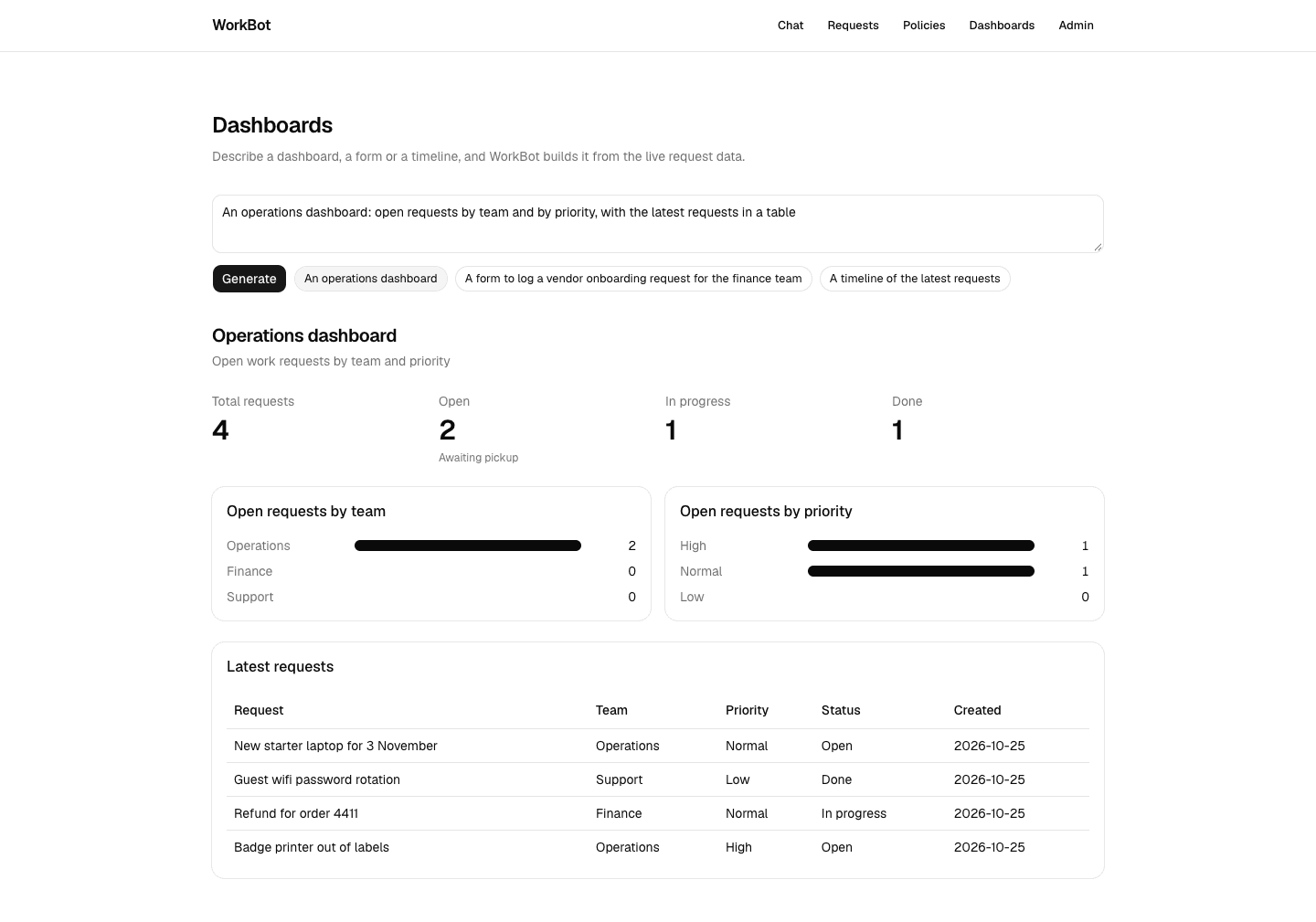
A generated dashboard
The operations dashboard example: counts and charts from the live requests, laid out by the model from the catalog.
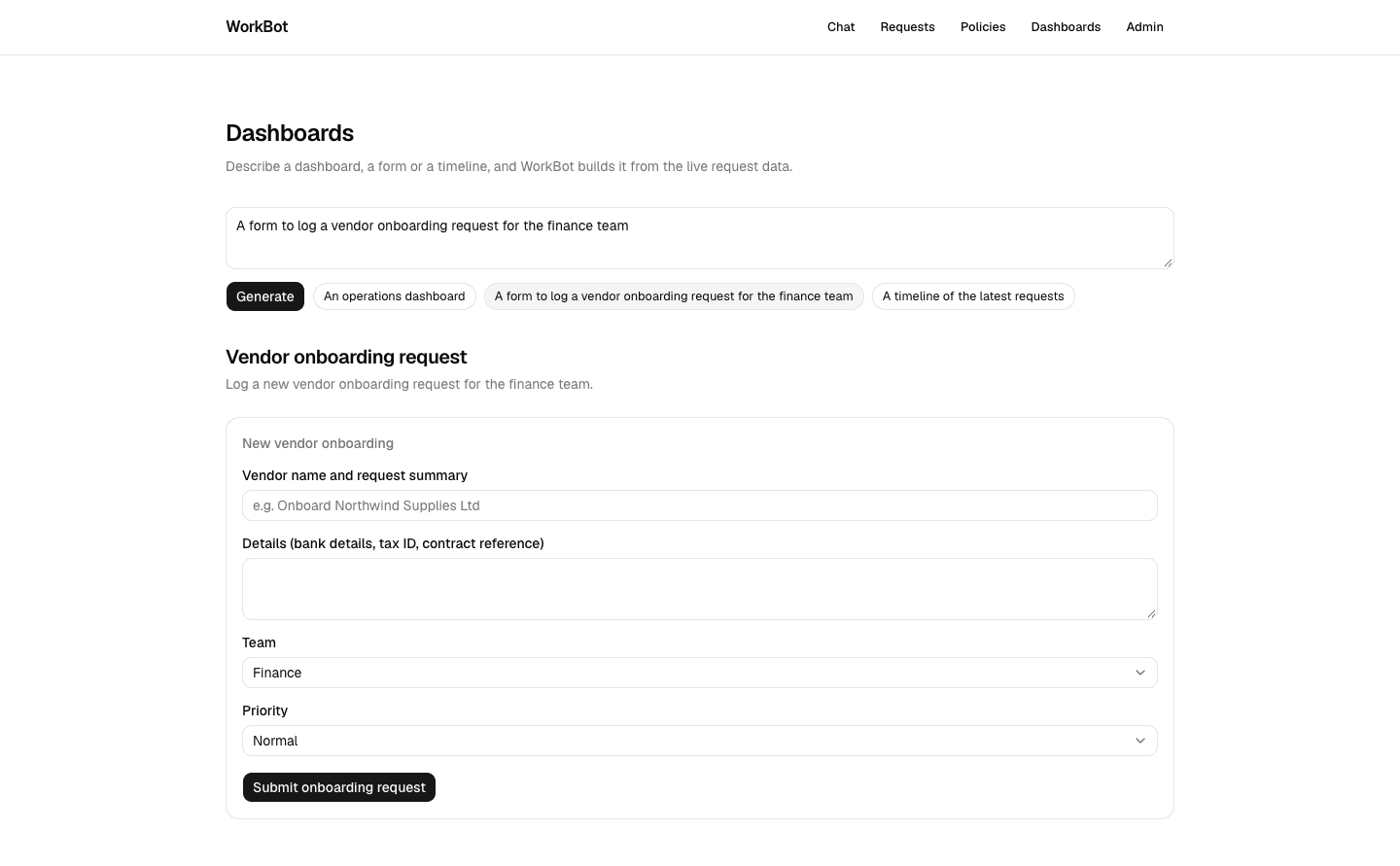
A generated form
The form example: fields from the catalog bound to state, and a button whose action files the request.
Technical notes
  • Elements can arrive before the state they bind to. json-render wraps each element in an error boundary that resets only when the element itself changes, so a component that throws on an undefined list stays hidden after the state arrives. Every list prop defaults to [].
  • The provider's uncontrolled store misses a patch that changes an array in place, because the array's identity is unchanged. Owning the store and copying a clone of the state on each spec change avoids the comparison.
  • Action handlers need the store, which exists only inside the provider; a small Actions component builds them with useStateStore and hands them to ActionProvider.
  • Tabs is the shadcn component in controlled mode, with useBoundProp holding the value in the spec's state, so a visible condition on another element can read it.
  • Skeleton placeholders, sortable tables and chart drill-downs are not in the catalog; add a component when a page needs it, with its renderer and a test.

Resources