Week 8 · Day 39 of 40 · Use AI

Research and analytics with agents

You ship: A published research dossier, the analytics stack with a semantic layer, and a read-only analytics agent. Builds on: Day 31, Day 33.

By the end of the day you can

  • Run first-hand research with coding agents: gather, verify, cite, publish
  • Build an analytics stack from Postgres to ClickHouse with Metabase or Hex on top
  • Use agents for business intelligence without letting them invent numbers

Topics

First-Hand Research with Agents

  • Research as an agent workflow: a question → a source list → extraction per source with citations → cross-checking → a dossier with confidence labels
  • Claude Code and Codex as research tools: scripts to harvest, parse and tabulate; the repository as the lab notebook
  • Verification: every number traced to a source and a date; disagreements between sources kept
  • Publishing: datasets with licenses, methodology sections, stable URLs updated in place (Day 38)

BI Techniques

  • Metrics as definitions in code: one source of truth for revenue, active users, retention; the semantic layer the agent queries
  • Modeling: events, entities, facts and dimensions; what stays in Postgres, what moves to a column store
  • The 5 analyses every product needs before a dashboard: cohorts, funnels, retention curves, unit economics, segment comparison
  • Dashboards that answer a question, with the question in the title

The Stack

  • Postgres: operational truth and small analytics; read replicas for queries
  • ClickHouse: event-scale analytics; columnar storage, materialized views, ingestion from Postgres and from event streams (Day 33)
  • Metabase: team dashboards and questions over both databases
  • Hex: notebooks mixing SQL, code and narrative; agent-assisted analysis with review
  • Transformations as versioned SQL with data tests (dbt or equivalent)

Agents in the Loop

  • The agent writes SQL against the semantic layer, shows the query, runs it, cites the result; no number without a query
  • Guardrails: read-only roles, row limits, cost limits, approved tables
  • Scheduled analyses: weekly reports written by the agent from fresh queries, reviewed by a person before sending

Build

Features shipped today

  • WorkBot: The analytics stack over tenant workflows, with cohort and retention analytics over anonymized user data; a research dossier on its market

Build the research and analytics layer for WorkBot:

  1. Research: a market question relevant to WorkBot; 50+ sources harvested with scripts; extraction and cross-checking; a published dossier page with citations, confidence labels and a dataset
  2. Stack: ClickHouse ingesting product events from the Day 33 event stream and a nightly copy of the Postgres tables; Metabase connected to both; Hex for notebooks
  3. Semantic layer: metric definitions in versioned SQL with data tests; the 5 core analyses as dashboards
  4. Agent BI: a read-only analytics agent with query display, row and cost limits; it produces the weekly report, which a person reviews
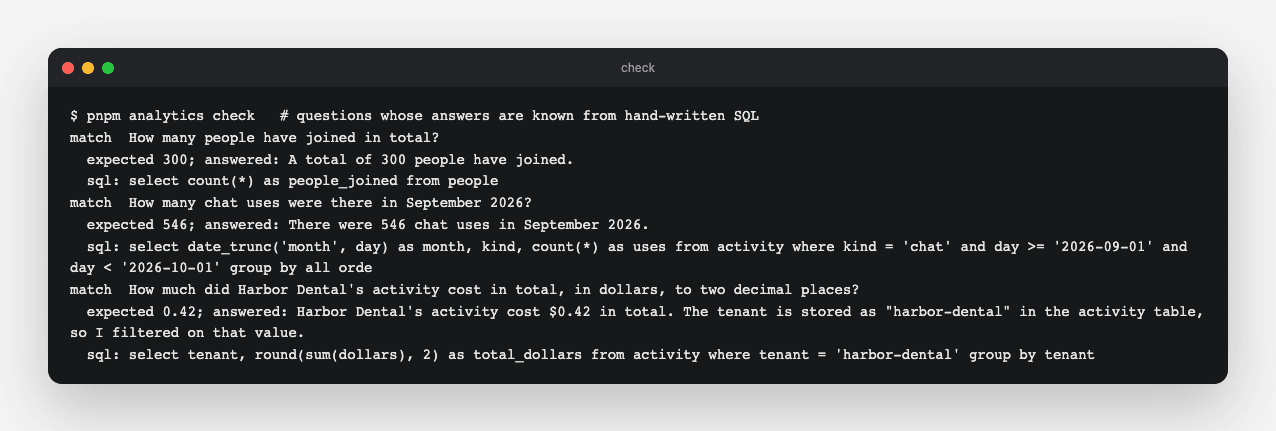
  5. Prove it: 3 questions whose answers you know; every answer shows its SQL and matches

Walkthrough

Measure how WorkBot is used, ask about it in plain words with answers you can check, and research its market with every claim's source shown. The analytics are a dataset, metrics written as SQL with tests, and an analyst agent that shows its SQL. They run in the locked DuckDB the spreadsheets already use. The research is a dossier of 47 claims from 76 sources, published with confidence labels and the dataset.

Part 1

Research a market question

Study first

  • Harvesting sources with scripts and agents, extracting claims, cross-checking each against the others, and labelling confidence by what supports it.

Build

  1. One question for WorkBot's market: how independent building-supply dealers take contractor orders and handle supplier invoices, with what software, at what cost.
  2. An agent harvests the sources, extracts claims and cross-checks them; each claim gets a confidence label. High needs two independent sources or a survey with a method, medium one credible source, low a vendor's claim.
  3. Publish it at /research on the public site, with the dataset at /research/dossier.json.

Done when

  • Every claim shows its sources and its label, and the weakest finding is named as such.
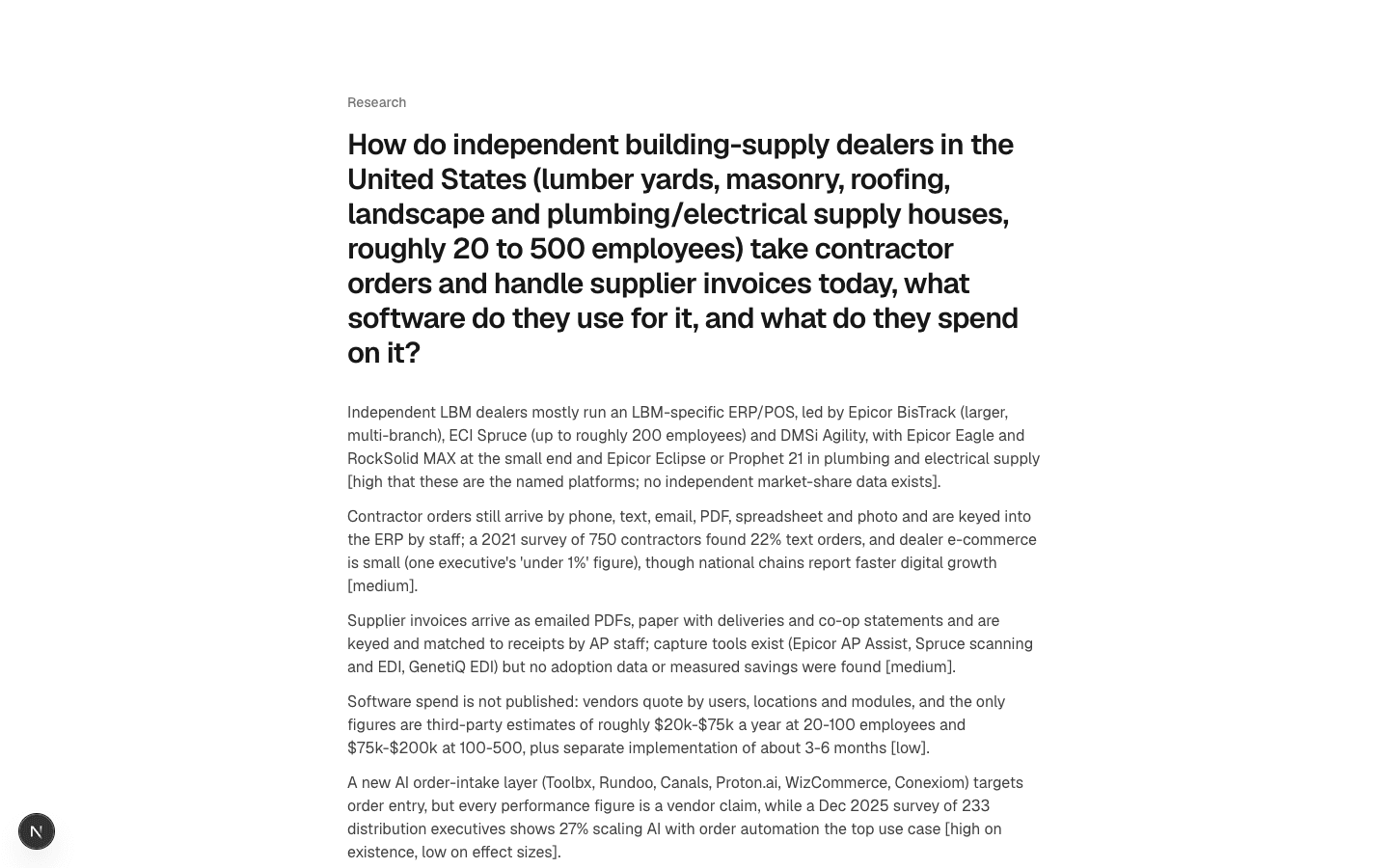
Dossier
The dossier on the public site: the question, the summary with each finding's confidence, then 47 claims with their sources.
Technical notes
  • The weakest part is spend: no survey measures what dealers pay for software, and the only figures are third-party estimates, labelled low.
  • Several trade publications blocked automated reading, so some claims rest on search excerpts, and the claim's note says so.
Part 2

Choose the analytics stack

Study first

  • Warehouses (ClickHouse), BI servers (Metabase), notebooks (Hex), and the semantic layer: metrics defined once, in versioned SQL, with data tests.

Build

  1. At two tenants and a few thousand rows, DuckDB in memory: the spreadsheets' sandbox, generalized to load any data, with no file or network access.
  2. A dataset made by a hash of person and day, so every run has the same rows and the known answers stay known. People are ids, never names.

Done when

  • You can say what would make a warehouse worth running, and the metrics would move to it as written.

Part 3

Metrics as SQL, with tests

Build

  1. Five files in content/analytics/metrics: weekly active people, retention by weekly cohort, use by kind, spend per person, new people. Each file's first line is its title.
  2. Data tests in content/analytics/tests: each a query that must return no rows. One checks that nobody was active before joining, and one that no cohort retains more than it had.
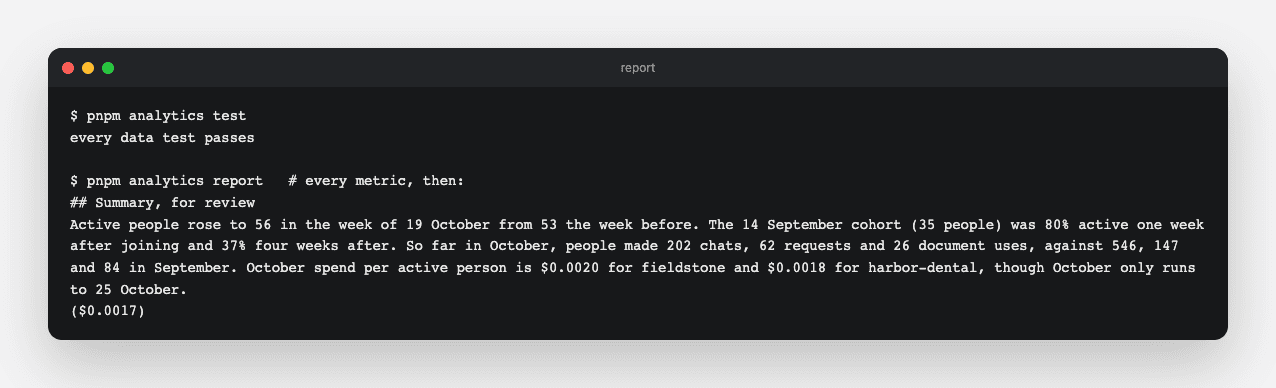
  3. pnpm analytics report: every metric's table.

Done when

  • The tests pass, and changing a definition changes the report and the analyst together.

Part 4

An analyst that shows its SQL

Study first

  • Agent BI: read-only access, query display, row and cost limits, and checks against known answers.

Build

  1. src/lib/analysis.ts: one tool that runs a single SELECT, 50 rows at most, with a time limit per query and step and dollar limits per question. The metric definitions sit in its instructions.
  2. Three questions whose answers are known from hand-written SQL; the analyst must match each one.
  3. The weekly report, headed by the analyst's four-sentence summary, which a person reads before it goes anywhere.

Done when

  • All three known answers match, each with its SQL shown.
Known answers
Three of three matched: 300 people, 546 chats in September, $0.42 for Harbor Dental, each with the query that produced it.
Report
The data tests pass, and the report ends with the analyst's summary for a person to review.
Technical notes
  • DuckDB's random() gave the same draw to every cohort across the seed's cross join. A hash of person and day gives an independent, reproducible draw per row.
  • The first run of the check failed safe: the query tool requires a viewer's role, checked outside the model since Day 30, and the terminal had not said who it was. It runs as the operator now, like every other command.

Resources