Day 7

Tool use and chaining calls

You ship
4 tools running on both providers, and a research command with citations.

What you'll build today

After Day 6, WorkBot can hold a conversation, but it only knows what the model already knows. It cannot read a page, do exact arithmetic or look up the company's policies, which is why it declined to state the refund limit.

Today you give it tools. A tool is a function in your code that the model can ask to run, and the model decides when to call one from its name and description. You learn the tool loop, in which the model asks for a tool and your code runs it and sends back the result. The model carries on until it can answer. The same loop runs on both providers.

Then you chain several focused model calls into one research command, each with its own job and its own model. By the end of the day, WorkBot answers a policy question from the company's own documents, with a citation after every fact.

By the end of the day you can

  • Implement Claude tool use (function calling) from end to end
  • Handle multi-turn tool interactions, where the model calls tools again and again
  • Chain several model calls into a multi-step workflow

Topics

Tool Use Fundamentals

  • How tool use works: you define tools, the model decides to call one, you run it and return the result, and the model continues
  • Tool definitions: name, description and input_schema (JSON Schema)
  • Good tool descriptions: clear and specific, with examples of when to use the tool
  • Input schemas: use JSON Schema to constrain a tool's parameters, with required and optional fields

Handling Tool Calls

  • Read the tool_use content blocks in the response
  • Run the tool functions: map each tool name to a handler function
  • Return the results as tool_result content blocks, and handle errors gracefully
  • Write error messages that help the model: "No results found for query X, try broadening the search" helps, and "Error" does not

Tool Calling on OpenAI

  • Function tools on the Responses API: type: "function", name, description, parameters (JSON Schema) and strict: true
  • Calls arrive as function_call output items with a call_id. Results go back as function_call_output items
  • The loop is the same: run the tools, append the results, and call again until the response has no function calls
  • Parallel calls, iteration limits and human-in-the-loop work the same way

Multi-Turn Tool Loops

  • The agent loop: send a message, the model responds with tool calls, you run the tools and send the results, and you repeat until the model gives a text response
  • stop_reason: "tool_use" against stop_reason: "end_turn": how you know the model wants to call more tools
  • Parallel tool calls: when Claude calls several tools at once, run them in parallel
  • Iteration limits: a max_turns setting keeps the loop from running forever
  • Human-in-the-loop: pause the loop and ask the user to confirm before a sensitive tool runs

Chaining Model Calls

  • Sequential chains: the output of one model call becomes the input to the next
  • A common pattern is research, then synthesize, then format. Each step is a separate model call with a focused prompt
  • Why chain: smaller focused prompts work better than one giant prompt. Each step can use a different model, Haiku for simple steps and Sonnet for complex ones
  • Passing context along the chain: extract structured data from one response to feed the next
  • Error handling in chains: what to do when a middle step fails

Build

Features shipped today

  • WorkBot: A tool registry that runs on both providers. On Day 27 it grows into the layer through which WorkBot acts in other systems. Today it holds 4 tools, plus a research command that answers a policy question from the company's sources with citations

Build a chatbot with tools and a multi-step chain:

Tools (implement all 4)

  1. web_search searches the web through an API (Brave Search or Tavily) and returns the results
  2. read_url fetches a URL and returns the page content as text
  3. calculator evaluates mathematical expressions
  4. save_note saves a note to a local JSON file for later retrieval

One tool registry serves both providers. The loop runs against Anthropic or OpenAI, chosen with the Day 6 flag.

Multi-step chain

Build a "research and report" command:

  1. Step 1 (Haiku): take the user's topic and generate 3 specific search queries
  2. Step 2 (Haiku): run a web search for each query and collect the results
  3. Step 3 (Sonnet): read the top 3 URLs and extract the key information
  4. Step 4 (Sonnet): synthesize the findings into a structured report with sections and citations

The chatbot supports both regular chat, with tools, and the /research <topic> command, which runs the chain.

Step by step

Four tools in one registry

Before the model can use a tool, it needs a description of the tool and a schema for its input. A registry keeps both next to the code that runs the tool, and each provider maps the schema into its own API format.

Study first

  • Learn how tool use looks on each API. On Anthropic, read about tools with input_schema and the tool_use and tool_result blocks in the tool use overview. On OpenAI, read about function tools and the function_call and function_call_output items in the function calling guide.
  • Learn Zod 4's z.toJSONSchema (JSON Schema in Zod), which turns an input schema into the JSON Schema both APIs accept.

Build

  1. Write src/lib/tools.ts with a Tool type (name, description, input schema, run) and a tool() helper that types run's input from the schema. The tool loop in the next part parses the input before any tool runs.
  2. Register 4 tools, calculator, read_url and save_note, plus web_search when a Brave Search key is configured.
  3. Give each implementation its own module and its own test. calculator.ts is a recursive-descent parser for + - * / % ^ and parentheses, which means one function per precedence level, each calling the next. web.ts holds readPage and searchWeb.
  4. Write notes.ts, which keeps a notes table through the Day 5 query function, and append its create table to the schema list from Day 5. The curriculum's save_note writes a JSON file, but WorkBot already has a database, so the notes go there.
  5. Write descriptions that say when to call each tool, not only what it does, because the model chooses tools from these words. The calculator's description says to call it for any calculation.

Done when

  • pnpm test covers the calculator's precedence and errors, the page reader's refusals and byte cap, and the shape of the search request.
Technical notes
  • readPage refuses the private address ranges, the shared range 100.64.0.0/10 and link-local 169.254.0.0/16, where cloud metadata services answer. It also refuses localhost and .internal names, and any scheme but http and https.
  • readPage follows redirects by hand, so it checks every hop, and it reads at most 512 KB of a body.
  • The text extractor drops scripts, styles and tags but keeps block boundaries as line breaks, and it caps the result at 8,000 characters per page.
  • The registry holds web_search only when BRAVE_SEARCH_KEY is set.
  • The calculator refuses anything it cannot tokenise, and any non-finite result such as 1 / 0.
  • No tool today changes anything outside WorkBot. When one does, on Day 27, a confirmation step goes between the model's call and the run.
The tool loop on both providers

The registry describes the tools, but nothing runs them yet. In this part, each provider's stream becomes a loop in which the model asks for a tool, and your code runs it and sends the result back. The loop repeats until the model replies with text.

Study first

  • On Anthropic, learn stop_reason: "tool_use" and the tool_use blocks in the final message, from the page on handling tool calls. Each call gets a tool_result block in the next user message, with is_error set when the tool failed.
  • On OpenAI, learn the function_call items in the response output and the function_call_output items that answer them by call_id. Because your loop manages the conversation itself, it also sends back the reasoning items, which a reasoning model needs in order to continue. OpenAI's reasoning guide explains this under keeping reasoning items in context.

Build

  1. Add tools to Completion, the Day 6 type that holds one call's settings. Then change stream to take an events object with text(delta) and tool(call), where a call holds the tool's name, its input, its result and whether it failed.
  2. Write one run function for both providers, which finds the tool, parses the input with the tool's schema, runs it and catches what it throws. Unknown tools, invalid input and failures go back to the model as error results, never as exceptions, so the model sees what went wrong.
  3. Write the loop in each provider, with up to 8 rounds. Any stop reason other than a tool call ends the turn, including a reply cut off at max_tokens in the middle of a call.
  4. Make the terminal show each call as it happens, dimmed, with its input.
  5. Write tests with recorded streams. Test a tool call round trip on each provider, and check the exact tool_result and function_call_output messages sent back. Then test that a reply cut off inside a tool call runs nothing.
  6. In providers.live.test.ts, have the small model multiply 2 numbers through the calculator.

Done when

  • Both providers answer "What is 1234 * 5678?" by calling the calculator, and pnpm test:live shows the call.
A turn with tool calls
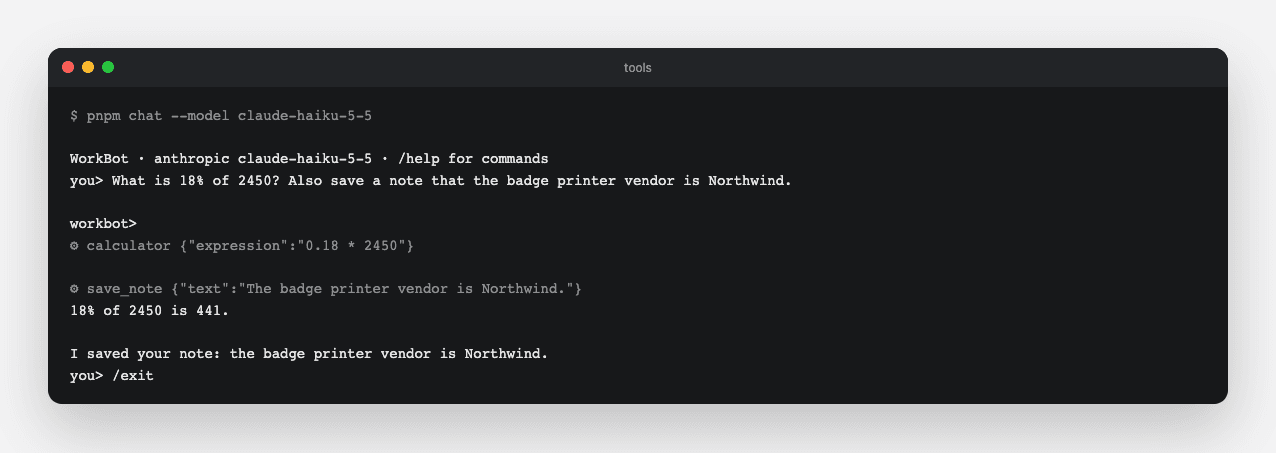
WorkBot on the small model runs the calculator for the arithmetic and save_note for the request to remember something. The terminal shows each call as it happens.
Technical notes
  • A truncated tool input must never run. When max_tokens cuts a reply inside a tool_use block, the stop reason is max_tokens, and the loop ends there.
  • Anthropic's eager_input_streaming, described in fine-grained tool streaming, streams a tool's input as the model produces it. The loop still waits for the final message before it runs anything, so the setting adds no token cost now and matters later, for large inputs.
  • OpenAI's function tools are declared strict, so the arguments the model sends match the schema. The shared run function parses them again anyway with the tool's schema, as the one validation step for both providers.
  • Anthropic may ask for several tools in one message, so send the results back together in one user message, in order.

A research chain with citations

One large prompt asks the model to plan, read and write all at once, and smaller focused prompts work better. A chain splits the work into a series of model calls, where each step's output feeds the next. Every call then gets a focused prompt and the model that suits it. This chain has 4 steps. The curriculum's version searches the web only, but WorkBot's first sources are its own policies, so its planner picks both policies and web searches.

Study first

  • Read the prompt chaining section of Anthropic's "Building effective agents". Each call works on the output of the one before. A check in code between 2 steps, such as validating the plan, keeps the chain on track.
  • Learn which call needs which model, and see Anthropic's guide to choosing a model for the trade between capability, speed and cost. Planning suits the small model, claude-haiku-5-5 at $0.10 per million input tokens, while extraction and writing suit the large one, claude-sonnet-5-5 at $2. The provider's model list carries these prices.
  • Learn how to get JSON from a model without a schema feature. Ask for JSON only, parse it and validate it with Zod, and on failure send the validation error back once.

Build

  1. Write src/lib/research.ts with research(question, provider, on). In the first step, the small model picks up to 3 policies by slug and up to 3 web searches.
  2. In the second step, read the chosen policies from content/policies, and with a Brave key, also fetch the top result of each search.
  3. In the third step, the large model extracts the relevant facts from each source as bullet points.
  4. In the fourth step, the large model writes the answer from those notes, with a numbered citation after every fact and a source list at the end.
  5. Report progress through events. step(message) fires as each stage starts and text(delta) streams the answer, while spend(model, usage) fires for each call, so the session's /cost counts the chain.
  6. Add /research <question> to the terminal, and a record(model, usage) method on the session for the chain's spend.
  7. Test the chain with a scripted provider. Check the steps, the model chosen for each call, the citations in the answer, and the retry when the plan is not valid JSON.
  8. In research.live.test.ts, run the chain on the small model in both roles, and check that it cites the refunds policy.

Done when

  • /research How much can a support agent refund without approval? answers with the limit in your refunds policy and cites it. In the reference run, the answer was $200.
  • /cost after it includes the chain's calls.
A research run
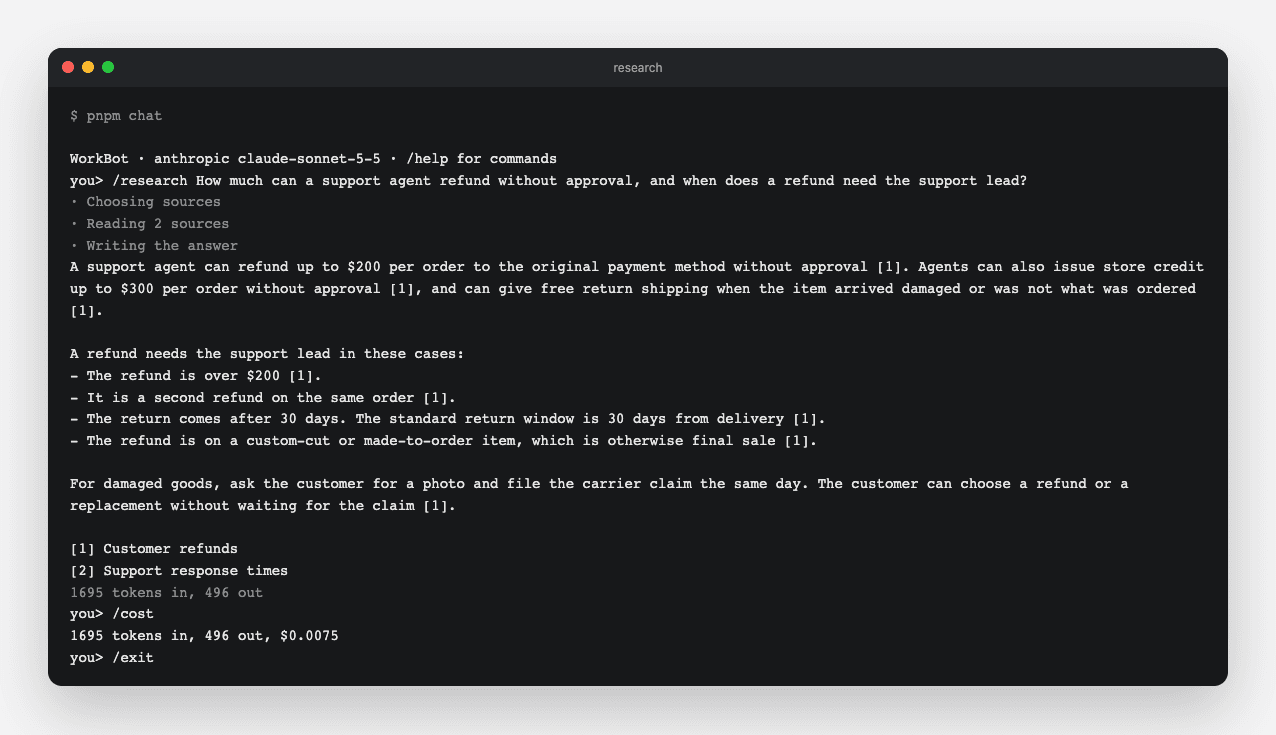
/research shows the steps as they run, the answer with a citation after each fact, the source list, and the tokens the chain used.
Technical notes
  • The plan step retries once with the validation error, and if the retry fails too, it throws an error that includes the model's text. A run makes one planning call, one extraction call per source and one writing call, plus one more call when the plan retries.
  • Number the sources when you collect them, and pass the same numbers to the extraction and writing prompts, so [2] means the same document in every step.
  • Extraction runs for each source in parallel. The writing step is one call that streams, so the person asking sees the answer as it is written.
  • When a page fails to load, the chain uses the search result's snippet instead. When an extraction or writing call fails, it throws, the terminal prints the error, and nothing from the run enters the conversation history.
  • Without a Brave key, the chain reads policies only, and it ignores the planner's web searches instead of sending them to a tool that would fail.

Resources