Day 34

Cloud services: AWS, GCP, Azure and the neo-clouds

You ship
WorkBot as two container images on a stack shaped like a major cloud, with deployment steps for a neo-cloud and a major cloud, cost estimates and a recommendation.

What you'll build today

After Day 33, every part of WorkBot runs on the execution model it needs, on your machine and on Vercel. A customer will ask where it should run in their world, what it will cost, and who will operate it.

Today you prepare WorkBot for a neo-cloud and for a major cloud. A neo-cloud is a managed platform such as Vercel, Supabase, Neon or Render, and a major cloud is AWS, Google Cloud or Azure. You package the system as two container images and a database, and run it on a stack shaped like a major cloud's. There it must pass the eval smoke suite, Day 25's small set of scored tests, and the load test from Day 33.

Then you price it at 1,000 and 100,000 monthly users on three platforms, and recommend one for a named customer. The deployments create billed resources in someone's account, so you write them as steps for the account owner to run. By the end, someone holding the accounts can follow those steps from top to bottom.

The stack
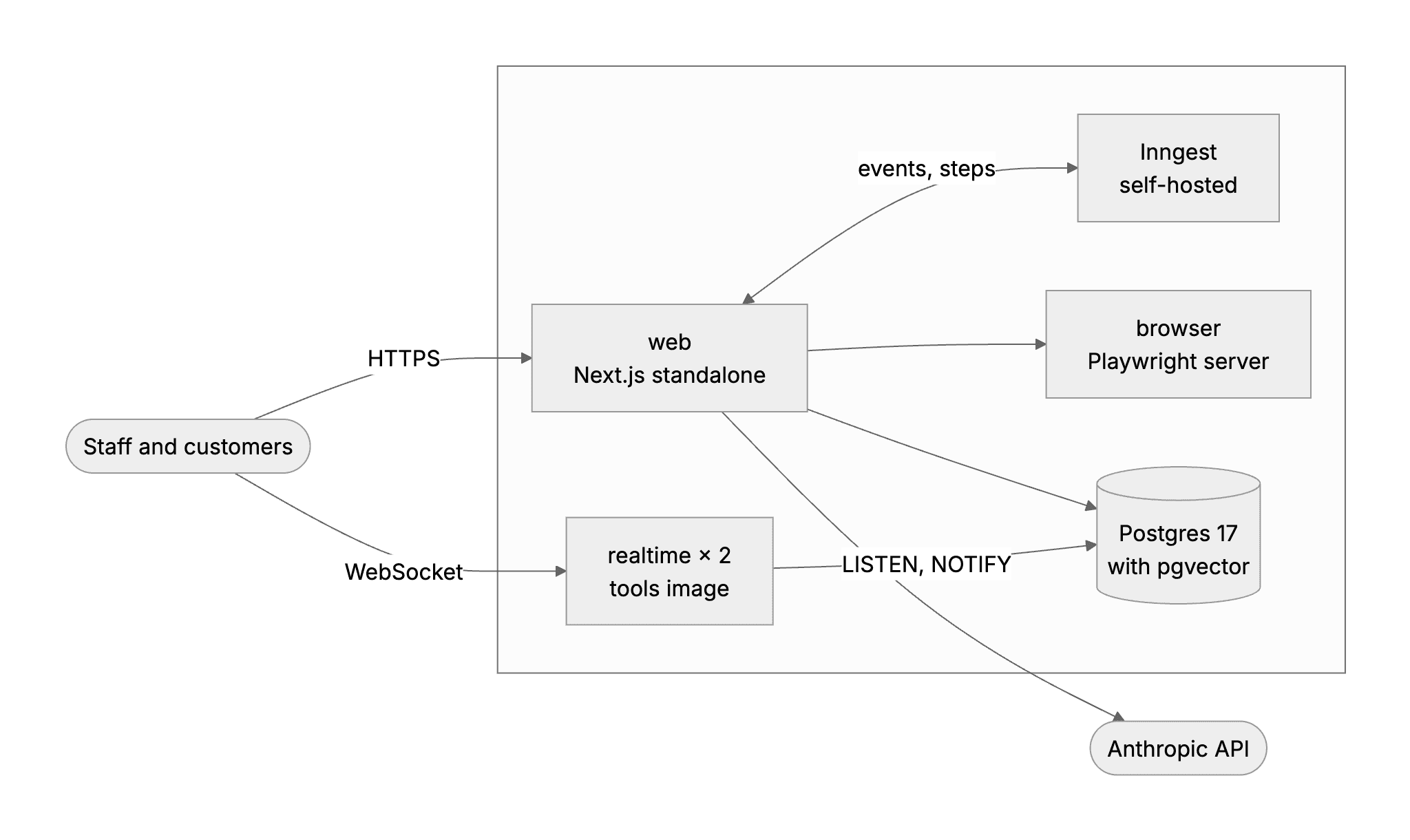
A major cloud would run the stack like this. The web tier, two realtime instances, a self-hosted Inngest and a browser service share one private network, with Postgres under them and the model's API outside.

By the end of the day you can

  • Navigate the 3 major clouds by the handful of services an AI product needs
  • Choose between a major cloud and a neo-cloud platform, such as Supabase or Render, for a given customer, with a written rationale
  • Prepare WorkBot to stand up on a managed platform and on a major cloud in one day

Topics

The Services That Matter

  • Categories: compute (functions, containers, virtual machines), storage (object, block), data (managed Postgres, caches, queues), networking (load balancers, DNS, private networks), identity (IAM roles and policies), secrets and keys
  • AWS: Lambda, ECS on Fargate, EC2 (Elastic Compute Cloud), S3, RDS, ElastiCache, SQS, IAM, KMS (Key Management Service), VPC (Virtual Private Cloud)
  • GCP: Cloud Run, GKE (Google Kubernetes Engine), Compute Engine, Cloud Storage, Cloud SQL, Pub/Sub, IAM, Cloud KMS, VPC
  • Azure: Functions, Container Apps, Virtual Machines, Blob Storage, Azure Database for PostgreSQL, Service Bus, Entra ID, Key Vault, VNet
  • Managed model endpoints on each cloud: a customer may require them for data residency or procurement

Neo-Clouds

  • Supabase: Postgres with auth, storage, realtime, edge functions and pgvector. It is the fastest path to a complete backend
  • Neon: serverless Postgres with branching, so each preview deployment gets a database of its own
  • Render and similar: containers, workers, cron and managed Postgres with little configuration
  • Vercel for the web tier, and where its limits push work elsewhere (Day 33)
  • Tradeoff: speed and simplicity against control, compliance scope and egress cost

Choosing for a Customer

  • Existing estate: an enterprise agreement, a landing zone (the cloud accounts and guardrails the customer has already set up) and a security review process. Deploying into the customer's own account is often the requirement
  • Data residency and regions, and private connectivity to customer systems
  • Cost models: per request, per second, per instance. Estimate a monthly bill before building
  • Portability: containers, Postgres and object storage keep most options open

Accounts, Billing + Guardrails

  • Separate accounts or projects per environment, with budgets and alerts from day one
  • IAM least privilege for humans and for the app, and no root credentials in use
  • Tagging and cost allocation per tenant and per feature

Build

Features shipped today

  • WorkBot: Packaged as two container images and proven on a stack shaped like a major cloud. Its neo-cloud deployment (Supabase and Vercel, with a Neon branch per pull request) is written as steps. So is its major-cloud deployment (ECS on Fargate or Cloud Run, managed Postgres and secrets, with Inngest as the queue)

Prepare both deployments of the Week 6 monorepo. Each creates billed resources in an account, so write it as steps the account owner runs, and prove every piece on containers first:

  1. Neo-cloud: Supabase (Postgres, auth, storage) plus Render or Vercel for web and workers, and a Neon branch per pull request for preview environments
  2. Major cloud: the same system on AWS with ECS on Fargate for API and workers, RDS Postgres, S3, SQS and Secrets Manager. Or use GCP: Cloud Run, Cloud SQL, Cloud Storage, Pub/Sub and Secret Manager. Leave out what the system does not need, and say why
  3. Run the system on a stack of containers shaped like the major cloud, and pass the Day 25 eval smoke suite and the Day 33 load test there
  4. A cost estimate for each at 1,000 and at 100,000 monthly active users, with the 3 assumptions that drive it
  5. A one-page recommendation for a named customer or customer type (regulated enterprise, mid-market SaaS, public sector): the decision and the 2 reasons

Step by step

Map the cloud services

Each cloud names the same few services differently. Mapping WorkBot's parts onto each one shows what a deployment needs before you build anything.

Study first

  • The categories are compute (functions, containers, virtual machines), storage (object, block), data (managed Postgres, caches, queues), networking (load balancers, DNS, private networks), identity (roles and policies), and secrets.
  • Each major cloud has its own names for them. On AWS they are Lambda, Elastic Container Service (ECS) on Fargate, S3, Relational Database Service (RDS), Simple Queue Service (SQS), Identity and Access Management (IAM) and Secrets Manager.
  • On Google Cloud they are Cloud Run, Cloud Storage, Cloud SQL, Pub/Sub and Secret Manager. On Azure they are Container Apps, Blob Storage, Azure Database for PostgreSQL, Service Bus, managed identities and Key Vault.
  • Managed model endpoints are a cloud's own hosted access to models, such as Bedrock, Microsoft Foundry and Google's Gemini Enterprise Agent Platform, formerly Vertex AI. A regulated customer may accept a model only under its cloud's terms, in a named region. For each endpoint, check where inference runs, who processes the data, and which agreement applies.

Build

  1. In docs/hosting.md, write a table of WorkBot's parts and where each runs on a neo-cloud, AWS, Google Cloud and Azure.
  2. Write down what is left out, and why. A cloud queue would duplicate Inngest, which already retries and orders the work. Object storage can wait, because documents of about 100 KB kept 30 days come to about 20 GB at 100,000 users, which Postgres holds without strain.

Done when

  • Every part has a home on every platform, and every product left out has a reason.
Package the system as images

Every platform on the map runs containers, so packaging WorkBot as container images is what lets it move between them.

Study first

  • Multi-stage builds install once, build once, and copy only what runs into the final image.
  • Next.js's standalone output is a server with only the files its routes import.
  • Code and the build's commit go in an image, while secrets and per-environment settings never do.

Build

  1. Write a Dockerfile with two targets from one dependency install. web is the standalone server, with the static files and the content folder it reads at run time. tools holds the source and every dependency, for the realtime server and the operator's commands.
  2. Add a build argument, COMMIT_SHA, which /api/health and the eval records report.

Done when

  • The web image starts with nothing but environment variables, and its health check names the commit it was built from.
Technical notes
  • In the reference run, the web image is 532 MB and the tools image 3.2 GB. The tools image carries the musl builds of every native package beside the glibc ones, because the lockfile does not record a package's C library, so pnpm cannot filter them. The realtime server runs from the tools image, which costs a slower first start, not memory.
  • Read COMMIT_SHA first, in /api/health and in the eval command. Health read the commit only from Vercel's variable (Day 1), and the eval command called git, which no image contains.
  • Cloud Run runs x86-64 images only, so a build on Apple silicon must pass --platform linux/amd64.

Run and test the stack

A laptop hides dependencies that a cloud does not have. Running the images as separate containers on one network finds them early, and the evals and the load test then show the stack works as a whole.

Study first

  • When the parts are separate machines, each part has an address instead of localhost, the parts share a private network, and only a short list of them is public. Docker's guide to Compose networking shows how each service is reached by its name, and which ports reach the host.
  • A dependency on your machine is a dependency on the platform. A laptop has Chrome and git, and a container has neither. The Twelve-Factor App's factor on dependencies states the rule, that an app declares every dependency and never assumes a system tool is installed.
  • A smoke suite proves that the image, the database, the model route and the services the code reaches work together. The smoke suite is the small set of eval cases from Day 25, where an eval is a scored test of WorkBot's output.

Build

  1. Write compose.yaml for Docker Compose, which runs the stack on one network. It holds the web image, two realtime instances, Postgres with pgvector, a self-hosted Inngest with its own keys, and Playwright's browser server. Set INNGEST_BASE_URL to point the app at the engine.
  2. Run the system there, and fix what breaks. The investigation and the document evals launch the machine's Chrome, which no container or function has. Make both connect to a Playwright server when BROWSER_URL is set, and give the browser service no exposed port.
  3. Run the eval smoke suite and pnpm load from the tools image against the stack, with docker compose run --rm tools node --import tsx cli/<command>.ts. Against a deployment on Google Cloud, the same commands run as Cloud Run jobs, as docs/deploy.md shows.

Done when

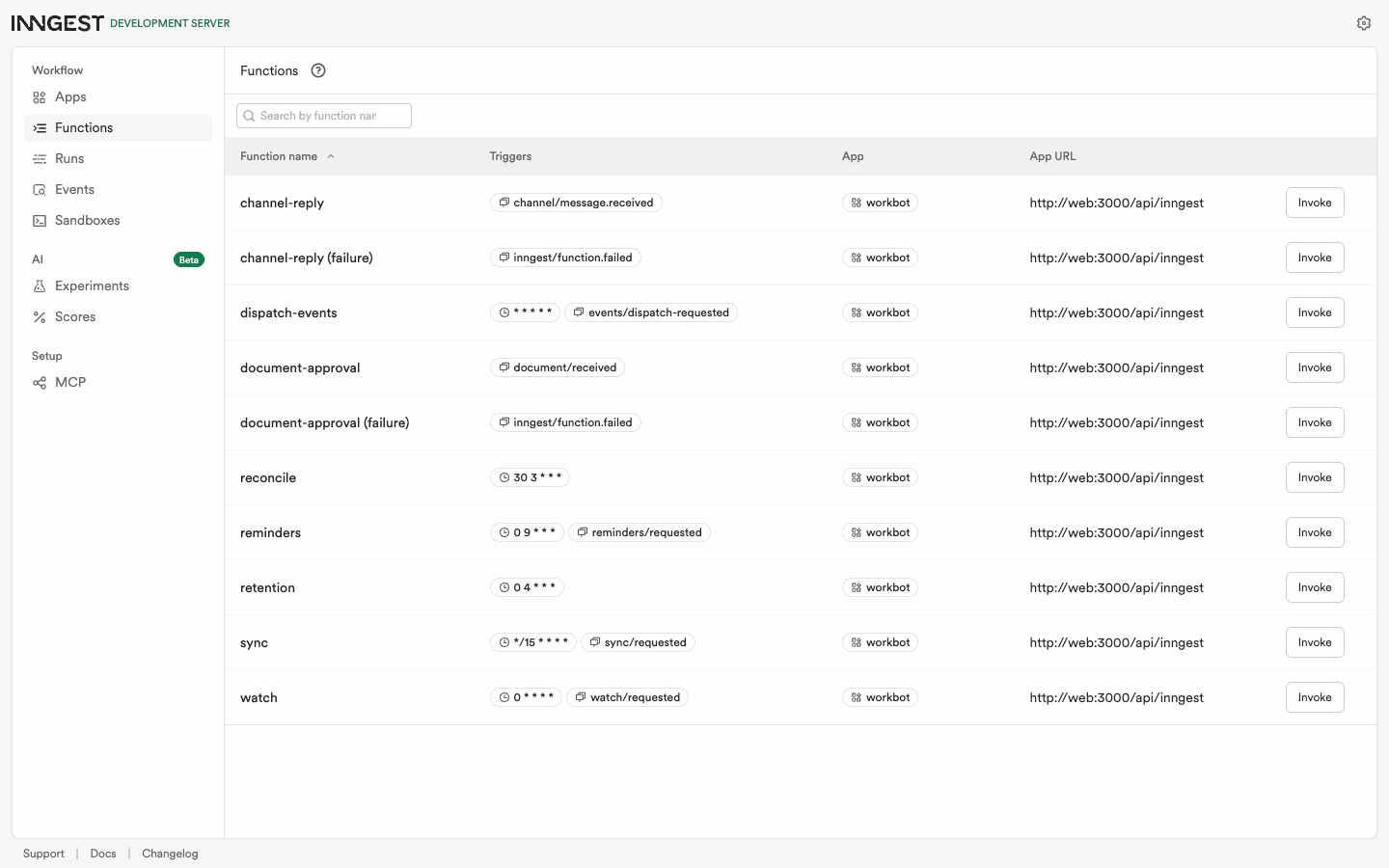
  • Health is ok on the stack's database, the engine has synced the app's functions (10 in the reference run), and a document sent to the API goes through the workflow.
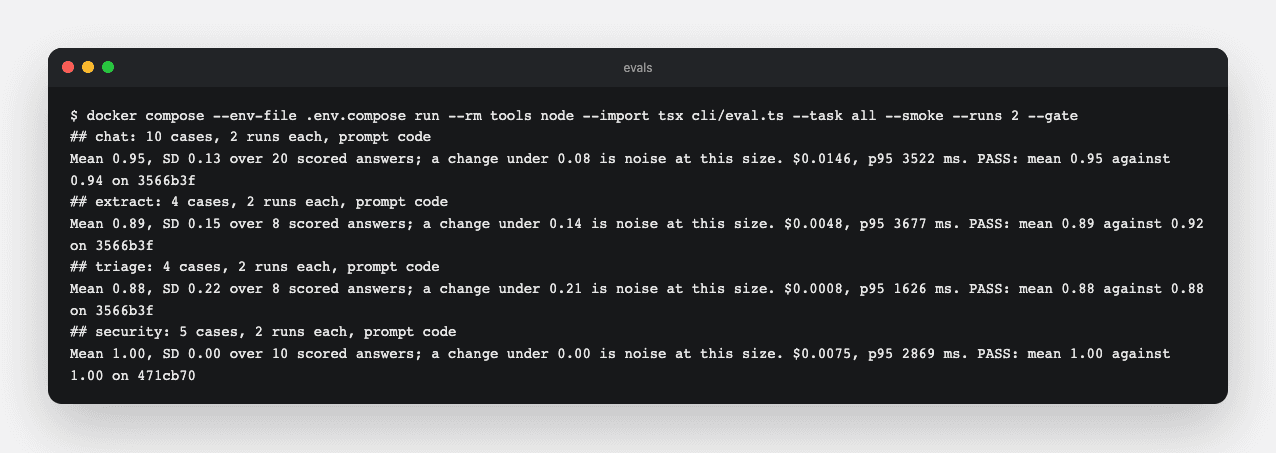
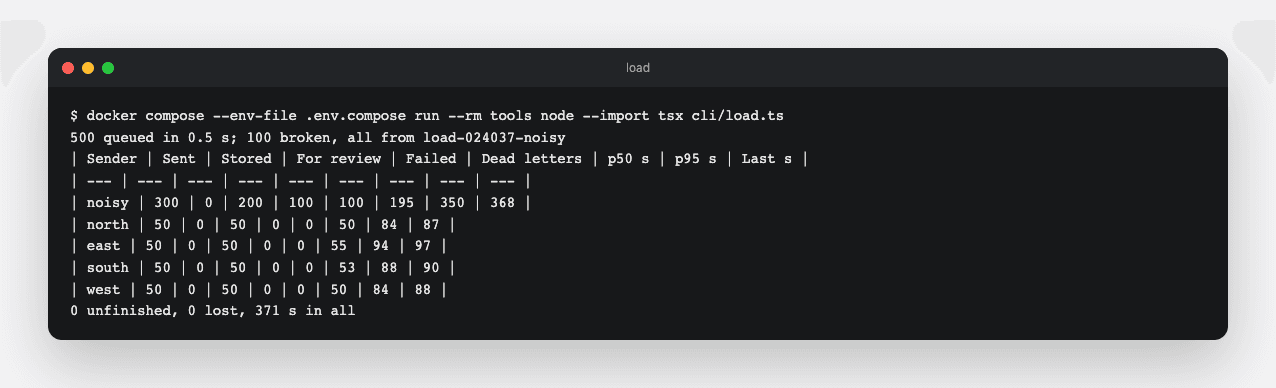
  • Every eval gate passes, and the load test loses nothing and keeps the steady senders out of the noisy one's backlog.
Compose
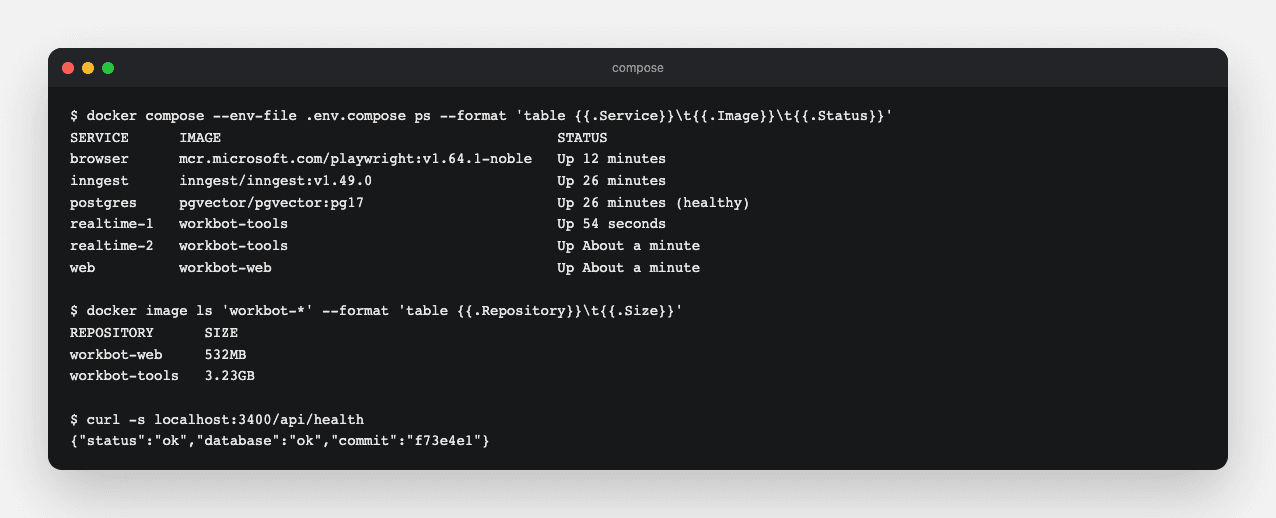
Compose shows the stack's six containers and the two images' sizes, and the web container's health names its commit.
Inngest
The self-hosted engine shows WorkBot's functions, synced from the web container. The dashboard is the dev server's, but the engine rejects an event without its key.
Evals
In the reference run, chat scored 0.95, extract 0.89, triage 0.88 and security 1.00 in the tools container, and every gate passed. The extraction rendered its invoices through the browser service.
Load
In the reference run, 500 documents went through the self-hosted engine. The four steady senders' 200 were done within 97 s, and the noisy sender's 300 took 368 s, with its 100 broken PDFs in the dead letters and none lost.
Jobs
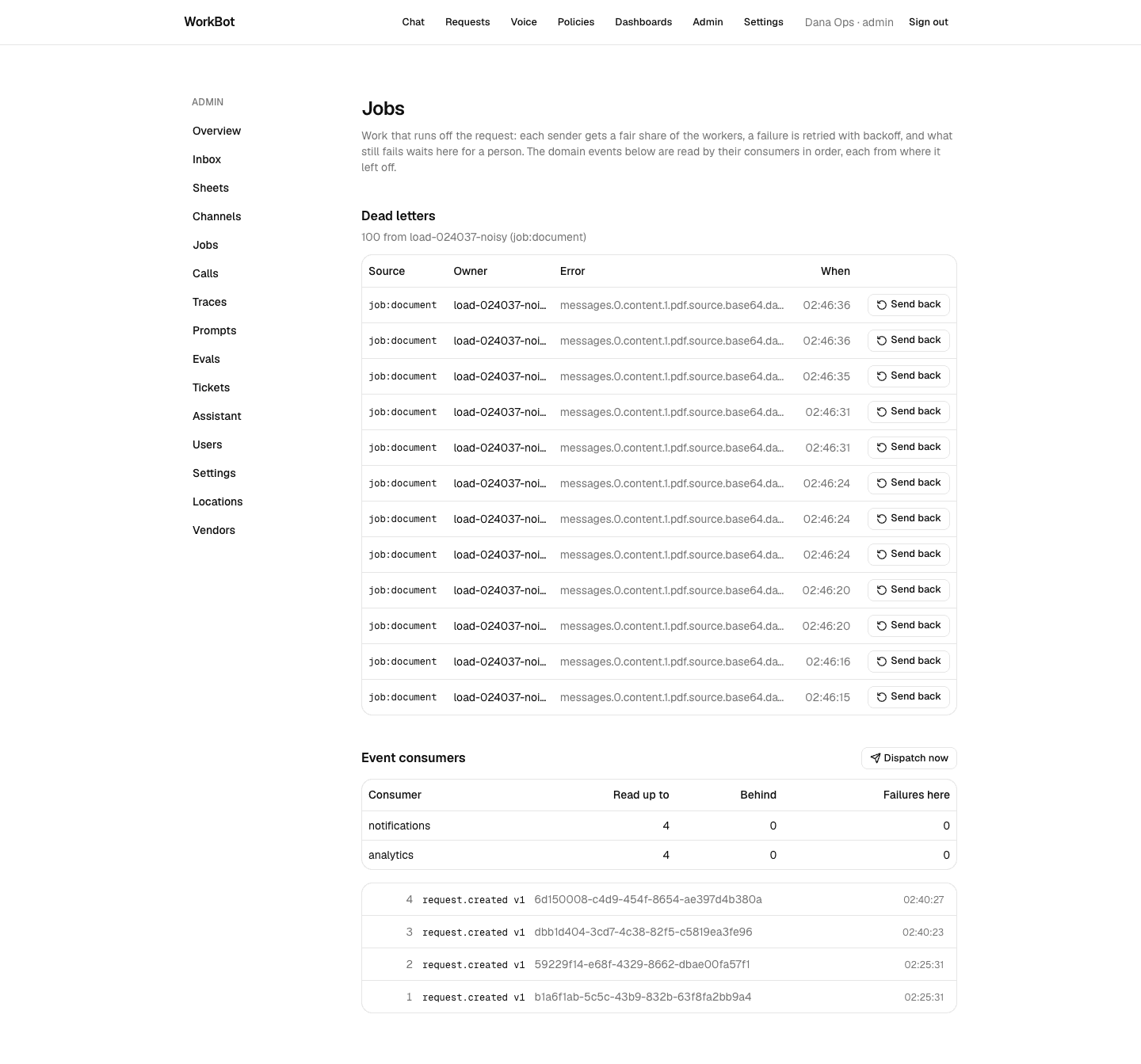
After the run, the containerised app's Jobs page shows 100 dead letters from the noisy sender, and both event consumers are up to date.
Technical notes
  • A Playwright server and the playwright-core library that connects to it must share a major and minor version. So pin the browser image to the playwright-core version in package.json.
  • The investigation's limits on where the agent may browse still hold on a remote browser, because they are routes on the browser context.

Keep long connections alive

The live calls from Day 33 hold connections open for minutes. In a cloud, load balancers, deploys and cookie rules all work against that, so the realtime server and its pages have to expect it.

Study first

  • Load balancers end idle connections, and AWS's default is 60 s. Its page on the idle timeout says to send at least a byte before each period ends, which is what a ping does. Deploys restart every instance, and a platform stops an instance with SIGTERM, the signal that asks a process to exit, before it kills it.
  • A cookie without a Domain goes back only to the host that set it, and a WebSocket's handshake carries cookies like any request. Mozilla's guide to cookies shows how Domain widens a cookie to subdomains.

Build

  1. Make the realtime server ping every socket each 30 s, and end one that did not answer the last ping. Make it exit at once on SIGTERM, since nothing on it needs finishing.
  2. Write a socket that reopens itself, src/lib/socket.ts, and use it on both the caller's page and the staff page. A reconnecting call keeps its id, so it stays one call on the team's page.
  3. Add COOKIE_DOMAIN. When the realtime server has a host of its own, the session cookie then covers a parent domain that holds only WorkBot's hosts.

Done when

  • A socket that stops answering is ended within a minute, and a page reopens its socket 2 s after it closes.
  • An instance restarts in 1 s instead of about 10.
Technical notes
  • On localhost the cookie problem cannot appear, because cookies ignore ports. On two cloud hostnames, the realtime server would not have recognized staff.
  • Serving both under one host avoids widening the cookie, with a load balancer that routes a path to the realtime service. On AWS that is a rule on the load balancer already there, and elsewhere it is a load balancer added in front of both services.
  • A random id made during render fails Next's prerender. Make the call's id inside the effect, and let the reconnecting socket reuse its address.

Price it and recommend a platform

With the system running like a cloud, you can price it. The prices, together with what the customer already runs, lead to a recommendation that a customer can approve.

Study first

  • Platforms charge in three ways, per request, per second of compute or memory, and per instance-hour. Watch for free tiers, plan minimums, and a database standby that doubles the price. Cloud Run's billing settings contrast paying per request with paying for an instance's whole life. Vercel's function pricing bills active CPU and memory separately.
  • Some fixed costs do not scale down, such as load balancers, NAT gateways and instances kept running. A NAT (network address translation) gateway lets private machines reach the internet.
  • The choice rests on the customer's existing cloud estate and security review, data residency, regulation, who will operate the system, and how hard the choice is to undo.

Build

  1. Write down three assumptions. In the reference run, a monthly user has 20 turns and sends 2 documents. On the small models a turn costs $0.0008 and a document $0.001, measured from the traces. A turn holds a server about 8 s, and traffic is concentrated in working hours.
  2. In docs/hosting.md, write line items for Vercel with Supabase, Cloud Run with Cloud SQL, and ECS with RDS, at 1,000 and 100,000 users. The table below shows the reference run's totals.
  3. Write one page in docs/hosting.md for Fieldstone Supply, with the decision, the two reasons, what it gives up, and when the answer changes.
  4. In the reference run, Fieldstone gets the neo-cloud. Nobody there runs a network, and the move to a major cloud is a runbook, since the images and Postgres go anywhere. It gives up a database standby.
  5. In the reference run, Harbor Dental, the other customer in content/customers, gets Google Cloud. Patient data needs a business associate agreement from every vendor, and one agreement from Google covers all the services.
Monthly total1,000 users100,000 usersModel's share at 100,000
Neo-cloud$180$2,25380%
Google Cloud$240$2,28479%
AWS$262$2,39775%

Done when

  • Each total traces back to the assumptions, and you can say which line moves first when one of them changes.
  • Fieldstone's owner could approve the recommendation from the page alone, and the page says what would change the answer.
Technical notes
  • At 1,000 users in the reference run, the platform is about 90% of the bill, mostly minimums. Inngest's heartbeat delivers the domain events every minute (Day 33), which is 86,400 executions a month at any traffic. That is past the free 50,000, so the job engine's $99 plan starts with the first user.
  • At 100,000 users the platforms are within 7% of each other, and the model dominates the bill. The large model is priced at 20 times the small one, so every turn on it would take the model's line from $1,800 to about $32,000.
  • A project per environment, and labels on the resources that take them, split the platform bill by app, environment and tier. The traces already split the model's bill by tenant and task, where a tenant is how WorkBot separates one customer's data and settings from another's.

Write the deployments

The last step turns everything proven today into steps that someone can run against real accounts. Writing them also surfaces what each platform requires of WorkBot.

Study first

  • Set guardrails before anything runs. Use an account or project per environment, set a budget with alerts, give the services one identity that can reach their secrets and nothing else, and label resources for cost. Google Cloud's guide to budgets explains alert thresholds, and that a budget alerts without capping the spend.
  • Neon gives previews database branches. Each pull request gets a copy-on-write branch, a copy that shares the parent's storage until it changes, made from a parent without the customer's data. Neon's page on branching explains how a branch shares its parent's storage, and the schema-only branch for sensitive data.

Build

  1. Write docs/deploy.md, starting with what any target must provide. Then write the steps for Vercel with Supabase, Inngest Cloud and Render, with a Neon branch per pull request through Neon's Vercel integration.
  2. Then write the steps for Google Cloud with Cloud Run, Cloud SQL and Secret Manager. Check every gcloud flag against the installed command-line tool.
  3. Record the platform requirements you found. WorkBot sets its tenant and role when a session starts, takes advisory locks, and listens for notifications. A transaction pooler, which lends a connection for one transaction at a time, carries none of these.
  4. So give WorkBot a direct connection, and make it read DATABASE_URL_UNPOOLED first where a platform sets both. Supabase's direct connection needs its IPv4 add-on for Vercel to reach it.

Done when

  • Someone holding the accounts can run the steps from top to bottom, and every requirement found today is in them.
Technical notes
  • Cloud Run reaches Cloud SQL through a socket path, which postgres 3.4.9 cannot take from a URL. So the runbook gives the database a private address on the project's network instead.
  • Neon's integration deletes a preview branch when its Git branch is merged or deleted. The reference repository keeps its day branches, so their databases are deleted by hand.
  • Vercel made WebSockets generally available on 20 October 2026, under its functions' limits. A call can outlast those, so the realtime server stays a container.

Resources