Day 18

Workflow orchestration with Inngest

You ship
A durable document pipeline with human approval, deployed on Vercel.

What you'll build today

After Day 17, a document given to WorkBot becomes a request, but all the work happens inside one web request. If the server restarts halfway, the work is lost, and nothing can wait a day for a reviewer to answer. Handling documents for real needs both.

Today you move the pipeline onto Inngest, a workflow engine for TypeScript. You learn durable execution, where the engine saves each step's result. After a crash, a deploy or a long pause, the run picks up at the step it was on instead of starting over. You also learn to pause a run until a person approves, without holding a server, and to run work on a schedule.

By the end of the day, an inbox page takes a batch of documents. WorkBot files the confident ones, waits for a reviewer on the doubtful ones, and sends reminders every morning, and the runs survive a restart of the app.

By the end of the day you can

  • Build durable AI workflows that survive failures and handle long-running tasks
  • Implement fan-out and fan-in, retries, and human-in-the-loop patterns
  • Deploy event-driven AI workflows on Vercel

Topics

Why Agents Need Durable Execution

  • The problem: AI workflows can take minutes or hours, while servers restart, APIs fail and users close their browsers
  • Without durability: a 10-step agent that fails on step 7 loses all progress
  • Durable execution: each step is checkpointed, and after a failure the workflow resumes where it left off
  • Use cases: document processing pipelines, multi-agent research, approval workflows, scheduled AI tasks

Inngest Fundamentals

  • What Inngest is: a workflow engine for TypeScript, built for serverless, that works with Vercel
  • Functions: define a multi-step workflow as a TypeScript function
  • Steps: with step.run(), each step is retried and checkpointed on its own
  • Events: trigger workflows from events, such as webhooks, API calls and schedules
  • Sleep: step.sleep() pauses a workflow for hours or days without holding a server connection
  • Vercel integration: deploy Inngest functions alongside your Next.js app

Workflow Patterns

  • Sequential steps: step A, then step B, then step C, each checkpointed
  • Fan-out and fan-in: process 100 documents in parallel, then collect all the results
  • Human-in-the-loop: the workflow pauses, sends a notification, waits for a person's approval, then resumes
  • Scheduled agents: run an AI agent every hour, day or week on a cron schedule
  • Event-driven triggers: a user uploads a document, which triggers the extraction workflow, which stores the results and notifies the user
  • Error handling: per-step retries with backoff, dead-letter queues that hold failed messages, alerts on failure
  • Checkpointing: the engine saves state between steps, so a run can resume from any step

Long-Running AI Workflows

  • Document processing: upload, optical character recognition (OCR), extract, validate, store, notify, in minutes
  • Research pipelines: gather sources, read each, synthesize, review, publish, in 10 minutes or more
  • Approval workflows: the AI drafts, a person reviews, the AI revises, a person approves, then it publishes
  • Batch operations: process 1,000 items with AI, within rate limits, and recover from failures

Build

Features shipped today

  • WorkBot: The document approval workflow, which takes in a document, extracts and validates it, waits for a person's approval, stores it and notifies the uploader. Scheduled check-ins and reminders run as durable scheduled agents

Build an orchestrated multi-step AI workflow:

Scenario: a document processing pipeline that receives uploaded documents, extracts their data, gets a person's approval, and stores the results.

  1. Event trigger: a user uploads a document, a PDF or an image. A page by its URL goes through Day 17's POST /api/documents instead
  2. Step 1, Classify: determine the document's kind. The model reads the PDF or the image itself, so nothing is parsed first
  3. Step 2, Extract: pull out the structured data with Day 17's extraction engine
  4. Step 3, Validate: check the extraction's confidence, and flag the low-confidence fields
  5. Step 4, Human review: if any field is low-confidence, pause the workflow and notify the reviewers through an outbox, the messages a mail or chat integration would send
  6. Step 5, Wait for approval: with step.waitForEvent(), the workflow pauses until a person approves, corrects or rejects the record, or 3 days pass
  7. Step 6, Store: file the request and save the validated record to the database
  8. Step 7, Notify: send a confirmation to the uploader

Requirements

  • Each step retries up to 3 times on failure
  • The workflow survives server restarts. Test it by restarting the app while a batch runs
  • Fan-out: accept a batch of up to 10 documents, and process them all in parallel
  • Dashboard: an inbox page that shows where each document is, such as received, waiting for approval or filed
  • Deploy on Vercel with Inngest Cloud, through Inngest's Vercel integration

Step by step

Set up the workflow engine

Before any workflow, WorkBot needs the engine and a route the engine can call. Your app serves the functions and the engine runs them, as Inngest's dev server on your machine or as Inngest Cloud in production. With the engine in place, a crash, a deploy or a day waiting for a person no longer sends the pipeline back to the top. It resumes at the step that was interrupted.

Study first

  • Durable execution. The engine re-runs a function from the top after every pause or failure, and the steps it has already recorded return their saved result instead of running again. A step's result must be JSON. A step's side effects can run twice when its result was not recorded, so make each write that must not repeat a step of its own.
  • Inngest's pieces. Your app creates an Inngest instance and defines events, each with a name and data. A function has triggers, an event or a cron schedule, and inside it step.run does work, step.waitForEvent pauses for an event, and step.sleep waits for a time. The engine calls the app's serve route to run each step.
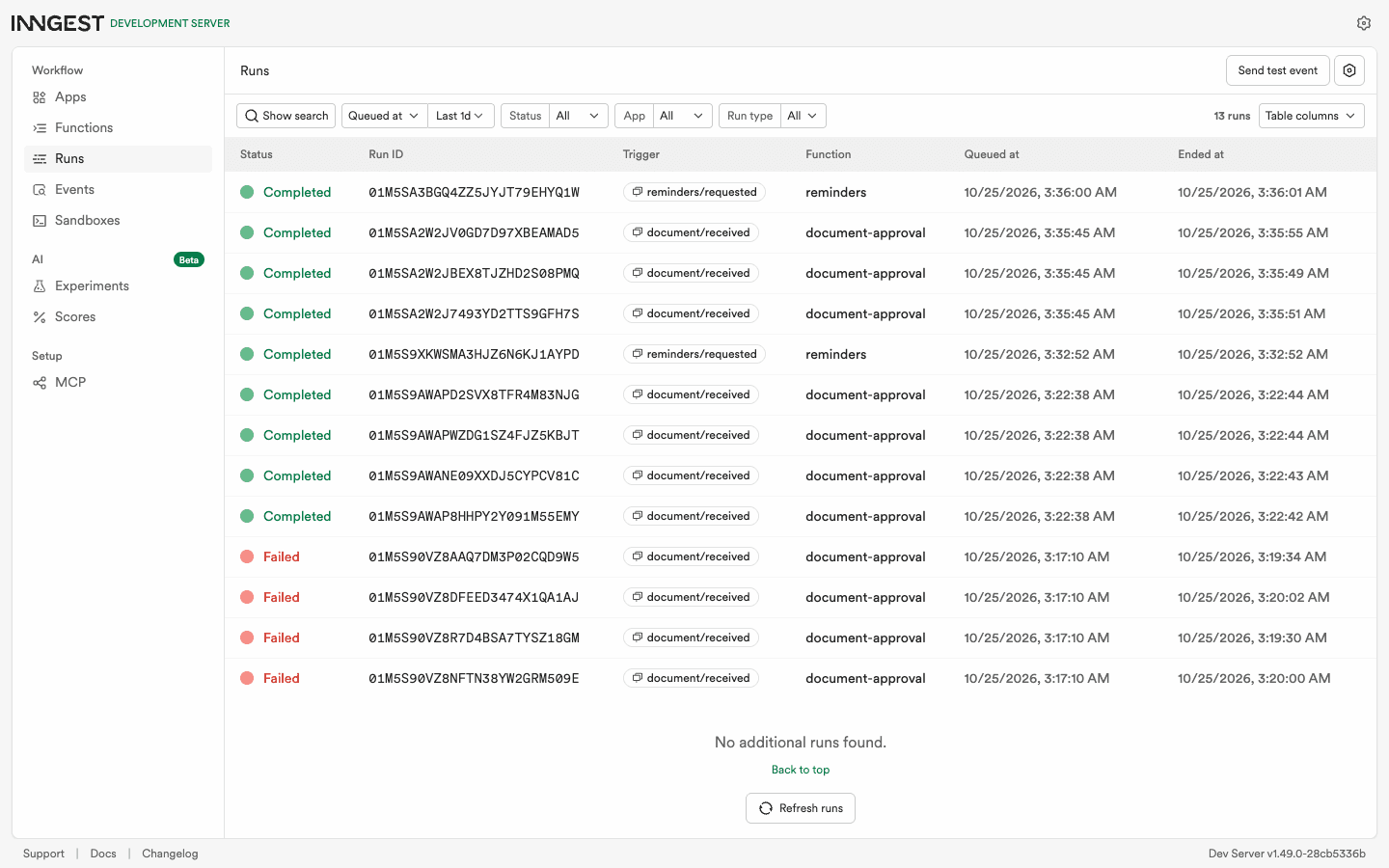
  • Local development. The dev server, inngest-cli dev -u <app>/api/inngest, is the engine on your machine, with a dashboard of runs at localhost:8288.

Build

  1. Run pnpm add inngest and pnpm add -D inngest-cli @inngest/test. Then list inngest-cli under onlyBuiltDependencies, one of pnpm's settings, in pnpm-workspace.yaml. Its install script fetches its binary, and pnpm runs a package's install script only when the package is listed there.
  2. Create src/inngest/client.ts with new Inngest({ id: "workbot", eventKey, signingKey, isDev: !signingKey }), and read the keys from config. Inngest's own switch is INNGEST_DEV=1 or isDev: true, but in this build no signing key means dev mode, against the dev server.
  3. Create src/inngest/events.ts with 3 events. Define eventType("document/received", { schema }) with a Zod schema, document/reviewed with the decision and the corrected fields, and reminders/requested.
  4. Create src/app/api/inngest/route.ts with export const { GET, POST, PUT } = serve({ client, functions }). In route.test.ts, call GET(new NextRequest(url), { params: Promise.resolve({}) }) and expect status 200 and function_count: 3 in the JSON. This response is how the engine learns which functions the app serves. The 3 are the workflow, its failure handler and the reminders, which you write in the next 2 parts.
  5. Add pnpm inngest, which starts the dev server pointed at the app, and add INNGEST_EVENT_KEY and INNGEST_SIGNING_KEY to .env.example for Inngest Cloud.

Done when

  • pnpm test src/app/api/inngest passes, once the 3 functions exist.
  • With pnpm dev and pnpm inngest running, localhost:8288/functions lists document-approval, its failure handler and reminders.
Technical notes
  • The serve route is the only route this repository does not write itself. It is the SDK's handler, listed as the exception in src/app/api/CLAUDE.md.
  • The code decides dev mode from the absence of a signing key, not from INNGEST_DEV in the environment. So config.ts stays the one module that reads process.env, and the tests run in dev mode without setup.
  • On Vercel, the same route serves Inngest Cloud. Install Inngest's Vercel integration, which sets INNGEST_EVENT_KEY and INNGEST_SIGNING_KEY in the project and syncs the functions on each deploy.
  • When a run uses up its retries, the dashboard marks it failed and the engine raises an inngest/function.failed event. onFailure on the function handles that event, and an alerting function can trigger on it too. So there is no separate dead-letter queue, a holding place for failed messages, to drain.
The approval workflow

With the engine connected, wrap Day 17's pipeline in an Inngest function. It classifies, extracts and validates, then asks a reviewer when a field is doubtful. After that it files the request, attaches the record and notifies the uploader.

Study first

  • What goes in a step. A step is one unit of work whose result is worth keeping, so the model calls are steps and so is the write that files the request. Reading a row is not.
  • step.waitForEvent, from Inngest's wait-for-event guide. The run suspends until a matching event arrives or the timeout passes, and match: "data.id" says which field must match. The result is the event, or null on a timeout.
  • NonRetriableError, from Inngest's error reference. Throw it for a failure that a retry cannot fix, such as a document that is not there, and it ends the run instead of retrying it.

Build

  1. Add an inbox table and src/lib/inbox.ts. A row keeps the document's bytes as bytea, Postgres's binary column type, and its status, one of received, extracted, awaiting_review, stored, rejected, expired or failed. It also keeps the kind, the record, the confidence, the review fields and the request the document became. Write receive, fileOf, getItem, updateItem, listInbox and waitingSince.
  2. Add a notifications table and src/lib/notify.ts. The table is an outbox, the messages a mail or chat integration would send. Write notify(recipient, message, link) and listNotifications.
  3. Create src/inngest/document-approval.ts with inngest.createFunction({ id, retries: 3, triggers: [documentReceived], onFailure }, ...), whose first steps are classify and extract.
  4. When review is not empty, run the step ask-for-review, then waitForEvent("review", { event: documentReviewed, match: "data.id", timeout: "3d" }).
  5. Then run the step file, which files the request, the step attach, which puts the record on the request and the inbox row, and the step notify. On a null answer, run the step expire instead, and on a rejection run reject. On an approval, merge the corrected fields before file.
  6. Write onFailure, which runs when the retries are spent and marks the row failed with the error, so a document never sits at Received for good.
  7. Have each step write its outcome to the inbox row, so the dashboard reads the database, not the engine.
  8. Test with @inngest/test, Inngest's testing library. InngestTestEngine runs the function with the model's steps mocked by id, where classify returns "invoice" and extract returns the record. Everything after them runs for real against the embedded database.
  9. Write 4 tests. In the first, WorkBot files a confident extraction and notifies the uploader. In the second, a doubtful one pauses at review with the right options and notifies reviewers, and WorkBot then files the approval's corrections. In the third, a rejection and a timeout end without a request. In the fourth, the real classify and extract steps run on a scripted model, a test model that returns set replies, and write what they found to the row.

Done when

  • pnpm test src/inngest passes the 4 workflow tests, and after the next part it passes 5, with the reminders test.
  • In the paused case, the test sees ctx.step.waitForEvent called with match: "data.id" and timeout: "3d".
Technical notes
  • The engine serializes a step's return value. So extract returns the record, the confidences and the review fields, not the row, and file returns the request's id, title and team, not the request with its Date.
  • Each step that needs the document's bytes reads them from the database, instead of receiving them from the step before. A step's result must stay small, and a replay must find the same bytes.
  • In @inngest/test 1.0.0 with inngest 4.26, a mocked waitForEvent step fails the engine's event validation before its value is awaited, so the tests replace the step tool itself. They use transformCtx, the engine's hook for changing the context a function gets, with mockCtx to keep the spies. They set step.waitForEvent to a stub that returns the reviewer's answer. The paused case uses executeStep("review"), which runs the function up to that step, and checks the real tool's call.
  • retries: 3 means 3 retries after the first attempt, per step. A model call that fails 4 times fails the run, and the steps before it do not run again.
  • Mocked steps can hide a bug in the step itself. In the reference run, the first batch failed on a bug in the extract step's row update that the mocked tests had hidden. That is why the fourth test runs the real steps.

Inbox, review and reminders

The workflow runs, but nobody can feed it or answer it yet, so the last part gives it a page in the admin area. There you upload a batch, approve or reject what waits for a reviewer, and run the reminders that otherwise go out on a morning schedule.

Study first

  • Fan-out by events. Send one event per document, and the engine starts one run per event, in parallel. Fan-in is a step that waits for the others, which this workflow does not need. Inngest's guide to sending events shows a batch as one array passed to inngest.send.
  • Human in the loop as an event. The Approve button sends document/reviewed with the document's id, and the paused run matches it and goes on, so nothing polls.
  • A scheduled agent is a cron trigger and steps. The trigger is cron("0 9 * * *"), the morning schedule, and each notification is one step, so a retry never repeats a sent one. Inngest reads the expression in UTC unless a TZ= prefix names a time zone.

Build

  1. Create src/app/admin/inbox/actions.ts and write uploadDocuments. It keeps up to 10 files in the inbox and sends one document/received event for each with inngest.send([...]). When the send fails, it discards the rows and surfaces the error, so no upload is left that the engine never heard of.
  2. Write review(id, decision), which sends document/reviewed, and runReminders, which sends reminders/requested. The inbox takes files only, and a page by its address goes through Day 17's POST /api/documents.
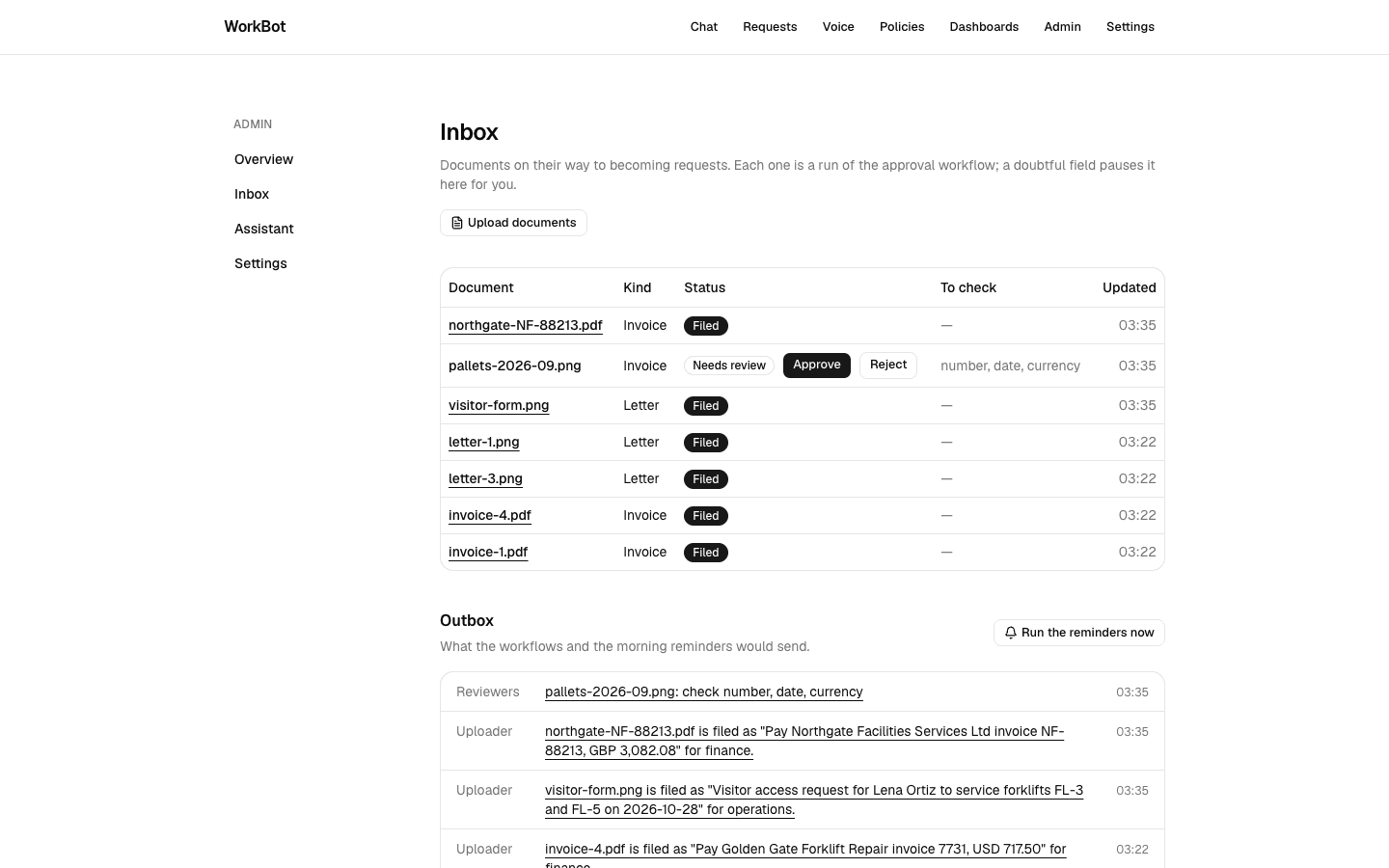
  3. Create src/app/admin/inbox/page.tsx with the upload button, FileUpload with multiple, and a table of documents with kind, status, the fields to check and the time. Put Approve and Reject on the ones that wait, and a link to the request on the ones filed. Show the outbox underneath, with a Run the reminders now button.
  4. Create src/inngest/reminders.ts, triggered by cron("0 9 * * *") and by reminders/requested. Its step find-waiting finds reviews older than a day with waitingSince(24), and a remind-<id> step nudges each one. Its step find-stale finds open requests older than a week, and a check-in-<id> step checks in on each one.
  5. Test the reminders function against rows backdated with SQL, and assert the step ids and the notifications.

Done when

  • You open /admin/inbox with the dev server running and upload 4 documents at once, and they appear as 4 rows. Each row moves from Received to Filed or Needs review as its run finishes, after 2 model calls, with the runs in parallel.
  • Approve on a waiting row files it.
  • Run the reminders now adds a line to the outbox for each review older than a day.
  • You stop pnpm dev while a batch is running and start it again, and the runs finish from the step that was interrupted.
The inbox after a batch
A batch on the small model in the reference run. 2 documents were filed, and 1 paused for a reviewer because 3 fields of a smudged invoice came back doubtful. The outbox underneath shows the reviewers' nudge and the uploaders' notices.
The engine's view of the runs
The dev server's dashboard in the reference run, with the day's runs. They include a batch of 4 that finished after the app restarted under it, and the 4 runs that failed on the first build's own bug.
Technical notes
  • The upload action stores the files and sends the events, and returns before any model call.
  • review validates the id and the decision with Zod before it sends the event, because an event is an input like any other.
  • The reminders send each check-in to the request's team, and a mail integration would map a team to its addresses.
  • The restart test works because the engine, not the app, owns the run's state. When the app comes back, the engine retries the step that was running when the app went away, with the retry policy's backoff.

Resources